
Zoom Scheduler for Chrome/Google Calendar - creating event for now instead of the correct date. | Community
Skip to main content
JonWatts
Newcomer
Newcomer
December 1, 2022
Solved

Zoom Scheduler for Chrome/Google Calendar - creating event for now instead of the correct date.

  • December 1, 2022
  • 6 replies
  • 0 views

Hi Zoom Community

We're encountering problematic behaviour with Google Calendar > Make it a Zoom Meeting Add-on for Google Calendar Zoom Scheduler Chrome Extension.

The future-dated meeting is automatically being scheduled as now (today) instead of the correct future date.


Steps to reproduce

  1. Log in to Google Calendar
  2. Add a meeting on a future date (e.g. Saturday 03rd December 2022 at 10 am)
  3. Select the Make it a Zoom Meeting button

The Zoom meeting toast notification pops up (Windows 11) and displays that the meeting is scheduled for now (today) instead of the date selected in the Google Calendar event.

If you view the Zoom Meeting calendar https://zoom.us/meeting#/upcoming you can see that the meeting has been incorrectly scheduled for now(today) instead of the selected future date. (e.g. Saturday 03rd December 2022 at 10 am).

Has anyone else encountered this issue? It has only started happening this week. I'm assuming perhaps something to do with the new Zoom/Google Calendar and mail integration feature.

Thanks
Jon
    Best answer by JonWatts

    @JonWatts 


    I upgraded my Windows 10 PC to Windows 11 pro and I was not able to replicate this either by the Chrome extension scheduler or by just creating an event in Google calendar and making the date a future date. Was this an event that was already coming up and you moved the event out further in the future?


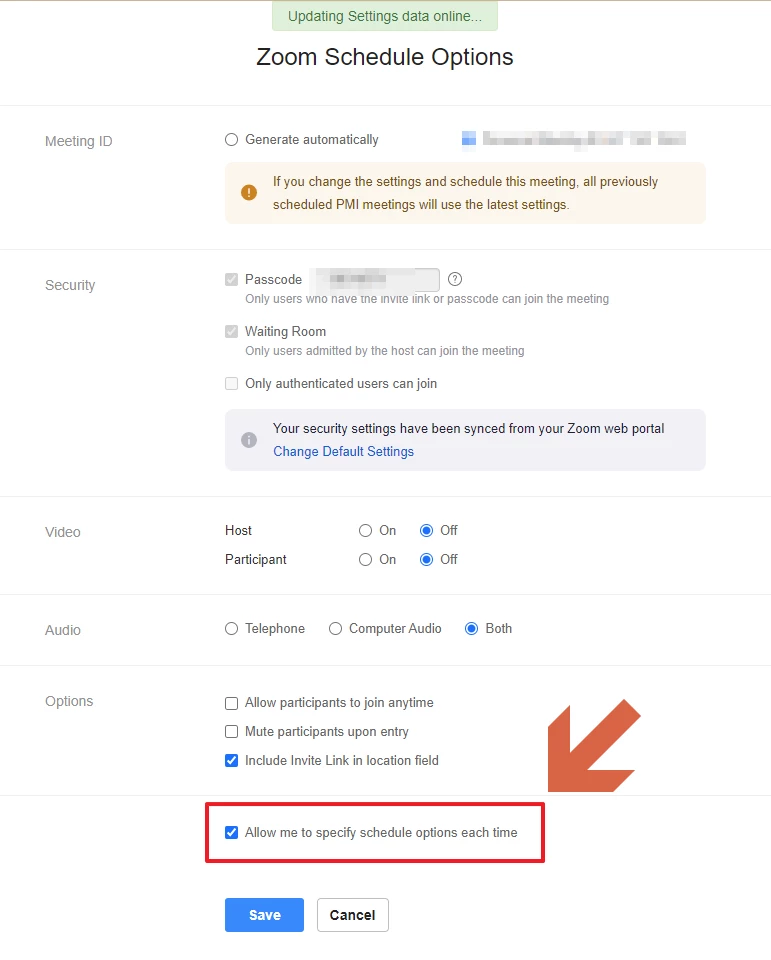
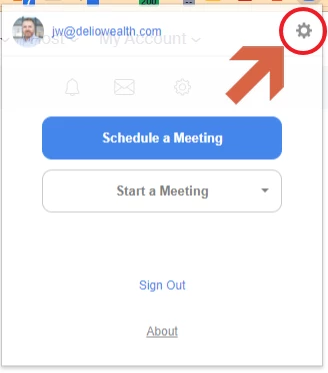
    Also, if you click on the extension icon and then click on the settings cogwheel, do you have the setting "allow me to specify schedule options each time" 


    Hi @YaBoiB 


    Yey 🎉


    It was the extension setting, Allow me to specify schedule options each time that was the problem.

    • I clicked on the extension and selected the Cog icon

    • Checked the Allow me to specify schedule options each time option On


    • Now the Event entered on Google Calendar is set to the correct Date and Time 


    Thanks for the assistance on this one. 🙏


    Best regards
    Jon


    6 replies

    Community Manager
    December 1, 2022

    Hey @JonWatts tested this on MacOS and I am not really experiencing the same as you. Everything seems to be in sync with the Zoom scheduler, Gcal, client, etc.


    Have you tried going to your Chrome extensions (chrome://extensions/) and removing the 'Zoom Scheduler'? and re-adding and trying to re-schedule that test meeting? 


    Re-download and add https://chrome.google.com/webstore/detail/zoom-scheduler/kgjfgplpablkjnlkjmjdecgdpfankdle?hl=en


    JonWatts
    Newcomer
    JonWattsAuthor
    Newcomer
    December 6, 2022

    Hi @RN52_2 

    Thanks for the feedback that this appears to be OK on macOS. Unfortunately switching OS is not an option for most of the team here.

    The issue occurs on Windows 11 with the Chrome extension - Zoom Scheduler and is consistently reproducible on this combination. See the below screenshots. This is after deleting and redownloading the Chrome extension.


    • Google Calendar event booked for Sunday 11th December at midday
    • Zoom Scheduler/Zoom notification shows that the meeting has been created for now(today)


    Best regards
    Jon


    Newcomer
    December 5, 2022

    We are encountering the exact same issue in our organization.  I first noticed it last week and our IT team has since reproduced it on 2 different devices.  FWIW, I am using Windows like the original poster.  Perhaps that is the reason you were not able to reproduce it, @RN52_2.  

    Newcomer
    December 6, 2022

    I am experiencing this same issue.

    YaBoiB
    Community Champion | Employee
    Community Champion | Employee
    December 6, 2022

    Hello @ddoyle @JonWatts @Martin101


     I am going to update my windows test machine to 11 right now and see if I can replicate this. If I can, I will submit a ticket to our Engineering team. 


    Thanks for bringing this to our attention. 


    Brandon

    YaBoiB
    Community Champion | Employee
    Community Champion | Employee
    December 6, 2022
    JonWatts
    Newcomer
    JonWattsAuthor
    Newcomer
    December 6, 2022

    Hi @YaBoiB 

    Here's what I'm running:

    Edition Windows 11 Pro
    Version 22H2
    Installed on ‎17/‎10/‎2022
    OS build 22623.1028
    Experience Windows Feature Experience Pack 1000.22638.1000.0


    Chrome Version 108.0.5359.95 (Official Build) (64-bit)


    Zoom Scheduler extension Version 1.8.5


    Zoom Client November 28, 2022 version 5.12.9 (10650)


    All latest and uptodate versions.

    Thanks for the feedback.

    Best regards
    Jon

    Newcomer
    December 9, 2022

    I believe updating my Zoom desktop client fixed the issue with the Chrome extension Zoom Scheduler.

    Newcomer
    March 30, 2023

    Hello Jon,

    I continue to have an issue when ZOOM creating 'categories/tags' for my ZOOM events. The titles all start with "Susanne Arens TEST....." with a long URL string. All these ZOOM sessions/meetings are filling up my drop down list. How do I make it stop?