

Microphone works in "Sound Recorder", but not Zoom | Community
Skip to main content
Newcomer
January 10, 2023
Solved

Microphone works in "Sound Recorder", but not Zoom

  • January 10, 2023
  • 1 reply
  • 0 views

This problem is happening on Windows 11.

The microphone works in other applications, such as Sound Recorder, but not Zoom. There's only 1 microphone device (the built-in speakers in the laptop), so there isn't really the possibility of the wrong device being chosen and the privacy settings are allowing desktop apps and show Zoom accessing the microphone while the app is open. I'm at a loss for what else to try.
    Best answer by keeganwitt

    Solved. This is a similar problem/solution as the issue with "Bang and Olufsen" software on HP laptops others have reported. Here's what I did.


    1. Install the MaxxAudioPro application for Dell, using the installer from the Dell support website that launches the Microsoft Store to the appropriate page.
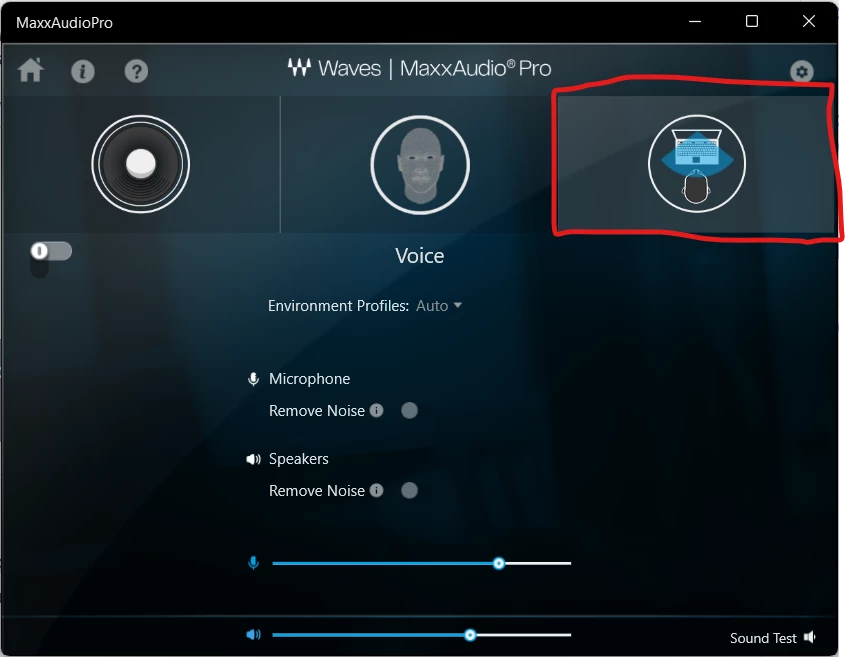
    2. Select the "voice" tab
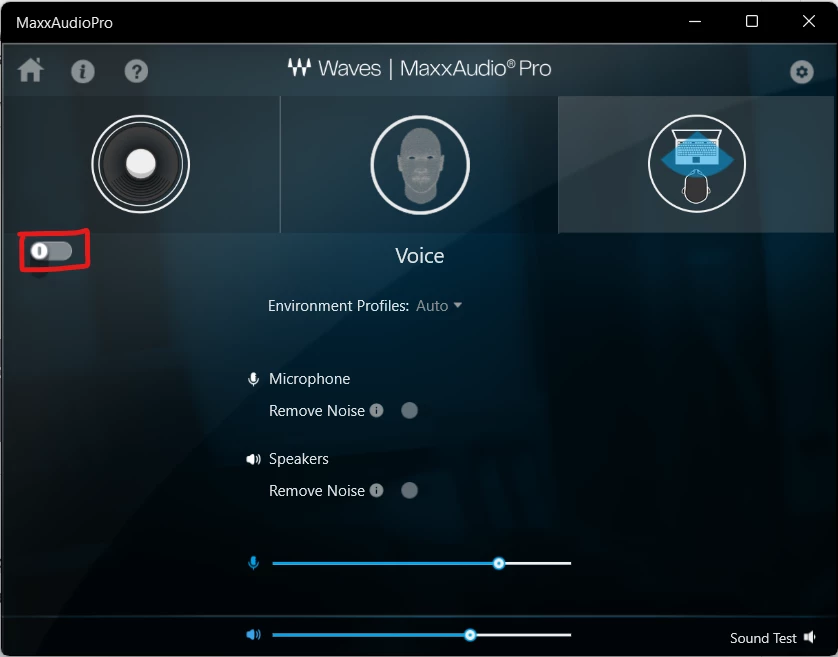
    3. Disable the enhancements.


    1 reply

    keeganwittAuthorAnswer
    Newcomer
    January 11, 2023

    Solved. This is a similar problem/solution as the issue with "Bang and Olufsen" software on HP laptops others have reported. Here's what I did.


    1. Install the MaxxAudioPro application for Dell, using the installer from the Dell support website that launches the Microsoft Store to the appropriate page.
    2. Select the "voice" tab
    3. Disable the enhancements.