

How to hide all day meetings in my zoom client, under "upcoming meetings"? | Community
Skip to main content
Newcomer
September 7, 2021
Question

How to hide all day meetings in my zoom client, under "upcoming meetings"?

  • September 7, 2021
  • 14 replies
  • 2 views

I use outlook as my calendar app, and we have integration to zoom.

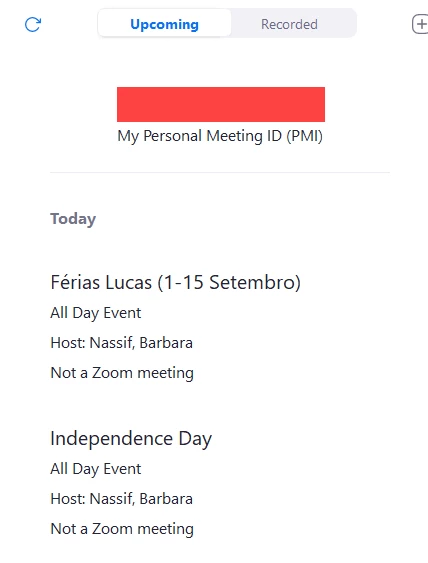
But I have tons of "all my all day meetings" that use my screen (usually vacation notice and holidays), and I need to keep scrolling on zoom to find my next meeting to join.

Is this possible to hide all day meetings in the client?

And past meetings (on the current day), can I hide them?


    14 replies

    Newcomer
    September 8, 2021

    Plus one to this. I've also noticed this only affects the windows desktop zoom client. On my mac the zoom client ignores all day meetings and scrolls to my next upcoming meeting when I hit refresh. 

    Newcomer
    July 15, 2022

    Another plus one.  Wish the @51 product team would prioritize this.  On Windows, the zoom client's calendar view is pretty crummy.  It never defaults to "now" or what my next meeting is, but instead auto-scrolls to the top of a day's meetings.  And during the summer or holiday periods especially, that is cluttered by several "so-and-so is OOO" events.  Scrolling is made worse by the lack of clear delineation between days, too.  If I have to scan 20 or 30 or 50 cards to find my next meeting, that's a fail.  I'm about ready to stop using the zoom calendar view/reminders and just rely on outlook's reminders, as clunky as they are.

    Newcomer
    May 16, 2024

    What I think the problem could be, is the fact that my full name on the ID is handwritten, and the person who wrote it seems to have made a slight mistake and one letter looks like "l" instead of "k", which I'm guessing is making some kind of automatic verification bot fail the application.

    Newcomer
    August 25, 2022

    Add me too -- I have a lot of ALL DAY   / NOT A ZOOM MEETING   meetings that clog up my Meeting list,  and I have to scroll down to find the next meeting   everytime,  whether it is 9am or 3pm   still have to scroll thru the whole list 


    Partner
    October 3, 2022

    Plus one - Anyone got a solution or workaround for this?

    Newcomer
    November 8, 2022

    I would like to have a setting where Zoom meeting section only displays Zoom Meetings and nothing else. Having all of the meetings in there clogs down zoom and makes the integration worthless.

    Newcomer
    February 21, 2023

    Is there a solution/setting for this? I only want the Zoom meeting section to only display Zoom meetings. Why am I seeing my entire calendar?

    Newcomer
    May 25, 2023

    It's pretty crazy that this feature - being such an obviously necessary one - is missing.


    And I think the problem caught up to MacOS too, because my zoom "Upcoming" view is cluttered with non-zoom calendar events like "out of office" all day events. When I refresh my view I don't see the next upcoming Zoom meeting by default, I have to scroll - and when I scroll, there's no delineation between calendar dates, so I have to scroll very carefully. 

    All in all this is a BADLY designed experience, and Zoom should have been all over it a long time ago. 

    Newcomer
    October 17, 2023

    Please prioritize this! We need to be able to remove all day meetings AND meeting with out zooms... I am sorry zoom, but no one is using your meetings page to manage their calendars... if it isn't relevant to zoom, it shouldn't be there.

    Newcomer
    December 1, 2023

    Is there any update from @608130 if there are plans to fix this in future releases and when we can expect it?

    Newcomer
    January 19, 2024

    Still no update from Zoom? I'm still facing this issue on my Mac client and its quite irritating on the day when many of the co-workers are OOO. 😖

    Newcomer
    May 15, 2024

    Zoom team, this "bug" breaks the calendar on the Windows client. It has been an issue for years. It is the "top bug" in your client. You are not even looking at your own comments that tell you what is important. 

    Newcomer
    June 27, 2024

    Wow, got a huge new calendar update on Zoom today, Windows Client. Looks to directly integrate Google Calendar, great first step. Will see if all day bug goes away as it defaulted to midnight start.