
How can I eliminate the date/time stamp on recordings? | Community
Skip to main content
Newcomer
October 12, 2022
Solved

How can I eliminate the date/time stamp on recordings?

  • October 12, 2022
  • 6 replies
  • 6 views
No text available
    Best answer by ZoomTestKitchen

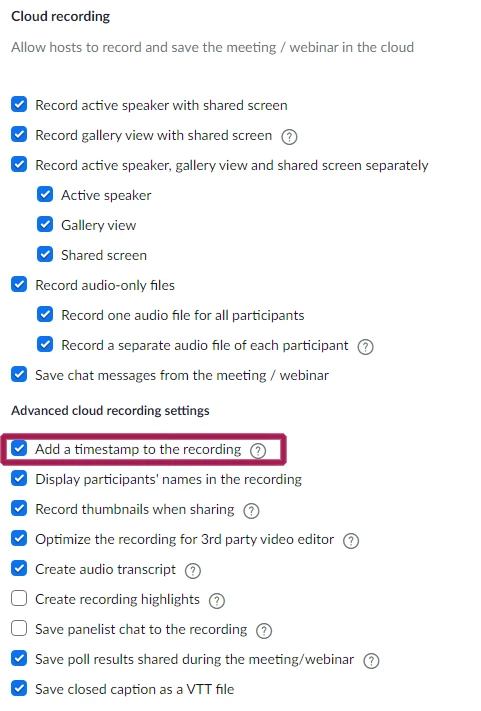
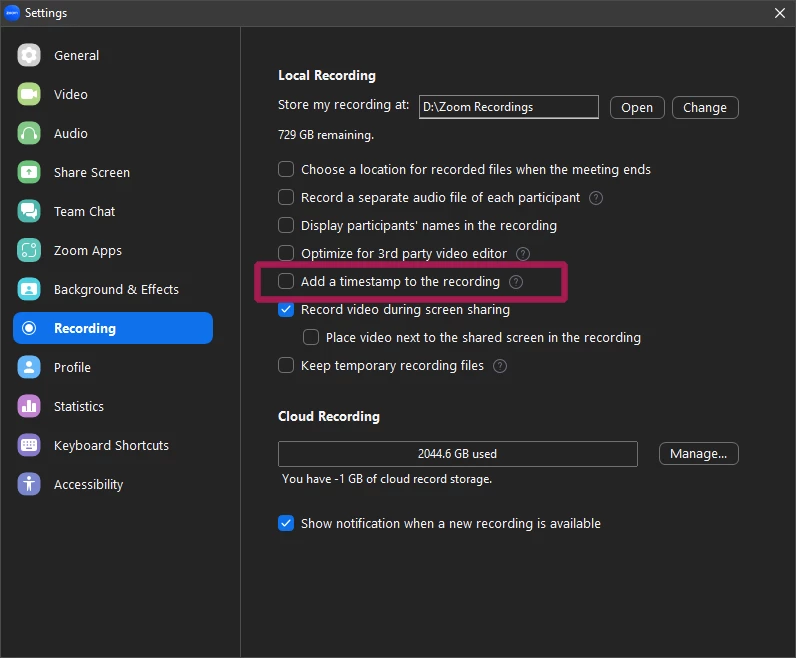
    Uncheck the box that is adding the Date/Time Stamp to your recordings.


    If Cloud Recording...
    If Local Recording...

    If you find this information helpful, please click on "Accept as Solution".

    If you have further questions, please reply, we're happy to help.

    6 replies

    ZoomTestKitchen
    Specialist
    Specialist
    October 12, 2022

    Uncheck the box that is adding the Date/Time Stamp to your recordings.


    If Cloud Recording...

    If Local Recording...


    If you find this information helpful, please click on "Accept as Solution".

    If you have further questions, please reply, we're happy to help.

    Newcomer
    January 25, 2023

    Problem solved. Thank you

    Newcomer
    June 11, 2023

    Thanks very clear!

    Newcomer
    January 30, 2024

    How to disable the timestamp on the 2024 version of Zoom


    Newcomer
    January 30, 2024

    I don't see a noticeable difference between the 2024 Zoom and older versions in this regard.


    Do you not see the settings screenshotted above in your settings?

    Newcomer
    January 8, 2025

    I have "Add a timestamp to this recording" unchecked but it persists in adding these infernal timestamps. How to stop this?

    Newcomer
    April 24, 2025

    The timestamps are still showing up on my cloud recordings

    I turned off zoom, restarted my computer and still there.  It is unchecked.  Any other options?
