


Can't switch audio in on version 5.10.6 | Community
Skip to main content
fallingrock
Newcomer
Newcomer
May 28, 2022
Question

Can't switch audio in on version 5.10.6

  • May 28, 2022
  • 2 replies
  • 0 views

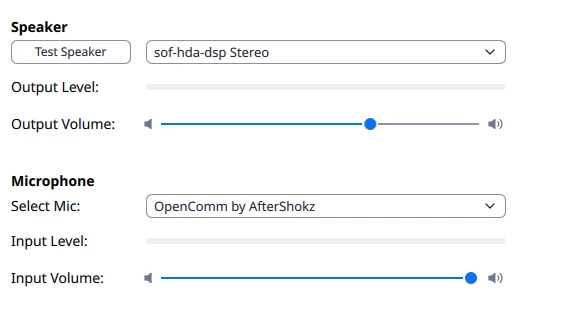
After updating to  version 5.10.6 on my Ubuntu Linux system, I'm unable to get the program to use my bluetooth headset as a speaker.

Version 5.10.4 works fine.

With 5.10.6 if I try to switch the speaker to  anything it automatically switches back to sof-hda-dsp.

Downgrading to 5.10.4 resolves the issue.
 

2 replies

YaBoiB
Community Champion | Employee
May 28, 2022

Hello @fallingrock,
My name is Brandon. Thanks for joining the Zoom Community! Thank you for bringing this to our attention. May I ask that you create a support ticket so that we can pass on this information to our Engineering teams for further review?

fallingrock
Newcomer
Newcomer
June 1, 2022

#14464090 

Newcomer
August 29, 2022

I finally figured out how to fix this issue.  I am using the Pulse Audio Volume control in Xubuntu.  when I open it and go to the recording tab (and later the same for playback) I noticed that the Google Chrome browser was using this function, which I thought was wrong.  However I discovered that my Zoom launcher was actually starting a Chrome tab and calling a Chrome app for Zoom.  I went to the Chrome settings and opened the extensions page and saw the Zoom extension for Chrome.  I deleted this extension.  Then I googled & downloaded the Zoom app for Linux as a .deb file into my downloads folder.  I installed it by clicking  the downloaded file and it installed using the Software tool.  You could also install the Gdebi app which lets you install downloaded .deb software packagethat are not be in a Ubuntu repository, and use Gdebi to install the Zoom .deb file. 


Anyway, I then started the new Zoom native app and launched a new meeting.  Then the the PulseAudio Volume control app, the Zoom engine showed up on the playback and record tabs, so I knew Zoom had access to the audio.  In Zoom I had to select the right microphone ( I have a couple since my internal PC microphone is Kaflooey) and now the audio works with Zoom.  I found this on another Zoom community post, but it was using a different (Gnome) volume control app, but I can't find that post now to refer you too it.  ANyway I hope this works for you or you already fixed it yourself.

YaBoiB
Community Champion | Employee
August 30, 2022

@alfyj72


Yes, if you do not mind linking the reference here I can set that as the accepted solution for other users having this issue to find. Thank you so much for sharing this information with the Community. It is so helpful that we share with each other as so many users have differing set ups while using Zoom. 


Thanks, 

Brandon