


Important Message to all K12 School Accounts: Children’s Education Status setting
Hi all --
I wanted to let you know about a new change coming soon within your Admin Portal that will require action. For admins or owners of Zoom accounts that provide educational services to children under 18 years of age using Zoom products, we will be asking you to self-identify as an educational organization with your Zoom account profile (not your Community profile). This Children’s Education Status setting will help us more readily identify our education accounts to provide better service to you and your students. Please note, you will need to self-identify as an educational organization within your profile in order for the data protections detailed in Zoom’s Children’s Educational Privacy Statement to apply.
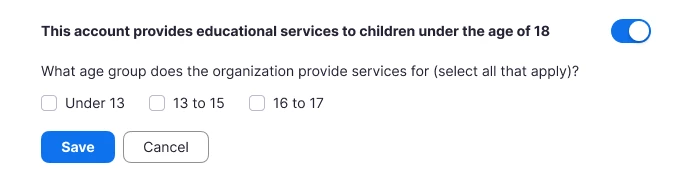
Starting September 19, you will see a new setting within your Admin Portal asking you to self-identify if your organization provides educational services to users under 18 years of age using Zoom products. Once you have toggled the switch to on, you will be asked to select all age groups to which you provide educational services.
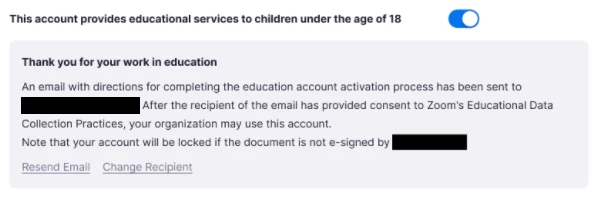
In addition, if you provide services to children in the United States under 13 years of age using Zoom products, you will be required to review and sign Zoom’s Consent to Educational Data Collection Practices within 30 days of self-identification to continue using Zoom services. We can only accept signatures from an authorized administrator or teacher, and your organization will be required to re-sign this notice on a yearly basis at renewal. We’ve included a few images below and published a help article to guide you through this new workflow.
We take privacy seriously at Zoom and this change is a part of our commitment to continuously enhance the privacy of our platform. If you have any questions or concerns, please feel free to reach out to your CSM for assistance, or refer to our help article or reach out to our Support Team. Thank you for choosing Zoom.
Team Zoom