license issue | Community
Skip to main content
Newcomer
May 17, 2023
Solved

license issue

  • May 17, 2023
  • 7 replies
  • 10 views

Hello,


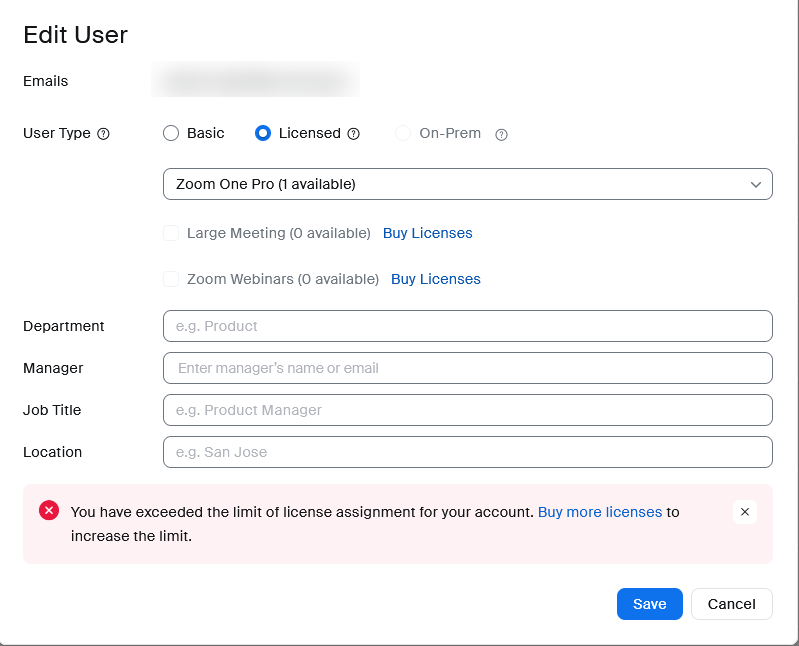
Two licenses bought, one user with license, can't assign second license to anyone.

Does anyone else have this problem today?


Regards

Best answer by rn-zm

@bayer would suggest reaching out to our Zoom billing support as they do not monitor the community. You can create a ticket here

7 replies

bayerAuthor
Newcomer
May 17, 2023

and the best thing is, that i can't even contact zoom support, because only licensed user can do this...

rn-zmAnswer
Community Manager
May 17, 2023

@bayer would suggest reaching out to our Zoom billing support as they do not monitor the community. You can create a ticket here

bayerAuthor
Newcomer
May 17, 2023

thank you

Newcomer
May 18, 2023

We are having the same problem. Do you think it is a glitch with the system.

Newcomer
May 18, 2023

same problem here.

Newcomer
May 18, 2023

yeah me too

Newcomer
May 20, 2023

Hi, has anyone resolved this issue yet?  Please share.

Newcomer
May 22, 2023

Yes, after 30 days my licenses were reinstated - Zoom ticketing support was beyond useless and wouldn't even tell me that much, I found it in one of the threads in this community forum 

Newcomer
August 27, 2023

I waited for an entire month - there was no assistance from Zoom in trying to get reinstated nor any idea of when it might happen - if you go into your account - account managment - reports - user activity reports - not sure which one to look at after that but its in there- it will show how many times you've assigned your license and when was the last time you were permitted to do so. Then wait a full 30 days from there.
Incredibly poor communication from Zoom - and even worse customer service. 


I am the treasurer of an art organization and we purchased a one year license PRO level.  In just a month we received the message that we had exceeded the number of transfers allowable.  So, if that is the case, there must be some indication of what that "number" is, however, I have searched the Terms of Service and find nothing even close to that.  It doesn't even refer to assigning licenses to users, but in the applications, there is that option.  So, it is Russian Roulette and you never know when you are going to exceed the transfers.  At that point, you receive the message and your license is basically suspended.  If you go to "Advanced" under users, you will see that you have ZERO licenses. I have called billing and have also opened a Ticket.  After many many emails back and forth, the best that I have gotten is that we have to purchase another license because we violated the Terms of Conditions.  Bizarre.  I was told to call support, but, as you know unless you have a Business license, you cannot get support.  The Billing call that I had alluded to the fact that I should "wait and it may be restored".   I see this was done to your account.  I have never been through such incompetent support online and on the phone.   I suggest to everyone, just buy a license and never try to assign it to a user or you may end up in this situation.  


Newcomer
May 29, 2023

Zoom Support has restored my license to my owner account.  BUt I am not sure whether I can assign license to another user like before.  Has anyone tried?


Newcomer
June 6, 2023

BEN İKİ DEFA ÖDEME YAPMAMA RAĞMEN HALA HESABIM YÜKSELTİLMEDİ. AYRICA ABONELİK İÇİN İKİ DEFA ÖDEME ALMALARIDA KANUN DIŞI DEĞİLMİ

Newcomer
June 21, 2023

I am with the same problem, I have two licenses, one license is addressed correctly to the user and the other one I cannot not address to the second user. I simply cannot use it. I don´t know what to do to solve it


Newcomer
June 22, 2023

The only solution is to wait an entire month from when you tried to assign the license. Zoom is incredibly inflexible for this issue they created.