

exceeded the limit of license assignment | Community
Skip to main content
Newcomer
July 5, 2023
Question

exceeded the limit of license assignment

  • July 5, 2023
  • 1 reply
  • 0 views

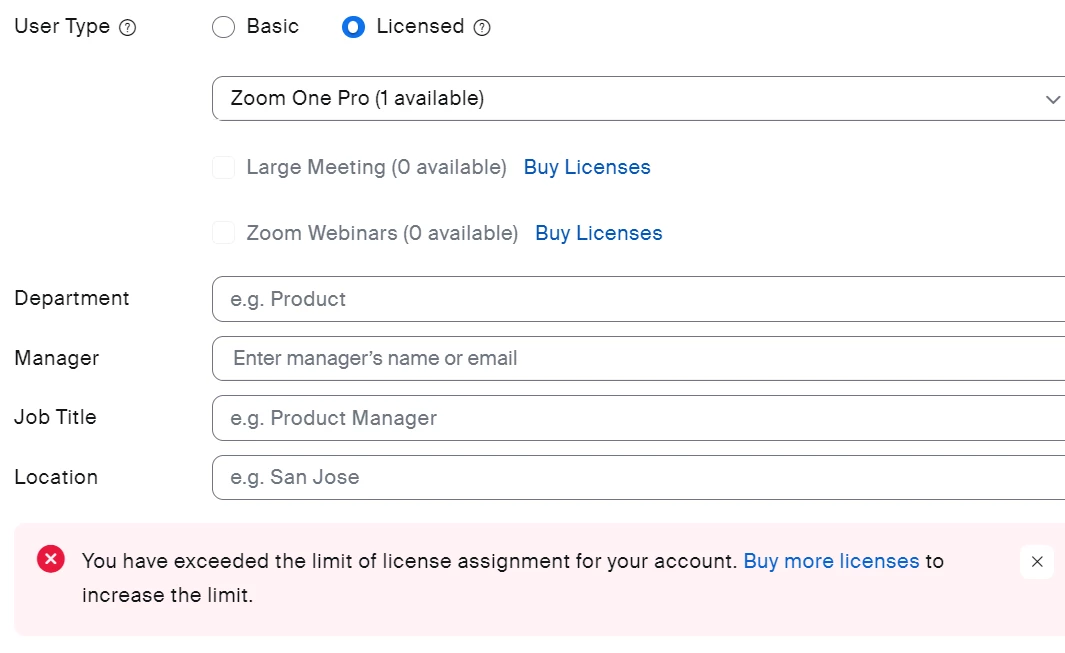
i cannot change the user type of my team ever since this message pops up.
"You have exceeded the limit of license assignment for your account. 
Buy more licenses to increase the limit." There was no problem so far. pls let me know the solution.
 

1 reply

Ray_Harwood
Community Super Champion | Customer
July 9, 2023

Welcome to the Zoom Community, @shvn.


Each license is intended to be assigned to one user indefinitely. While it can be removed from one user and assigned to another, there is an undocumented limit to the number of times a license can be reassigned. Once that that has been reached, Zoom gives you this error: “You have exceeded the limit of license assignment for your account”. Once you purchase an additional license and assign it to a user, my understanding is that the one or more of the remaining locked licenses will be released to be reassigned. 

It may be a violation of Zoom’s Terms of Service to freely reassign a small number of licenses among a larger number of users in an account. 
https://explore.zoom.us/en/terms/ 

See also this Zoom Support article:
https://support.zoom.us/hc/en-us/articles/14424120171405 

shvnAuthor
Newcomer
July 10, 2023

Dear Mr. Ray,


First off, thanks much for your feedback.

I understand that I reached the limit to the number of times a license can be reassigned.

However, we believe that at least one account owner should be able to use "zoom one pro", even if it is no longer possible to assign it to the other.
The current situation is that both the owner and one registered user are unable to use "ZOOM ONE PRO", and I don't think this is a fair situation for us who have already purchased a paid subscription.

I would like to know if there is a way to enable "ZOOM ONE PRO" for at least one user.


Regards,


SHVN

shvnAuthor
Newcomer
July 10, 2023

Unfortunately I’m unable to help you, as I’m Zoom costumer/volunteer, and only Zoom Billing can make these determinations. 


Because this is a public forum, billing related questions can’t be handled here. Please submit a support ticket to Zoom’s Billing team here and they will be able to assist you.

https://support.zoom.us/hc/en-us/requests/new?ticket_form_id=360000983032


Dear Mr. Ray,


Oh i see. It's okay.

Thank you so much your help!

Have a nice day.


Regards,