

Upgraded to pro Zoom but still showing basic account | Community
Skip to main content
Newcomer
September 19, 2023
Solved

Upgraded to pro Zoom but still showing basic account

  • September 19, 2023
  • 2 replies
  • 0 views

Team,


I upgraded to zoom pro account, but the account plan is still showing basic.

Can anyone help me with this regard? I have been logging with the correct email id that was used for the pro account. I have attached below a screenshot for the same.


Best answer by S_K

@GOVB 


I see that you submitted a Billing ticket for assistance. The ticket number is 18106093.


It looks like your payment for a past-due invoice coincided with the cancellation for nonpayment. This will require assistance from our Billing team.


We are experiencing a high number of requests and appreciate your patience as response time may be longer than normal. I also noted the ticket that you've reached out in Zoom Community.

2 replies

Vinnie
Community Champion | Customer
September 19, 2023

Hello @GOVB ; buy the license doesn't necessarily assign the license to your user.

Make sure the newly purchased license get assign to your user; check the procedure:

https://support.zoom.us/hc/en-us/articles/115004976063-Assigning-Zoom-licenses


Vinnie.

GOVBAuthor
Newcomer
September 20, 2023

Hi Vinnie,


I have tried doing the same. But the "licensed" option for user type is showing as disabled for me.

Pasted a screenshot of the same.


Vinnie
Community Champion | Customer
September 20, 2023

Interesting. I haven't seen that before.

If you click the "Drop-down" menu right below that, (where it says "Zoom One Basic"), Do you see any option to select "Zoom One Pro" or a similar license?


If you don't see anything there I would suggest going to the "Plans and Billing" menu (or simply "Billing" under the "Account Management" menu (if there is one) to check the Purchased License is actually showing there.

GOVBAuthor
Newcomer
September 20, 2023

Below is a screenshot of what is being shown in the Billing under "Account Management".

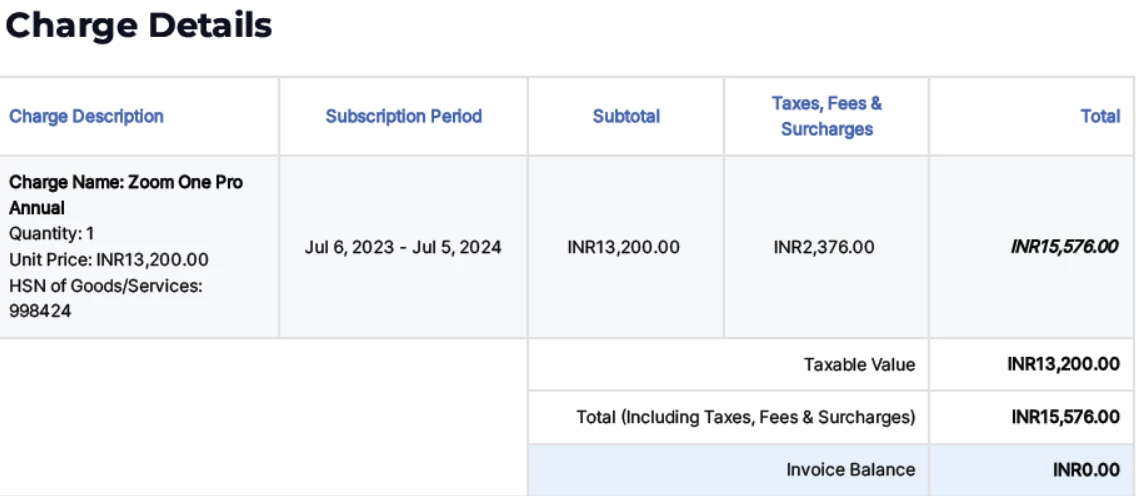
I have an invoice for purchasing the license till 2024 but the same is not reflected here.


S_K
Community Champion | Employee
S_KAnswer
Community Champion | Employee
September 20, 2023

@GOVB 


I see that you submitted a Billing ticket for assistance. The ticket number is 18106093.


It looks like your payment for a past-due invoice coincided with the cancellation for nonpayment. This will require assistance from our Billing team.


We are experiencing a high number of requests and appreciate your patience as response time may be longer than normal. I also noted the ticket that you've reached out in Zoom Community.