Re: 500 Participant Capacity Large Meeting Add-on | Community
Skip to main content
Newcomer
December 1, 2022
Solved

Re: 500 Participant Capacity Large Meeting Add-on

  • December 1, 2022
  • 1 reply
  • 23 views

Hi Ray,

I purchased the Large Meeting/500 capacity in March for work trainings. I noticed on one of the trainings that the room capacity capped out at 300. This made me check my Zoom plan to make sure it was actually 500 (not 300). I start and end meetings so I'm always the host. 


Would you know why the room capacity capped out at 300 during that training? 


We are hosting another training this month that will have 300+ attendees and I want to make sure it doesn't cap out again.


Thanks so much!


Kathy

    Best answer by Ray_Harwood

    Hi, Kathy!


    I just had this experience with a client on Tuesday as they had just increased from a Webinar 500 license to a Webinar 1000 license, and saw registrations go well over the 1500 mark... so I jumped in to help them with the Webinar 3000 issue -- only to notice that they hadn't really made the move to 1000 quite right.


    I'll start by pointing you to this Zoom Support article; they're sometimes technical, sometimes not enough info, but usually there's something there that will help, if you get stuck:

    https://support.zoom.us/hc/en-us/articles/201362823-Hosting-Large-Meetings 


    Are you the administrator of the Zoom account?  I assume you are probably not a "solo Zoom producer" and probably part of a larger organization.  If you do have admin or owner privileges, then you will be able to see and fix the issue.  If you do not have admin or owner access to the organizational account, you will likely need assistance.


    Look at your own profile here: https://zoom.us/profile  Scroll down til you see the light grey bar that reads "Account": (here's mine)
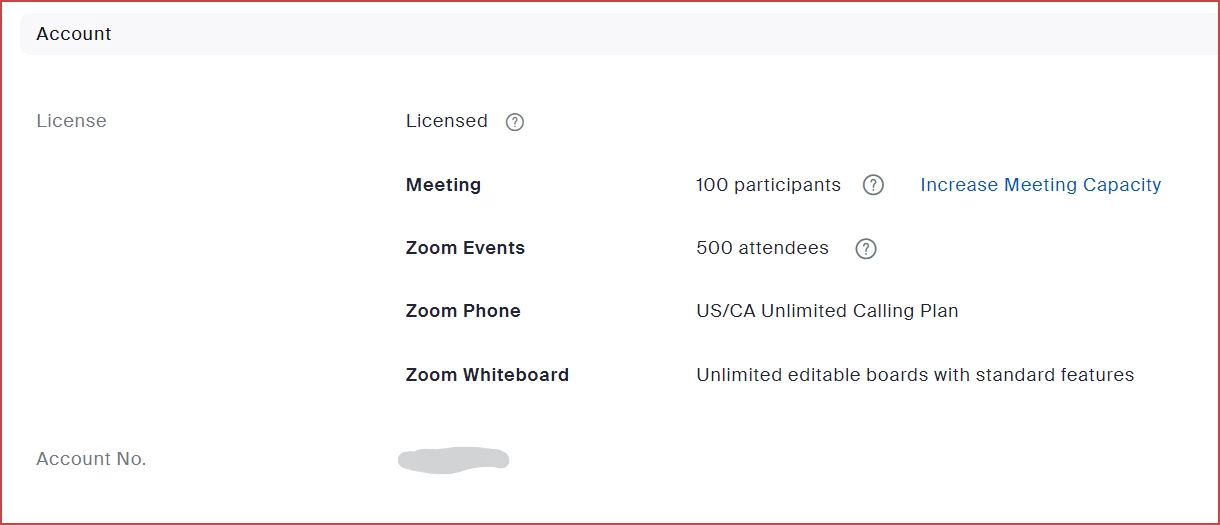
     

    This is the definitive source of the licenses and add-ons associated with your individual user account.


    I'll assume this says you have a Meetings 300, which probably indicates you are on a Business or higher plan.  (Pro plans start at 100 users initially.)  The instructions from the Zoom Support article to assign a 500 meeting license are pretty simple, assuming such an unassigned license is available:


    How to assign large meeting licenses to users

    1. Sign in to the Zoom web portal.
    2. In the navigation panel, click User Management, then Users.
    3. Locate or search for the user who you want to assign a license to.
    4. Click Edit at the end of the user entry.
    5. Select the license you want to assign. Choose the radio button for the size of the license, if it is not automatically selected.
    6. Click Save.
      The license is now applied to the user for immediate use.

    If there is no available license, then maybe it was assigned to someone else, or it wasn't really acquired (like not hitting that last "OK" button).  Someone can look in the Billing/Invoicing records and see if/when it was acquired, and what duration it was for (you can get a Large Meeting upgrade that doesn't renew).


    But assuming that there is an unallocated Meeting 500 license, those steps should get you there. 


    If not, provide me with some screen shots (redact any personal or financial info) and I'll see what I can do to help!


    1 reply

    Ray_Harwood
    Community Super Champion | Customer
    Community Super Champion | Customer
    December 1, 2022

    Hi, Kathy!


    I just had this experience with a client on Tuesday as they had just increased from a Webinar 500 license to a Webinar 1000 license, and saw registrations go well over the 1500 mark... so I jumped in to help them with the Webinar 3000 issue -- only to notice that they hadn't really made the move to 1000 quite right.


    I'll start by pointing you to this Zoom Support article; they're sometimes technical, sometimes not enough info, but usually there's something there that will help, if you get stuck:

    https://support.zoom.us/hc/en-us/articles/201362823-Hosting-Large-Meetings 


    Are you the administrator of the Zoom account?  I assume you are probably not a "solo Zoom producer" and probably part of a larger organization.  If you do have admin or owner privileges, then you will be able to see and fix the issue.  If you do not have admin or owner access to the organizational account, you will likely need assistance.


    Look at your own profile here: https://zoom.us/profile  Scroll down til you see the light grey bar that reads "Account": (here's mine)


    This is the definitive source of the licenses and add-ons associated with your individual user account.


    I'll assume this says you have a Meetings 300, which probably indicates you are on a Business or higher plan.  (Pro plans start at 100 users initially.)  The instructions from the Zoom Support article to assign a 500 meeting license are pretty simple, assuming such an unassigned license is available:


    How to assign large meeting licenses to users

    1. Sign in to the Zoom web portal.
    2. In the navigation panel, click User Management, then Users.
    3. Locate or search for the user who you want to assign a license to.
    4. Click Edit at the end of the user entry.
    5. Select the license you want to assign. Choose the radio button for the size of the license, if it is not automatically selected.
    6. Click Save.
      The license is now applied to the user for immediate use.

    If there is no available license, then maybe it was assigned to someone else, or it wasn't really acquired (like not hitting that last "OK" button).  Someone can look in the Billing/Invoicing records and see if/when it was acquired, and what duration it was for (you can get a Large Meeting upgrade that doesn't renew).


    But assuming that there is an unallocated Meeting 500 license, those steps should get you there. 


    If not, provide me with some screen shots (redact any personal or financial info) and I'll see what I can do to help!

    Newcomer
    March 27, 2023

    Hello,

    Can I do the month add on only on the months I need it?  I only do webinars every other month or so, can I just add it for the month of April for example and then again in June?

    Ray_Harwood
    Community Super Champion | Customer
    Community Super Champion | Customer
    March 27, 2023

    thanks for such a quick reply!  I can do this with the pro plan, correct? 


    @suzallard, yes.  I'm a 1-person Zoom event facilitator/producer, and all I have is a Pro plan myself.


    One more reminder: once you purchase a 1-month Webinar license, you need to assign that license to you (or whoever will be creating the Webinars).  There's some info toward the top of this topic, or see this Zoom Support article for additional guidance:

    https://support.zoom.us/hc/en-us/articles/115004976063-Assigning-Zoom-licenses