How to reset password when you forgot your old password | Community

Skip to main content
Newcomer
March 23, 2023
Solved

How to reset password when you forgot your old password

  • March 23, 2023
  • 7 replies
  • 0 views

How to reset password when you forgot your old password

    Best answer by Frank_TB
    This post has been deleted.

    Hello,


    Open a browser and navigate to


    https://zoom.us/signin 


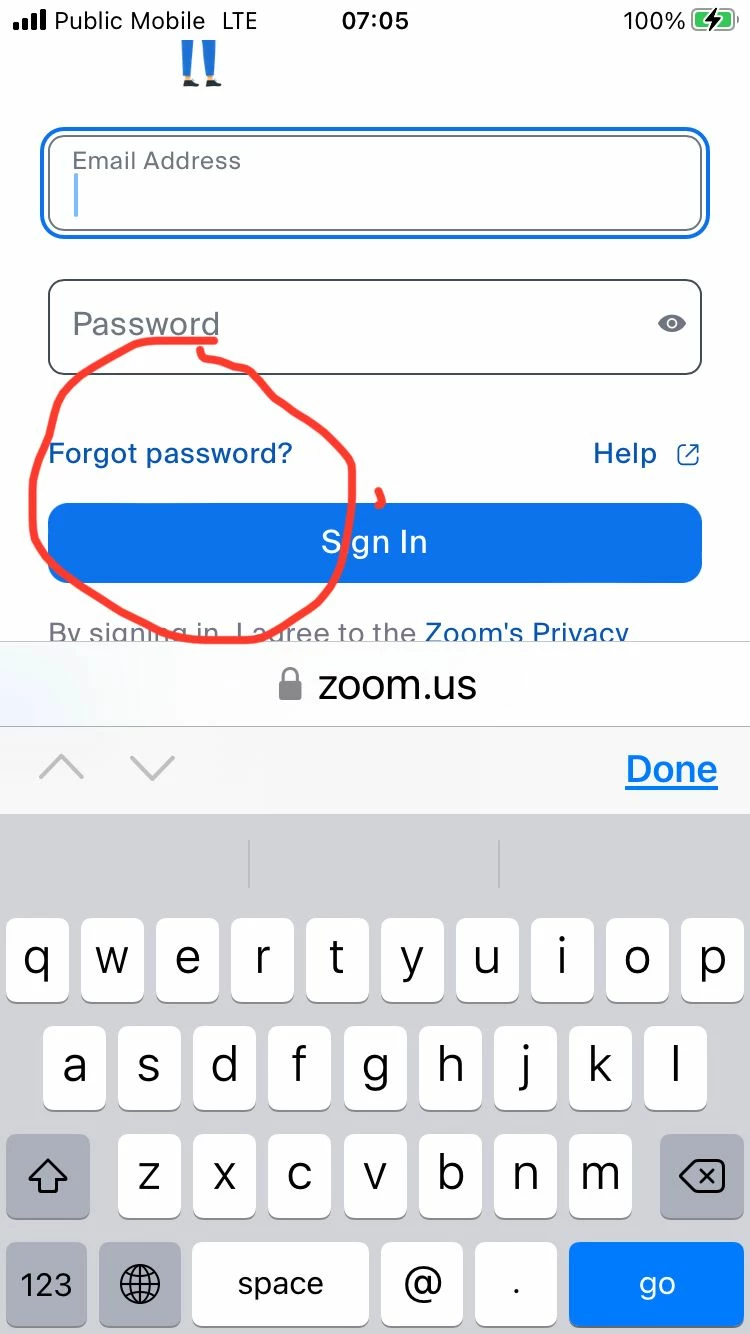
    Click forgot password.


    Regards

    If my reply helped, don't forget to click the accept as solution button!


    7 replies

    Newcomer
    March 24, 2023

    Did you get any reply ?  I am having this same problem......I can't change my Zoom password because I don't know my old Zoom password.

    Newcomer
    January 27, 2025

    this dose not work!!!!~!!! take me to a sign in and then signs me in with out an option to change forgotten password??!?!?!?!?!?

    Frank_TBAnswer
    Community Champion | Customer
    April 4, 2023
    This post has been deleted.

    Hello,


    Open a browser and navigate to


    https://zoom.us/signin 


    Click forgot password.


    Regards

    If my reply helped, don't forget to click the accept as solution button!


    Newcomer
    June 28, 2023

    Just opens zoom home account. no link to reset password. Delete my "like" that was for the user who's getting the same result I am.

    Newcomer
    April 25, 2023

    HI Frank or other expert.

    When I click that link ending with Signin or similar ending with forgot_password.. i get taken to the meetings page and no chance of putting email in to request link to change password. Any ideas please?

    thanks for your help

    Community Champion | Customer
    June 28, 2023

    Hello,


    Here is what the Zoom support says about this topic;


    How to reset your forgotten Zoom password

    1. Open a web browser and go to zoom.us/forgot_password.
    2. Enter your email address that was used to create the forgotten account  password and verify the reCAPTCHA.
    3. Click Send.
    4. You will receive an email with a link to reset your password. Click the link in the email.
      Note: If you didn't receive the confirmation email, please check your Spam folder and confirm that     No-reply @ zoom. us  is allowed in your inbox.  (Please note that the email  address posted here has been modified so the forum doesn’t block it. Go to the support article link for the exact spelling of the email address) 
    5. Enter your new password. 
    6. Enter the new password a second time for confirmation.
    7. Click Save. You have now reset your password and should be logged into the Zoom web portal.
    8. Click Go to My Meetings to be taken to the web portal.

     Note: You will also receive an email confirmation that your password has been reset.


    https://support.zoom.us/hc/en-us/articles/115005171726-Resetting-your-forgotten-password 


    Not-receiving-emails-from-Zoom Support article 

    https://support.zoom.us/hc/en-us/articles/360032808951-Not-receiving-emails-from-Zoom 


    Regards

    If my reply helped, don't forget to click the accept as solution button!


    Newcomer
    June 29, 2023

    I hope this isn't a robot we've been chatting with. It's impossible to use that forgot password link and recover a forgotten password. When you click on that link in your message it takes me to the meetings welcome page with no opportunity to recover a lost password. So, this makes it impossible to reset a password. I thought about logging off and then trying to log back in but if that doesn't help me reset the password I'll never be able to log back in.

    Newcomer
    June 28, 2023

    Tengo una cuenta en zoom y no puedo recuperar la contraseñas pues he perdido el acceso a la dirección de correo electrónico adjunta a la cuenta zoom (dirección con la que accedo a zoom cuando tengo

    que iniciar sesión)

    Cuando toco la opción recuperar contraseña me dice que se envía un correo a la dirección indicada (dirección a la que no puedo acceder) y ya no puedo seguir con el procedimiento.


    Hay otro método para restablecer contraseñas?

    En la pagina de zoom te dice que "Envié una solicitud al soporte de Zoom" pero ellos no me contestan...sólo me envían links con demos para aprender a usar zoom

    Newcomer
    July 1, 2023

    Reposting that same link doesn't solve the problem, without deleting cookies. Otherwise it just takes you back to your account, which has no option to change password, until I deleted the cookies. 

    Newcomer
    August 28, 2023

    Im having the same problem, how do we retrieve old password?

    Newcomer
    April 30, 2025

    I could not reset the password on my laptop.  I then tried resetting it on my mobile phone and it worked.  (don't know why).

    Newcomer
    April 30, 2025

    did anyone find a solution to this?  The link above does not have a reset password option (maybe it is because I am not in the US).