

How to disable login verification code | Community
Skip to main content
Newcomer
January 27, 2022
Solved

How to disable login verification code

  • January 27, 2022
  • 49 replies
  • 136 views

We have a Zoom account that is shared by several people to host meetings. When logging into Zoom it often thinks that there is an unusual login and the hosts are asked to enter a verification code (please see screenshot below). The verification code is sent to the account email that these hosts have no access to. This is causing a lot of frustration and delays. Is there any way we can disable this logion verification? Thank you.
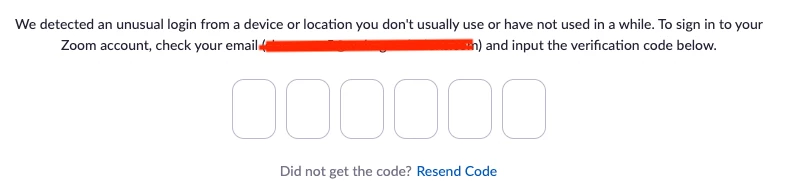


    This topic has been closed for replies.
    Best answer by JPWW

    Our admin set up a separate email to serve as the login for one of our organization’s licenses.  It’s not the main organization email and used only for Zoom.  The people who use Zoom in our organization have access to this email account and can pick up any OTP request.  Works so far. 

    49 replies

    jeremyjustin
    Community Champion | Employee
    Community Champion | Employee
    January 27, 2022

    Hi @leopoldj thank you for your post here on the Zoom Community! It looks like you may have Two Factor Authentication (2FA) enabled on your Zoom tentant. Assuming this account you are signing in with does not go through a corporate Single Sign On (SSO)  type login method, this setting can be modified in the Zoom portal. To modify this setting, an admin or the tenant owner can sign into the Zoom web portal, click on "Advanced" and then "Security"

    If you scroll down a little bit there is an option to enable/disable Two-Factor Authentication


    Here is a support article with more information in case it helps! 

    https://support.zoom.us/hc/en-us/articles/360038247071-Managing-two-factor-authentication-2FA-


    If this has answered your question to your satisfaction, please click the "Accept as Solution" button below but if not please reply and we can continue the  discussion. Thank you!

    leopoldjAuthor
    Newcomer
    January 27, 2022

    Hi. This is not related to 2FA. We don't have 2FA enabled. This issue is about Zoom thinking at times that there is an unusual login attempt. Sorry, I wasn't very clear about that. Let me modify the question. Thank you.

    Newcomer
    April 19, 2023

    Hi,

    I had the same problem you are describing.  We are a school that no longer needs individual accounts for our faculty and staff.  To remove the OTP (which is not the same as the 2FA which can be disabled), I had to contact support, acknowledge that I accepted the risks of having the Zoom-enforced OTP removed, and wait while my request was bumped up a couple of levels.  Eventually, the OTP was removed.

    jeremyjustin
    Community Champion | Employee
    Community Champion | Employee
    January 27, 2022

    Thank you @leopoldj I appreciate the extra details. Ok, this referred to as One Time Password or OTP.  OTP is a security feature that Zoom implemented to help protect Zoom customers who use the work email and password log on type without Two Factor Authentication (2FA) enabled. If Zoom detects that a user is logging into their account from an unusual or unknown location, Zoom will send the user an email with a One Time Password to enter into Zoom before they can access their account. By doing so, this will potentially cut down account hijackings due to compromised or weak credentials.


    So basically this is a security feature built into the system and not something you can disable. 


    By the way, it would be great if we could have you work with sales to acquire some more licenses so you don't have to share and run into these workflow snags 🙂


    If this has answered your question to your satisfaction, please click the "Accept as Solution" button below but if not please reply and we can continue the  discussion. Thank you!

    leopoldjAuthor
    Newcomer
    January 27, 2022

    Thank you for the response.


    We are an education company. We have about 12 paid licenses which is enough for the number of classes we run at the same time. However, we have about 30-40 instructors.  When an instructor is scheduled to teach a class we assign a Zoom user to them. They have the correct user ID and password but can't login because of the OTP issue.

    jeremyjustin
    Community Champion | Employee
    Community Champion | Employee
    January 27, 2022

    Hi @leopoldj I can definitely understand. Perhaps you could create a shared mailbox to receive those emails. I wish I could be more helpful but this is not a recommended solution as I'm sure you can understand. But thank you for using Zoom to teach and we appreciate your input here on the community! 


    If this has answered your question to your satisfaction, please click the "Accept as Solution" button below but if not please reply and we can continue the  discussion. Thank you!

    Newcomer
    February 2, 2022

    Hello, when this feature was implemented? I'm facing the same issue, there's no way to avoid these verifications?

    Newcomer
    February 10, 2022

    Hey Fabio...same problem here...so far Zoom is not offering any satisfactory option either except disabling the OTP which could be a security risk>>>with many host on our meetings and the OTP giving a window of 10minutes to use I have no idea how we are supposed to negotiate this change to their settings.. good luck :):


    Newcomer
    February 14, 2022

    There's a way to disable OTP? I'm trying to find.

    Newcomer
    February 10, 2022

    Hi,


    I am struggling with the same issue!! We are a professional training company so we use Zoom to deliver online training sessions. Our licenses are shared between different trainers that deliver the session, some are in APAC, some are in Europe. So this warning comes up whenever a different trainer signs in!!! This is so inconvenient as we can't give access to that shared email to everyone...but they can't get the code when they want to login!


    I know the purpose is to increase security but this is just too much! They are trying to stop us from sharing accounts!


    Best regards

    Jennifer

    Newcomer
    February 13, 2022

    Hi Jennifer...have you tried the 2FA as a solution??? Its been suggested to me but I dont even know how this would help??

    Terri

    Newcomer
    February 14, 2022

    Hi Terri,


    No, we don't even have the 2FA enabled. This is not related to 2FA at all


    Thanks

    Jennifer

    leopoldjAuthor
    Newcomer
    February 14, 2022

    For those of you having the same issue, you can open a support ticket with Zoom and ask them to enable "allow login from multiple resources" feature in your account. They can do that in the backend. Once this is enabled, login verification will go away.

    Newcomer
    March 3, 2022

    This unfortunately did not work. The Zoom agent said we could not avoid this, which is very frustrating as we also have multiple people logging into our multiple Pro accounts. We need to get a resolution to this issue, as it sounds like it's impacting many users!

    Newcomer
    February 19, 2022

    Hello Everyone,

    We had 2FA enabled to secure access to our account. I am the account admin and have disabled 2FA from the security settings but it is still requiring 2FA every time I log in. I have tried re-enabling and disabling this several times but this issue still persists. See the screenshots below.

    Please, who knows how to truly disable this feature once and for all?

    Thank you.

    Newcomer
    February 21, 2022

    Hi,

    Have you check if 2FA is enabled on that exact account? As an account admin, you can set the default settings but the user themselves can overwrite in their own account.

    Best regards

    Jennifer

    Newcomer
    February 21, 2022

    Thank you Jennifer. I am actually referring to the admin account. I just logged in with that account on my phone to respond to this and had to go to the Authenticator to allow me log in. 
    This is something I am experiencing directly. 
    Thank you for your response. 

    Newcomer
    May 9, 2022

    I'm late to this party but just started having the same issue. Small nonprofit, multiple accounts but multiple users per account. Did anyone ever find a satisfactory solution? The verification codes aren't even coming through when I can access the related email.  Incredibly frustrating!

    Newcomer
    June 3, 2022

    We're having the same issue. A small non-profit - we need to share the Zoom accounts. At the moment, we set up the emails to get auto-forwarded to 2 of us, then the teachers needs to text us if they need a code. It's a pain.


    Newcomer
    May 10, 2022

    is it possible to request Zoom to disable it ?

    YaBoiB
    Community Champion | Employee
    Community Champion | Employee
    May 10, 2022

    Hello,
    My name is Brandon. Thanks for joining the Zoom Community! This function is a security feature, so Zoom cannot disable it. Please see our blog on this subject that was published back on April 25th of this year.  https://blog.zoom.us/how-zoom-works-to-protect-your-account/

    Newcomer
    May 11, 2022

    Hi Peter,


    I'm the original poster of this topic. We haven't encountered any issues since the OTP feature was disabled yesterday. It will take few days to know for sure if the OTP emails due to unusual login actually stopped.


    It's not exactly clear from the two messages you have posted what kind of problems you are still having. I would like to know since it may affect us as well. Can you please provide more details about what problems you are still having? Thank you.


    Hi LeopoldJ,


    Thank you for reaching out, and thank you for initiating this thread in the first place.

    I do not know where you are located - I am in The Netherlands, Europe.


    Our problems went away only a few hours ago, after suffering multiple days where

    our Zoom licenses were largely inoperable. I guess when Zoom disabled this so-called

    security feature, it took a while before the new status rippled through to the rest of the

    world ..... What I do know, for certain, is that Zoom never sent out these login verification

    email-messages - running through the logs on our externally hosted, third-party email-

    filter (aimed at blocking spam), no trace could be found of these login verification messages.

    Perhaps this type of messages were sent out elswhere, but certainly not here.

    ==

    What bothers me is the fact that Zoom, at the expense of its current customers,

    and without notifying anyone, changes the EULA. I am in the midst of exchanging

    hardware within one of the institutions we administer - exchanging fixed workstations

    with laptops - with all of these devices having been used within the same environment,

    on the same domain, within the same IP-ranges, using the same Zoom-credentials -

    and all of a sudden, the Zoom-logins from within our office-environment are deemed

    ''suspicious''.  Now, I do not know what AI Zoom is using to decide that the login-

    attempts are, all-of-a-sudden, suspicious, but they are definitely legit.


    The condescending comments from the so-called Community Champions are then

    just the icing on the cake:

    * jeremyjustin: By the way, it would be great if we could have you work with sales to

    acquire some more licenses so you don't have to share and run into these workflow snags -

    * Brandon:I did some more digging on this. I was not aware, but apparently, there is a lot

    of user chatter about this -

    = these statements reveal the real purpose of this 'security feature': selling more licenses,

    and coercing existing users into this mold. These Community Champions are clearly not

    interested in building a community, and caring about the issues encountered - wolves in

    sheep-clothes, it would seem to me.


    Unfortunately Zoom is turning into a company with greed and profit as main drivers,

    which is also clear from the recent time-limitation Zoom has imposed onto 1-to-1 sessions.


    I fear Zoom will do this again. They will introduce new 'features', and try to sell them as 'uniforming' or as 'security improvements' - disrupting the day-to-day operations of their customers, and downplaying the aggravation caused as 'chatter', and trying to sell you

    a few extra licenses on-the-side. The first problem we will encounter, soon, again, is when

    Zoom will re-activate OTP - they have only de-activated OTP on a temporary basis .....

    --

    I consider the Zoom-technology as superior to Teams, especially in the area of

    audio - where it counts, in meetings, is in the audio area - the rest is of less importance.

    To the users we support the intelligent user-interface is important: it is simple, yet complete.

    However, if Zoom keeps up this attitude of neglecting its existing customers, a lot of us

    will have to turn to Teams - we cannot go through these pains again and again, while,

    at the same time, being belittled by our Community Champions.


    I know, ranting .....

    Best regards,

    Peter.

    Newcomer
    June 1, 2022

    I am also having this trouble where we pay the expensive Pro and webinar accounts and allow users to login to them. We don't need 40 pro accounts neither could we afford that, our three accounts are used just enough that its perfect. Until the OPT was enabled. Those users don't have access to the email account that the OTP password is sent nor should they.  Can you please disable this feature. 


    Don

    Newcomer
    June 1, 2022

    Hi all, I hope this lands in the right place. Wanted to share that through a Zoom chat today (6/1/22) I asked this was removed from an org's account. Here's the response from the Zoom rep:

    This feature is designed to avoid fraud and abuse. Only if an account has a legitimate use case where they can not use SSO, Two Factor Authentication, or OTP, we can request an exception to whitelist this account for OTP, however, submitting a request to have OTP disabled and that it is subject to review and approval by the right department, and it can NOT be guaranteed.

    😐I'll let you know what we hear back and if the request is granted. It was initiated in chat and then the rep. submitted a ticket and provided a ticket number. You might save yourself some time just by going straight to "submit a ticket."

    Newcomer
    June 1, 2022

    Thanks for that, i  may end up trying it with something like; The legitimate use case is we have multiple remote users and zoom hasn't figured out how to set an allow bit to make them authorized users. These users are from varying  backgrounds and may not have access to a cell phone for for a 2fa setup, but that's irrelevant because zoom doesn't have that ability. The OTP change disrupts our work flow we have had for 2+ years now and should be disabled. Its obviously editable thus the whitelist, allow users to check yes or no in their account set it to default yes. 

    Thanks.

    Don

    Newcomer
    June 1, 2022

    Hi All,


    I raised a ticket (#14280083) with Zoom in early May, when the OTP prompt first appeared. The Zoom agent confirmed that the OTP requirement had been "temporarily disabled". Here is the latest response (received May 30th):
    "I can confirm that our team has temporarily disabled OTP globally as we re-evaluate the feature. For the time being, OTP has been removed on login. We aim for the best solution/configuration for all our clients, including yours and we do value your feedback.
     
    Moreover, please know that Zoom users will be notified in advance once this feature goes live again. 
     
    Also, please know that Zoom detects a suspicious login when a user logs in from a different country or device than usual, among other factors. While we're unable to disclose or provide additional information on how this security feature works. With that, please know that Zoom welcomes feedback from our users and I would recommend filling out our feedback form here: https://zoom.us/feed so our Product Team can review your feedback."

    However, I have still received no satisfactory answer to my question "what constitutes a suspicious sign-in?" It seems that everything does! Also, if I enable VPN, then all my attempts at signing-in will be deemed suspicious. Basically, if Zoom re-enables OTP, then no-one will be able to use Zoom over VPN.  It seems as if Zoom has not really thought this through.

    Newcomer
    June 2, 2022

    We had the OTP issue today (6/1/22), so it's not currently globally disabled and we received no notice that it was reactivated.