

HELP!! unable to assign license error You have exceeded the limit of license assignment for your.... | Community
Skip to main content
Newcomer
April 4, 2023
Solved

HELP!! unable to assign license error You have exceeded the limit of license assignment for your....

  • April 4, 2023
  • 31 replies
  • 0 views

okay, maybe i start on the wrong location, let try a new fresh discussion


i dont understand why, i cannot assign my license, 

i can unassign, but after that i cannot assign again, 

is there something wrong?

my license is still more then 10, but i cannot assign to mw account, 

now, i cannot assign the license, and all my account turn to basic, 

and zoom want me to buy more lisence for me to can assign? 

im still missing the point here,
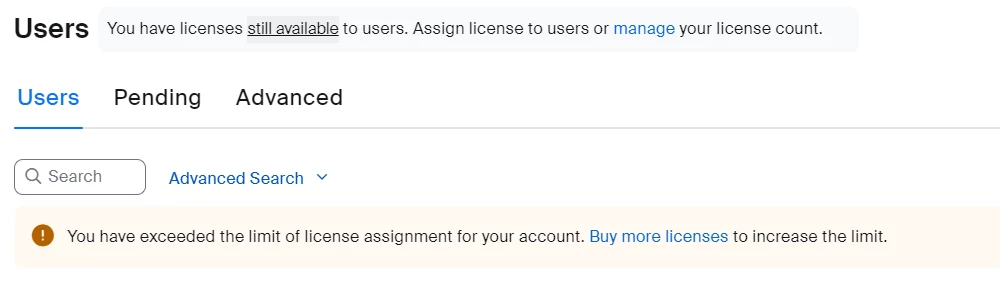
on top of the user account i got this notification

 soo im thinking is there a problem with my account, 

i sign up new fresh account, 

buy 1 lisence pro

and add other account, 

ok, now in my admin have to account, 

i try to assign and unassign, 

after 5 times  i cannot assign again, 
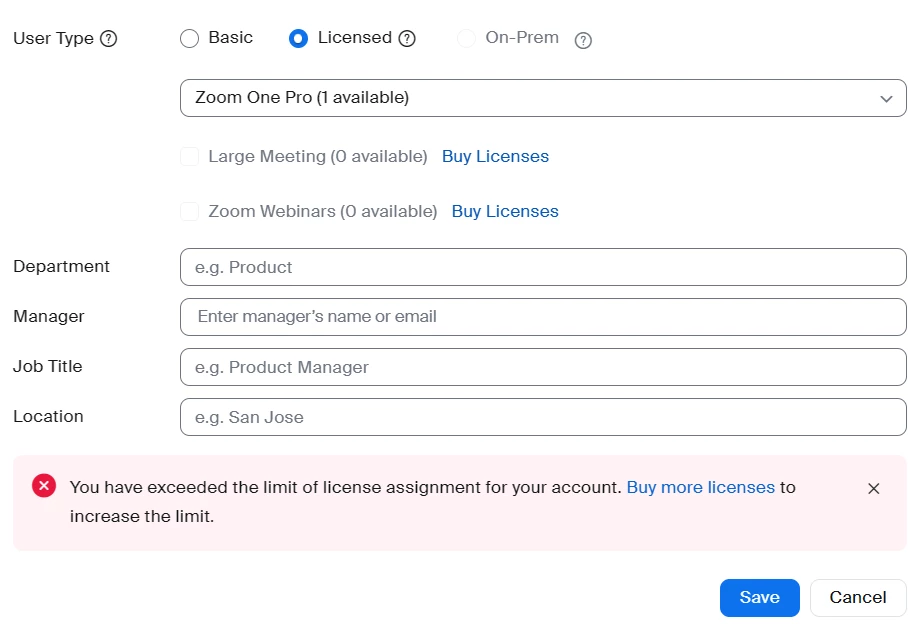
 

as you can see this is what it say,


so how do i assign new account? i have to buy more and more and more again? 

and after this, how can i assign? 

this is a scam, 

Best answer by Natalie7

Guys, I think nothing will be solved. Most of the users (me as well) received the same standard reply from tech support: 


Note: Sharing meeting licenses among multiple users is a violation of Zoom’s Terms of service. Per section 1.2 Prohibition on Sharing:
 

You may not share an account, Host rights, or any other user rights with any other individual, unless otherwise expressly pre-approved by Zoom in writing. You may not share any login credentials or passwords regarding the foregoing with any other individual. You acknowledge that sharing of any such rights is strictly prohibited. Your right to use or access the Services and Software is personal to you and not assignable or transferable. You may not assign or transfer any account, Host rights, or any other user rights with any other individual, except upon (i) an individual termination of employment or relationship with their employer, as applicable, or (ii) Zoom’s prior express written approval.


This Terms of Service agreement, (which most of us agreed to without reading during the recent update), is effective from March the 31st, approximately when the problems started. So, it's just a company policy, it's not a bug. I don't like this way to treat the customers, making significant changes in functionality without proper warning, so I decided to cancel my subscriptions.

31 replies

Newcomer
April 14, 2023

this is really a SCAM, mw former billing is 20 license, and already exceed limit, because the people in my organization come and go, so this month, just buy 16, and, suddenly all my account is unassign, 

contact the CS, not very Helpfull, ok, try buy 1 more, still cannot assign, 

try buy 2 more, still cannot assign, 

until i have 25 license, then i can assign, now, if i buy an addon i cannot assign? the CS not helping, the enginering is also not helping, the billing cannot refund, 

what to? i dont know? still use zoom? i dont know, 

i will tell my story in youtube, and hope, others perople dont get scam like i did, 

this is sad, realy sad, 

25 license, just to assign 16 license in my own email 

im buying this service, but i cannot use it? 

which law is zoom apply to? US? 

Newcomer
April 14, 2023

This is really ridiculous: I can't even assign the license to myself! I hope it's a bug rather than a scam, but who knows? If more people complain publicly, maybe it will put some pressure to the company.


Newcomer
May 2, 2023

This is me. I deleted all other users, and still my own account w/email associated as Owner, cannot be assigned the available License

Newcomer
April 17, 2023

We are still waiting for them to come back to us. They have given 3 different answers into response to me and my colleagues. The funniest advice was to recent the cache....

Newcomer
April 19, 2023

 That's extremely contradictive and illogical. I get a message that I still have licenses available and I'm welcome to assign them within my corporate group, but on the same page I get a message that I have no licenses available and need to buy more. What for? I can't use them! It's irrational... What's going on with Zoom?

Newcomer
April 20, 2023

Same Problem

Newcomer
April 28, 2023

Same problem( I don't understand what to do

Newcomer
April 28, 2023

did anyone find out - i am having the same issue- i have 5 users but only 2 of which needs licenses.  I have 2 saying unassigned - but i cant assign- it says i have exceeded  my limit and i have to buy more - which i dont want to do.  Help 

Newcomer
April 28, 2023

I have the same problem, unsolved!!

Newcomer
April 28, 2023

I've been running into the same issue today and I don't know what to do. I tried to contact @51 but nobody is answering my questions. This is very upsetting! Were you able to solve this problem? 

Natalie7Answer
Newcomer
May 1, 2023

Guys, I think nothing will be solved. Most of the users (me as well) received the same standard reply from tech support: 


Note: Sharing meeting licenses among multiple users is a violation of Zoom’s Terms of service. Per section 1.2 Prohibition on Sharing:
 

You may not share an account, Host rights, or any other user rights with any other individual, unless otherwise expressly pre-approved by Zoom in writing. You may not share any login credentials or passwords regarding the foregoing with any other individual. You acknowledge that sharing of any such rights is strictly prohibited. Your right to use or access the Services and Software is personal to you and not assignable or transferable. You may not assign or transfer any account, Host rights, or any other user rights with any other individual, except upon (i) an individual termination of employment or relationship with their employer, as applicable, or (ii) Zoom’s prior express written approval.


This Terms of Service agreement, (which most of us agreed to without reading during the recent update), is effective from March the 31st, approximately when the problems started. So, it's just a company policy, it's not a bug. I don't like this way to treat the customers, making significant changes in functionality without proper warning, so I decided to cancel my subscriptions.

Newcomer
August 13, 2024

I am experiencing the same thing!  No live phone support and I have meetings scheduled this week!!!  How do we contact support?!