

Zoomtopia is here. Unlock the transformative power of generative AI, helping you connect, collaborate, and Work Happy with AI Companion.
Register nowEmpowering you to increase productivity, improve team effectiveness, and enhance skills.
Learn moreKeep your Zoom app up to date to access the latest features.
Download Center Download the Zoom appDownload hi-res images and animations to elevate your next Zoom meeting.
Browse Backgrounds Zoom Virtual BackgroundsEmpowering you to increase productivity, improve team effectiveness, and enhance skills.
Zoom AI CompanionUser groups are unique spaces where community members can collaborate, network, and exchange knowledge on similar interests and expertise.
Help & Resources is your place to discover helpful Zoom support resources, browse Zoom Community how-to documentation, and stay updated on community announcements.
The Events page is your destination for upcoming webinars, platform training sessions, targeted user events, and more. Stay updated on opportunities to enhance your skills and connect with fellow Zoom users.
2025-07-17 06:04 AM
I would like to purchase a Webinar plan for 1 month. However, Zoom only allows me to pay up to July 30th because that’s when my current Meetings subscription expires.
Right now, I can’t renew the Meetings plan because Zoom requires me to wait until the current paid period ends.
Could you please advise me how I can proceed with paying for the Webinar package for 1 month?
Solved! Go to Solution.
2025-07-18 02:42 PM - edited 2025-07-18 03:48 PM
Welcome to the Zoom Community, @Aleksandr36.
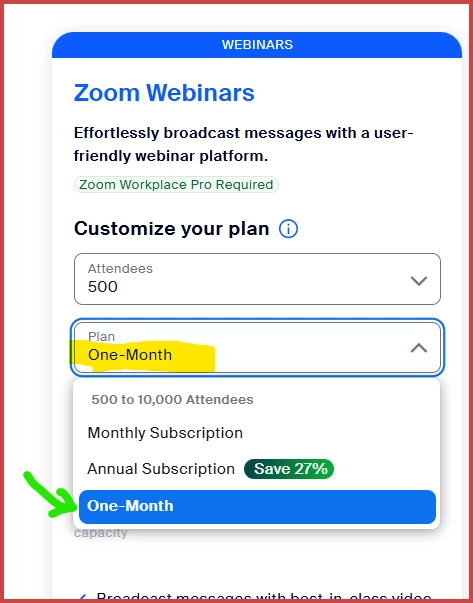
On the Zoom Pricing page, pick Events and Webinars (https://zoom.us/pricing/events) and then select the "One-Month" option as well as the size of Webinar you need (usually 500 is all that's needed, but if you need a larger one, pick otherwise):
From there, you are signing up for just a 1-month subscription based on the current date to one month from today.
(FYI: I previously thought the option for a one-month subscription was removed... but I just missed it, since they changed the user interface a bit!)
2025-07-18 02:42 PM - edited 2025-07-18 03:48 PM
Welcome to the Zoom Community, @Aleksandr36.
On the Zoom Pricing page, pick Events and Webinars (https://zoom.us/pricing/events) and then select the "One-Month" option as well as the size of Webinar you need (usually 500 is all that's needed, but if you need a larger one, pick otherwise):
From there, you are signing up for just a 1-month subscription based on the current date to one month from today.
(FYI: I previously thought the option for a one-month subscription was removed... but I just missed it, since they changed the user interface a bit!)
2025-07-23 12:19 PM
Hi @Aleksandr36! I wanted to let you know that I’ve marked @Ray_Harwood's response as the accepted solution, as I believe it answers your question. If you have any more questions or need further clarification, feel free to ask.