
CAN'T ASSIGN LICENSE EVEN WE HAVEN'T EXCEEDED THE LIMIT | Community
Skip to main content
Newcomer
August 4, 2023
Solved

CAN'T ASSIGN LICENSE EVEN WE HAVEN'T EXCEEDED THE LIMIT

  • August 4, 2023
  • 5 replies
  • 0 views

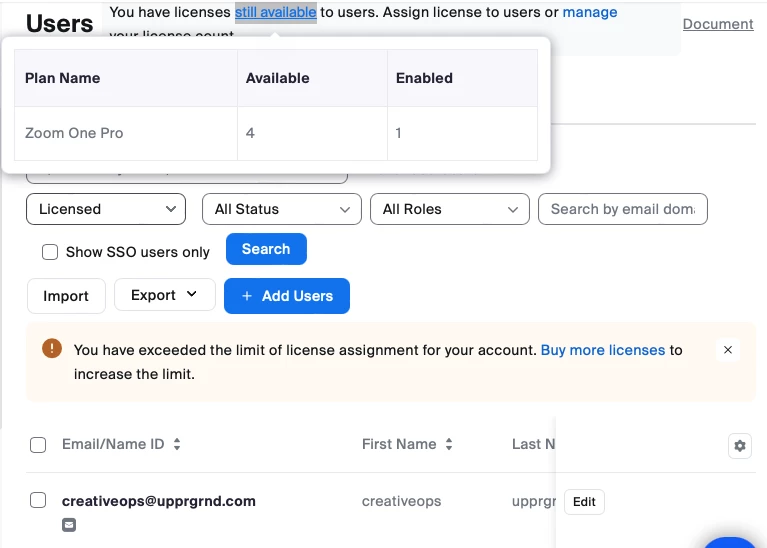
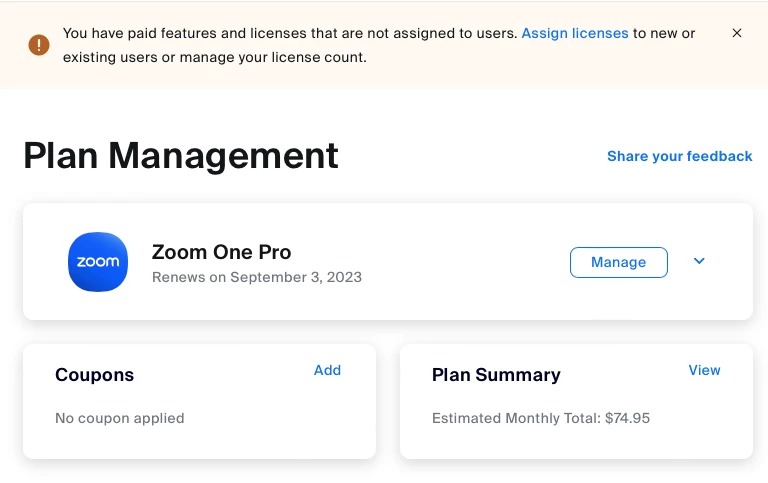
WE HAVE 4 LICENSE, ONLY 1 WAS ENABLED YET ZOOM KEEP ON SENDING ERROR NOTIFICATION "EXCEEDED THE LIMIT OF USERS" . WE CAN'T ASSIGN THE OTHER 3 LICENSES. WE NEED HELP ASAP!!

Best answer by ZoomVA

@Margot_UGLM Were these licenses previously assigned? For more information, please see Zoom error code: “exceeded the limit of license assignment”.

The limit is based on the number of purchased licenses on your account. Once additional licenses are purchased, the limit will be increased, and you can continue assigning licenses to users. Please note: Sharing meeting licenses among multiple users is a violation of Zoom’s Terms of Service, section 1.2 Prohibition on Sharing.


If your use of Zoom services requires additional licenses to comply with Zoom’s single-user-per-license requirement, you can visit your Billing page on the Zoom web portal to purchase additional licenses. Once additional licenses are purchased, the limit will be increased, and you’ll be able to assign licenses to users

5 replies

Newcomer
August 5, 2023

Margo, same issue here, keeps telling us to buy more, then it says we have a license and to assign it and then wont let us assign it

Newcomer
August 7, 2023

did you contact zoom?

Newcomer
August 18, 2023

I did - via email as I don't have live support. They just told me to buy more licenses and then "you will regain your access." 

But now I can't buy additional licenses either as "your plan is pending." 

?

Newcomer
August 7, 2023

same as here ... I don't know what happened suddenly we cant assign anymore license

Newcomer
August 7, 2023

is there a feedback from zoom?

Newcomer
August 8, 2023

No response yet on my tickets ... 

But I will immediately cancel all plans 

I have 30 regular licenses. 1 large meeting  and 4 webinars with additional 500G storage ... 


If this things are not responded then its no use for me to continue to use their services

ZoomVA
Community Manager
Community Manager
August 7, 2023

Hi @Margot_UGLM please check out Ray's response in this community thread for an explanation.

Newcomer
August 7, 2023

No it doesn't make sense. We need someone to talk to regarding this matter immediately.

ZoomVA
Community Manager
ZoomVAAnswer
Community Manager
August 7, 2023

@Margot_UGLM Were these licenses previously assigned? For more information, please see Zoom error code: “exceeded the limit of license assignment”.

The limit is based on the number of purchased licenses on your account. Once additional licenses are purchased, the limit will be increased, and you can continue assigning licenses to users. Please note: Sharing meeting licenses among multiple users is a violation of Zoom’s Terms of Service, section 1.2 Prohibition on Sharing.


If your use of Zoom services requires additional licenses to comply with Zoom’s single-user-per-license requirement, you can visit your Billing page on the Zoom web portal to purchase additional licenses. Once additional licenses are purchased, the limit will be increased, and you’ll be able to assign licenses to users

Newcomer
September 5, 2023

I had the same problem with unable to assign a paid license to the owner user.  

This fix worked for me:

Cancel all of your licenses. It will tell you the date then the licenses expires and will not be renewed.

Now go back in to you license plan and select reapply the cancelled licenses.

Now for me they were back and able to be reassigned with out having to purchase more licenses.


Newcomer
February 5, 2024

Hello, I have the same issue. Did anyone manage to find a workaround? I am stuck in managing my account...