

Account zoom blocked for too many attempts…what to do?? | Community
Skip to main content
Newcomer
December 1, 2021
Solved

Account zoom blocked for too many attempts…what to do??

  • December 1, 2021
  • 2 replies
  • 2 views
  •  
    Best answer by Peter_Uy

    Hello @Milena6 ,


    I hope all is well with you!


    Here's what you can do to unlock your Zoom Account:


    Changing a user's password

    Overview

    The account owner or admin can change an account member's password through User Management.

    If a user has entered an incorrect password too many times, their account may be locked. You can also unlock it for them on the Zoom web portal.

    Note: You cannot change the password for the account owner, account admins, or Zoom Rooms. They will need to reset their own password.

    This article covers:

    Prerequisites

    • Account owner or admin privileges

    Changing a user's password

    To change a user's password:

    1. Sign in to the Zoom web portal as an admin with the privilege to edit account settings.
    2. In the navigation panel, click User Management then Users.
    3. Click the email address of the user who needs their password changed.
    4. Find the Sign-in Password section, then click Edit
    5. Enter the new password twice, ensuring that it meets the password requirements.
    6. Click Save Changes.
      You will be notified that changing the password will sign you out of all devices. Click OK to confirm.

    Unlocking a user's account

    To unlock a user's account:

    1. Sign in to the Zoom web portal as an admin with the privilege to edit groups.
    2. In the navigation panel, click User Management then Users.
    3. Click Unlock next to the email address of the user who has locked their account.
      Their account will now be unlocked and you can change their password or they can reset their password at Zoom's Forgot your password? page.
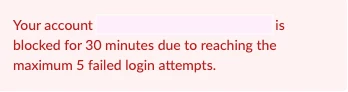
    If you are the owner or admin of the account and have no one to have your account unlocked, you will need to wait 30minutes and it will be unblocked then at that point you can perform a forgot password. 
     

    Please don't forget to hit like and accept the solution/ response provided if this answers/ resolves your question.


    Thank you and stay safe!

    2 replies

    Peter_Uy
    Community Champion | Employee
    Peter_UyAnswer
    Community Champion | Employee
    December 1, 2021

    Hello @Milena6 ,


    I hope all is well with you!


    Here's what you can do to unlock your Zoom Account:


    Changing a user's password

    Overview

    The account owner or admin can change an account member's password through User Management.

    If a user has entered an incorrect password too many times, their account may be locked. You can also unlock it for them on the Zoom web portal.

    Note: You cannot change the password for the account owner, account admins, or Zoom Rooms. They will need to reset their own password.

    This article covers:

    Prerequisites

    • Account owner or admin privileges

    Changing a user's password

    To change a user's password:

    1. Sign in to the Zoom web portal as an admin with the privilege to edit account settings.
    2. In the navigation panel, click User Management then Users.
    3. Click the email address of the user who needs their password changed.
    4. Find the Sign-in Password section, then click Edit
    5. Enter the new password twice, ensuring that it meets the password requirements.
    6. Click Save Changes.
      You will be notified that changing the password will sign you out of all devices. Click OK to confirm.

    Unlocking a user's account

    To unlock a user's account:

    1. Sign in to the Zoom web portal as an admin with the privilege to edit groups.
    2. In the navigation panel, click User Management then Users.
    3. Click Unlock next to the email address of the user who has locked their account.
      Their account will now be unlocked and you can change their password or they can reset their password at Zoom's Forgot your password? page.
    If you are the owner or admin of the account and have no one to have your account unlocked, you will need to wait 30minutes and it will be unblocked then at that point you can perform a forgot password. 


    Please don't forget to hit like and accept the solution/ response provided if this answers/ resolves your question.


    Thank you and stay safe!

    Partner
    January 9, 2023

    no


    Partner
    January 9, 2023

    how do i unlock my zoom camera