

unable to use the meeting scheduler link | Community
Skip to main content
Newcomer
August 4, 2024
Question

unable to use the meeting scheduler link

  • August 4, 2024
  • 7 replies
  • 120 views

I use a link with my clients to book meetings but recently shows them this message "This booking link has expired, Try refreshing your page, or ask the organizer to send a new link." I dont want to change the link i printed its QR code on my business card! What to do?
7 replies

Newcomer
November 24, 2024

I have the same problem and was hoping to find a solution.

Explorer
September 29, 2025

Same issue - any solutions?

New Member
May 7, 2026

Tried EVERYTHING to resolve this, and nothing works. At a loss. 

aluyun
Community Manager
Community Manager
May 7, 2026

Hi Community Members,

I’m sorry for the late response and for the inconvenience.

If you are getting the “This booking link has expired” message typically happens when the link you shared was tied to a one-time/custom schedule that expires after its available time slot(s) pass. Zoom Scheduler links like that can’t be renewed or reactivated once they expire. 


What you can do going forward (so it won’t expire again)

  • Create a reusable/recurring booking page (instead of a one-time/custom link). A recurring booking page stays active as long as the booking page itself is active. 

Create a new (reusable) booking page and get a new link

  1. Open Zoom Scheduler.
  2. Click Create booking pages.
  3. Choose the schedule type, enter the details, then click Finish.
  4. Copy/share the new booking link that’s generated. 

Important note about your printed QR code

  • Since the old URL can’t be kept after expiration, you’ll need to update the QR code to point to the new booking page link. 


I hope this helps with your query.

New Member
May 7, 2026

This doesn’t help as I have tried to create a whole new booking page and still getting same error


New Member
May 8, 2026

Still having same problem


Employee
May 26, 2026

@Ali Reid could u check my comment here? 

Employee
May 26, 2026

 "This booking link has expired, “
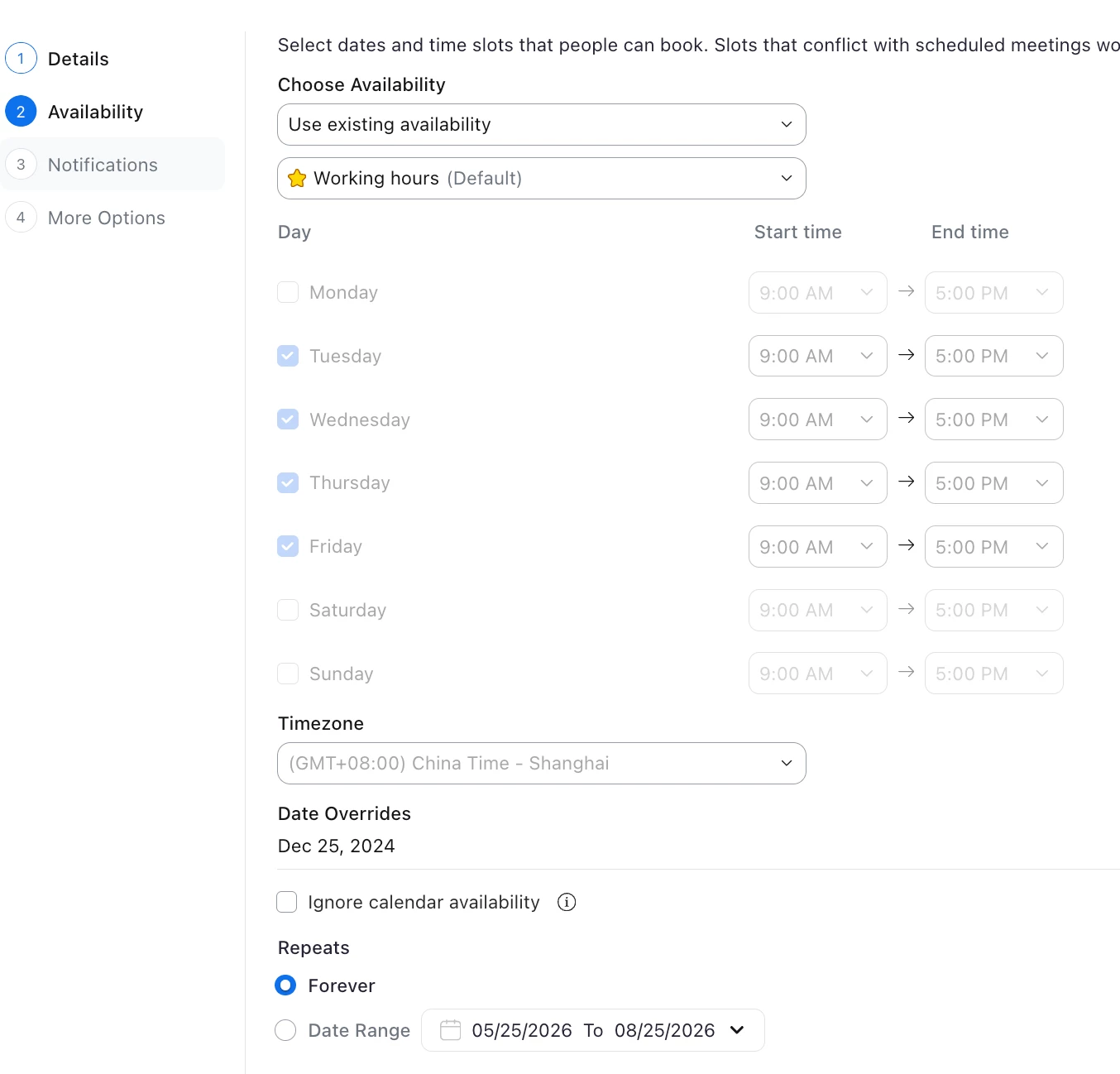
every booking link has a time range, plz edit your booking link to “Forever” or extend “end” time


Employee
May 26, 2026

@Ali Reid