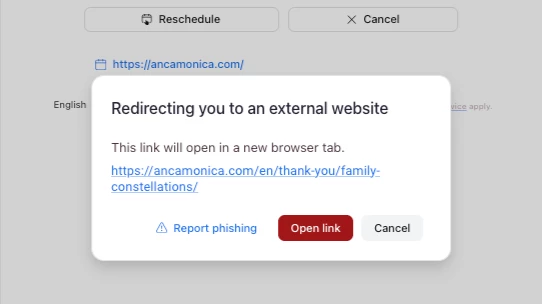
Redirect warning in Zoom Scheduler thank you page
Zoom Scheduler booking redirect shows external-site phishing warning pop-up; user wants ability to whitelist verified domains for seamless redirect to custom Thank You page.
Hi Zoom Team,
I am writing to share feedback regarding the redirect process in Zoom Scheduler.
Currently, when a user completes a booking, they are interrupted by a pop-up window warning them about being redirected to an external website.
This window includes a "Report phishing" button and a security warning that forces users to manually click "Open link" to reach my custom "Thank You" page. This creates unnecessary friction in the booking process for two main reasons:
- User Confusion: Clients are often unsure if the redirect is safe or if they have encountered a security issue, given the "Report phishing" terminology.
- Loss of Data: Many users hesitate to click "Open link," causing them to close the tab before reaching my custom confirmation page, which contains essential instructions for their sessions. I have already verified my domain, and I would love to see an option that allows account owners to "whitelist" their own domains.
Allowing a seamless, automatic redirect to a verified website would significantly improve the user experience and ensure that clients receive the necessary follow-up information. Thank you for your time and for considering this improvement to the platform.
Best regards,