Cannot approve registered guests | Community
Skip to main content
Newcomer
October 20, 2021
Solved

Cannot approve registered guests

  • October 20, 2021
  • 1 reply
  • 1 view

Hi, 


I created a zoom that guests would need to register for. I have had several emails come through showing that folks have registered, but when I go to the meeting to approve, they are not showing for me to approve. Any suggestions?

    Best answer by Rupert

    Hi @jewellynnw13 


    Are you seeing your registrants at all when you go to your meeting details?


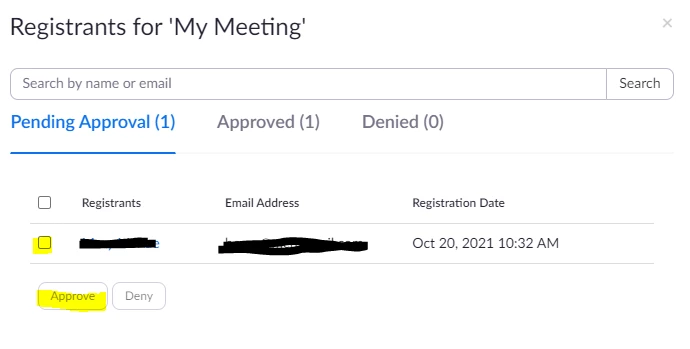
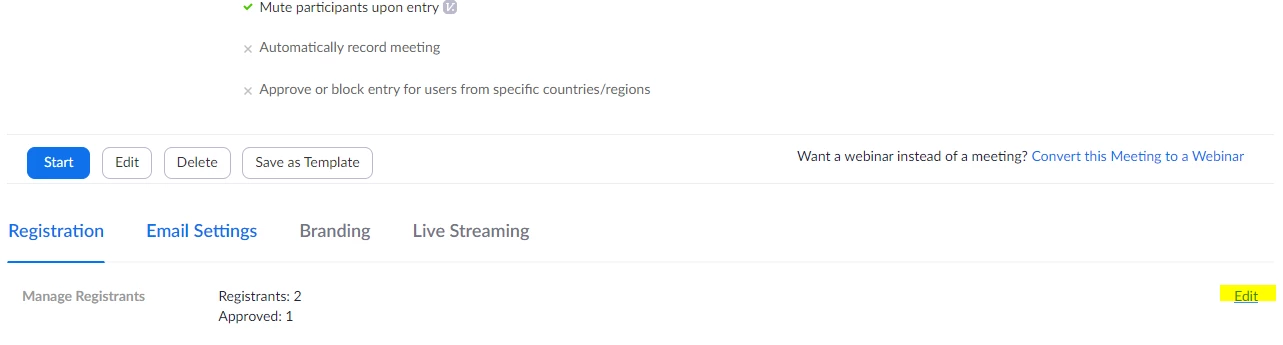
    You should be going to "Edit" to the right of "Manage Registrants" under "Registration" in your meeting. There you should be able to select registrants one-by-one or All with the check-boxes and click Approve (or Deny). See screen shots below.


    Does this help?


    1 reply

    Rupert
    Community Champion | Customer
    RupertAnswer
    Community Champion | Customer
    October 20, 2021

    Hi @jewellynnw13 


    Are you seeing your registrants at all when you go to your meeting details?


    You should be going to "Edit" to the right of "Manage Registrants" under "Registration" in your meeting. There you should be able to select registrants one-by-one or All with the check-boxes and click Approve (or Deny). See screen shots below.


    Does this help?


    Newcomer
    October 20, 2021

    Hey Rupert!


    That's what I typically do, but I think there is something with my computer? I logged into my account on another machine, and was able to approve. Thank you for your help!