SMS, Brand, and Campaign Ontario question
Hello Zoom,
I have been using Zoom as a secondary business number on my cell phone. I received an email saying that I will have to register a brand, and then campaigns to text with in Ontario/Canada. See below.
Dear Valued Customer-
We are reaching out to inform you of upcoming changes to SMS. US and Canada wireless carriers have changed their policies on SMS/MMS messages that originate outside of their mobile networks from SMS/MMS applications like Zoom. Wireless carriers now require Zoom customers to specify how they are using SMS and MMS via campaign registration. Starting February 1st, 2023 all customer phone numbers that are sending SMS and MMS are required to be associated with a “campaign” in a new Campaign Registry database. Wireless carriers may block the delivery of text messages to their mobile number ranges if the sender’s phone number is not associated with a valid campaign.
To ensure delivery of your SMS/MMS messages, please create and submit your Campaign information from the Zoom Web Admin portal using the following instructions. Below are links to get your business registered as a Brand and create your campaign.
- Follow these instructions to create your brand and campaign. While creating your brand and campaigns, you will be required to answer some questions regarding the nature of SMS/MMS that will be sent from your account.
- Once you have created your brand and campaign, please assign your Zoom Phone numbers to campaigns.
- A maximum of 49 numbers are allowed per campaign by default. If you wish to assign more than 49 numbers to a campaign, please follow the instructions provided here.
I want new customers to be able to text to into me. Will I still be able to do this with my business and customers? Point 3 saying a max of 49 numbers are allowed per campaign is the confusing part to me. Does that mean I can only text out, or have numbers text into my Zoom business number if I have previously added them to a campaign list? I hope it means, that I add my Zoom Business numbers to the list, so if I had a few business numbers I could add them all to the list, and then text like normal in and out, to new customers. Can some one clarify?
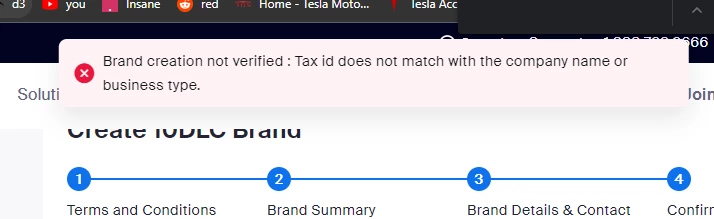
I started the process to register my brand and I am getting an error. See snippet below. I entered all of my information correctly but I am getting a Tax ID does not match error. What am I doing wrong or what Document should I be referencing from CRA or Canada.ca.