Call routing issue - how to | Community
Skip to main content
Newcomer
May 12, 2023
Solved

Call routing issue - how to

  • May 12, 2023
  • 3 replies
  • 3 views

Hi, I'm trying to set up some call routing but am struggling to find the perfect option to suit our needs.


We are a small single location office with 6 users.

2x admin team

2x production

2x other team members


We are wanting incoming calls to:

- ring on the 2x admin phones in the first instance, IF not picked up in X second

- ring on both the 2x admin phones & 3x production phones


We would also like the 2x other team members to be able to pick up the queue if they can hear it ring. We can see the call pick up codes - however it appears they need to be part of the call queue to make this work.


What's the best setup to achieve this?

    Best answer by Eliot

    hi sjf,


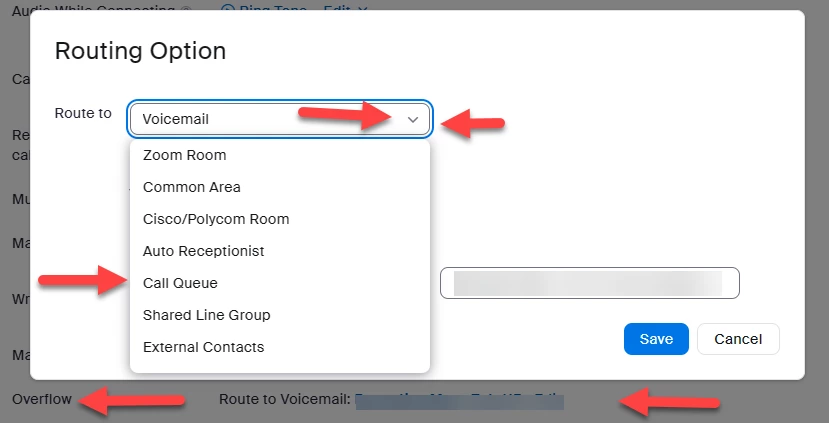
    i do not think there are regional differences for call queue overflow routing options.  i think what you need to do is to scroll down to see all the options.  try clicking on the down arrow on the right side of the route to box. 


    thanks,


    eliot

    3 replies

    FORE-Craig
    Specialist
    Specialist
    May 12, 2023

    Hi @SJF 


    I believe that the following should cover what you want:


    Set up a Call Queue called  Admin Call Queue for the two admin personnel.

    Set up a Call Queue called Admin + Production Call Queue for those five members.

    Set up a Group Call Pickup called Everyone for all phone users. Turn on Directed Call Pickup.


    On the Admin Call Queue:

    • Set Greeting Prompt to "Disable"
    • Set Call Distribution  to "Simultaneous".
    • Set Max Wait Time to however long you wish just those to phones to ring before additionally ringing the other phones.
    • Set Overflow to "Route to Call Queue" + "Admin + Production Call Queue"

    On the Admin + Production Call Queue:

    • Set Greeting Prompt to "Disable"
    • Set Call Distribution  to "Simultaneous".
    • Set Max Wait Time to however long you wish just those to phones to ring before going to Voicemail.
    • Set Overflow to "Voicemailof the Call Queue itself. and give access to all of the members.

    Set up your Main Auto Receptionist with your main company telephone number:

    • Set Greeting Prompt to "Disable"
    • Set Route to to "Call Queue" + "Admin Call Queue".

    Naturally, you'll need to configure all of the Business Hours, Closed Hours, Holidays etc. 


    I hope that helps!


    SJFAuthor
    Newcomer
    May 12, 2023

    Hey Craig, 

    Thanks for the response. 

    Where does the Group Call Pickup suggested come in to play? It doesn't appear I can add that extension to the queue.


    Also - My call queues don't have the option to overflow to another call queue, nor can I route the auto-receptionist to multiple queues.


    I'm an Australian customer of Zoom - perhaps there are some regional differences with features. 

    FORE-Craig
    Specialist
    Specialist
    May 12, 2023

    Hi SJF,


    The Group Call Pickup is to pickup any ringing phone for the other team members. It has nothing to do with the Call Queues. You add all of the extensions and users to it.


    You cannot route the Auto Receptionist to more than one Queue. My suggestion is to chain Call Queues from Admin to Admin + Production (That is how I suggest naming it, you cannot send to two queues at once). You may need to scroll UP in the pick-list to find the Call Queue option in Overflow.


    I hope that helps!


    Community Super Champion | Partner
    May 12, 2023

    may also consider using call queue pickup code for calls in the admin + production call queue.

    Setting up and using the call queue pickup code – Zoom Support


    thanks,  eliot

    SJFAuthor
    Newcomer
    May 12, 2023

    Hi Eliot,

    Thanks - this was the result we were hoping to achieve when we first started on Zoom phone. (It's simple and achieve what we need) 


    Issue is even though we are all at the one single location the pickup codes don't work for team members who aren't members of the queue.  (even though the article mentions it should) 


    In my mind the perfect set up would have been to have 'Simultaneous & Sequential Distribution' (a feature that doesn't exist) to

    - Admin 1 & Admin 2 DELAY

    - Admin 1, Admin 2 & Production 1, Production 2 DELAY

    - ALL


    This would then let any user pick it up as we are all in the queue. However as we can only pick between either sequential OR simultaneous it doesn't seem to work.


    Any ideas?

    FORE-Craig
    Specialist
    Specialist
    May 12, 2023

    You cannot set a mixed Call Distribution method. 😞 

    EliotAnswer
    Community Super Champion | Partner
    May 12, 2023

    hi sjf,


    i do not think there are regional differences for call queue overflow routing options.  i think what you need to do is to scroll down to see all the options.  try clicking on the down arrow on the right side of the route to box. 


    thanks,


    eliot

    SJFAuthor
    Newcomer
    May 12, 2023

    omg - I can't believe I missed that. I've tried this on multiple devices, didn't see the scroll bar and didn't think of using the keyboard to see the options.  I can't believe I missed something so basic - thanks again! 

    I'll raise a ticket for the pickup code issue as that's the preferred option, but at least now I can cascade from one queue to another

    Community Super Champion | Partner
    May 12, 2023

    hi sjf,


    glad it works.  not always ovious. 


    my personal opinion is that zoom phone with over 5 million users  has almost every feature that anyone could ask for.  i am constantly amazed by the great ideas i see in the Zoom Community to utilize Zoom for unique business needs.


    thanks,  eliot