Why can my clients can no longer join meeting via browser | Community
Skip to main content
Newcomer
February 19, 2024
Solved

Why can my clients can no longer join meeting via browser

  • February 19, 2024
  • 1 reply
  • 9 views

I'm a therapist and have been using Zoom for years. Now when I send my clients an invitation link, they can no longer join via browser, they get an error and have to download Zoom. They don't all want to download the app and this could cost me business.


I haven't changed any settings - Does anyone know what's up? TIA

Best answer by storyhub


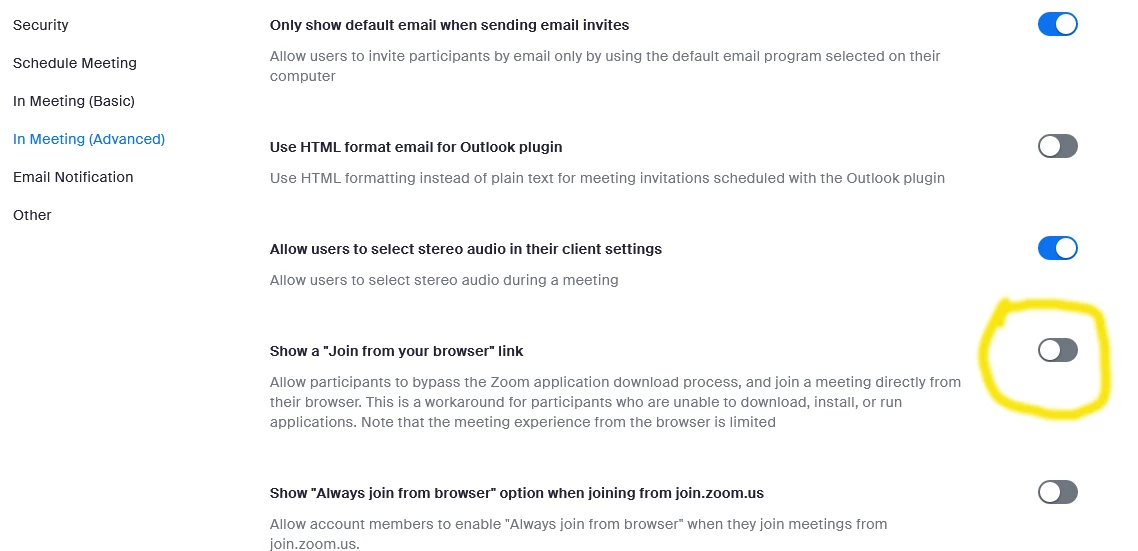
Be sure the Show a Join from your browser link is ON.

Those joining can click Cancel in the pop-up window, then click the Join from Your Browser link if you do not want to download Zoom before joining the meeting.
Note: You are not required to download Zoom on a desktop device before joining, but you will have access to limited functionality if you join from your browser. If you want to join a meeting from an Android or iOS device, you must download the Zoom mobile app.

1 reply

storyhub
Community Super Champion | Customer
storyhubAnswer
Community Super Champion | Customer
February 19, 2024


Be sure the Show a Join from your browser link is ON.

Those joining can click Cancel in the pop-up window, then click the Join from Your Browser link if you do not want to download Zoom before joining the meeting.
Note: You are not required to download Zoom on a desktop device before joining, but you will have access to limited functionality if you join from your browser. If you want to join a meeting from an Android or iOS device, you must download the Zoom mobile app.

mrklunkAuthor
Newcomer
February 25, 2024

Thanks for this. I didn't chang that setting but for some reason it was off, I have now put it on again. This has put me off Zoom now though, as well as their increase price to renew so next week I'll be trying Google Meet. My sessions are all one to one and I don't need a group option so it's free. Best wishes, Gary