

who was in a meeting | Community
Skip to main content
Newcomer
February 18, 2022
Solved

who was in a meeting

  • February 18, 2022
  • 3 replies
  • 0 views

I can not find any feature how to find out who was in a meeting on specific date, although I get emails like "person entered waiting room" but as to my understanding not all participants are registered and acknowledged this way... As far as I noticed if someone knows my room id and I allow that person to enter meeting without first sending him/her invitation, zoom does not register such participation. If I want to review with whom i had meetings within last month I do not have any register list within zoom.. i must track it myself which leads to some problem when you do have many meetings.. is there any feature in zoom where you could track all participants names and dates of meetings?

    Best answer by Bort

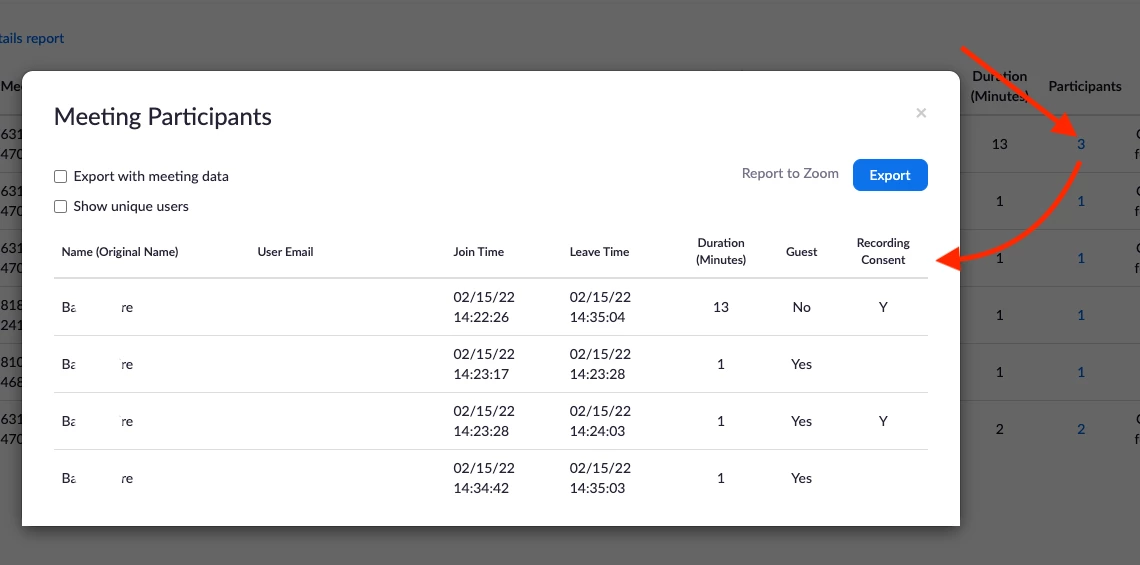
    Please make sure that you check the Reports > Usage Reports > Active Host (may be Usage instead). (Here is a direct link) That page should allow you to narrow the search range to find the meeting, then the number under the Participants column should be clickable and show you more info about exactly who joined, exactly when they joined, and when they left the session. 


    Hope that helps and please make sure to mark the solution as accepted if this information is what you needed.

    3 replies

    Bort
    Employee
    Employee
    February 18, 2022

    Zoom does provide reporting on meetings you've hosted, but this is only available for paid accounts and Zoom does not track meetings which had only 1 participant in these reports. You can find out more here: https://support.zoom.us/hc/en-us/articles/201363213-Getting-started-with-Zoom-reporting


    Hope that helps and please make sure to mark the solution as accepted if this information is what you needed.

    mathworldAuthor
    Newcomer
    February 18, 2022

    Thank you Bort for your answer. My account is paid one and there are many meetings with more than one participant, unfortunately none of your mentioned reports where unable to show participants, just the number of them within some time frame.. so it seems if it is needed to recover whether some person participated in some meeting you should have been recording participant list manually .. as in my case its crucial feature I will be forced to look for another software, its a pity though..

    Bort
    Employee
    BortAnswer
    Employee
    February 18, 2022

    Please make sure that you check the Reports > Usage Reports > Active Host (may be Usage instead). (Here is a direct link) That page should allow you to narrow the search range to find the meeting, then the number under the Participants column should be clickable and show you more info about exactly who joined, exactly when they joined, and when they left the session. 


    Hope that helps and please make sure to mark the solution as accepted if this information is what you needed.

    mathworldAuthor
    Newcomer
    February 18, 2022

    Sincere thanks, Bort. Real big headache-problem solved..