
Using active directory for group creation | Community
Skip to main content
sywalker
Newcomer
Newcomer
January 4, 2022
Solved

Using active directory for group creation

  • January 4, 2022
  • 3 replies
  • 11 views

We are new to Zoom and we're looking to use Active Directory groups to manage groups in Zoom. For an example, we have a group in AD which we've called "Zoom w/ Recording".  We'd like to be able to use this group in ZOOM so we can simply manage recording rights by adding and removing users from the AD group.  

    Best answer by townsendwc

    @sywalker 
    Good day.  I assume you are doing SSO with AD/ADFS.  Did you follow this support article for the basic configuration?
    https://support.zoom.us/hc/en-us/articles/202374287-Configure-Zoom-With-ADFS
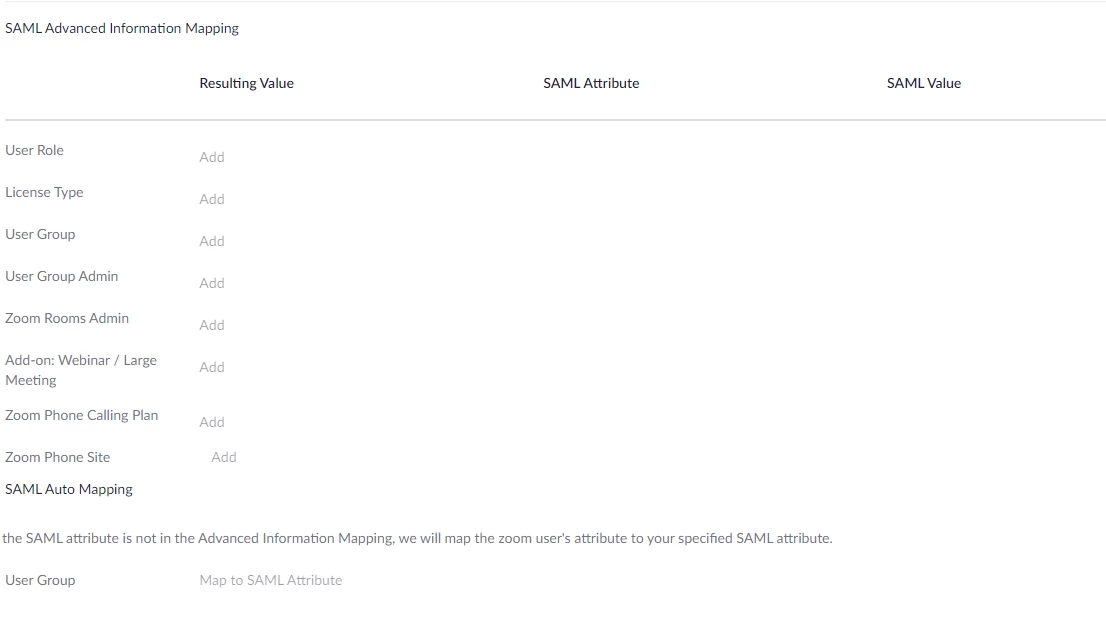
    To answer your specific question, you will want to use the SAML Advanced Information Mapping to define the group.  You will then have a matching group to assign the license.

    To ensure that the group is being sent and matched properly, you will likely need to review the SAML Response Logs.
    https://support.zoom.us/hc/en-us/articles/360036466191-Accessing-SAML-Response-Logs

    Bill

    3 replies

    Employee
    January 4, 2022

    Hi sywalker,


    The easiest way would be to create a group in Zoom that has manage recording rights, then using SSO to update those users groups.


    https://support.zoom.us/hc/en-us/articles/201363023-SSO-with-Active-Directory

    https://support.zoom.us/hc/en-us/articles/115005081403 


    Make sure you have the group created, then in the Advanced SAML mapping options you can set the SAML attribute for your group, then the value will be the name of the group in AD.


    Once users log in they'll be assigned to the group, and if you remove them from the AD group, that will be synced the next time that user logs in (which they have to do to manage recordings). 🙂 


    Hopefully this help!

    Dan_ZoomSE
    Employee
    Employee
    January 4, 2022

    Good Morning @sywalker,


    First you need to create the Group in Zoom and configure the proper settings for that group.  Then you can add a SAML mapping to your SSO configuration to automatically add users to this Zoom Group based upon their membership in the AD Group.


    Please see the following support document regarding setting up Advanced SAML Mappings:

    https://support.zoom.us/hc/en-us/articles/115005081403-Setting-up-advanced-SAML-mapping


    If this has answered your question, please click the Accept as Solution button at the bottom of this message so that others in the Community may benefit from this as well.


    Thanks!

    sywalker
    Newcomer
    sywalkerAuthor
    Newcomer
    January 6, 2022

    Thank you @Dan_ZoomSE !  

    townsendwc
    Community Champion | Employee
    Community Champion | Employee
    January 4, 2022

    @sywalker 
    Good day.  I assume you are doing SSO with AD/ADFS.  Did you follow this support article for the basic configuration?
    https://support.zoom.us/hc/en-us/articles/202374287-Configure-Zoom-With-ADFS
    To answer your specific question, you will want to use the SAML Advanced Information Mapping to define the group.  You will then have a matching group to assign the license.

    To ensure that the group is being sent and matched properly, you will likely need to review the SAML Response Logs.
    https://support.zoom.us/hc/en-us/articles/360036466191-Accessing-SAML-Response-Logs

    Bill