

Updating time range | Community
Skip to main content
Explorer
September 1, 2024
Solved

Updating time range
  • September 1, 2024
  • 12 replies
  • 51 views

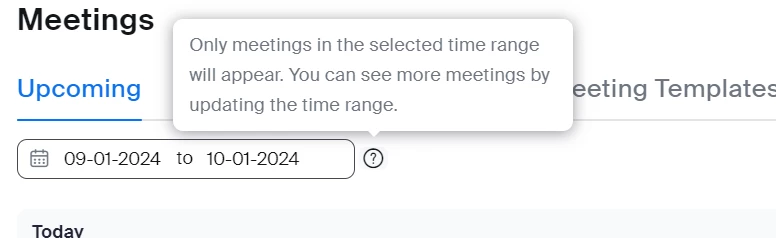
It says only meetings in the selected time range will appear. You can see more meetings by updating the time range.
I can find absolutely no way of updating this. And I can see no tuition on how to do it.
Can somebody tell me how to do this?
I found it much easier when we could just see all of our booked-in meetings.
I don't know why this has changed.
If you can help me that would be great and many thanks.

Best answer by lotusmoon

I have found it.
Click on the calendar emblem.
It will pull up 2 months click on a date in the first month and then click on the same date in the 2nd month.
For example 4th of October to 4th of November.
It will pull up the meetings between those 2 dates.
It would really help if zoom actually answered questions.

12 replies

Newcomer
September 3, 2024

I have the same question. I cannot figure out how to change the time range so I can view ALL of our future Zoom meetings. (I consider myself computer literate and I cannot figure this out). Thanks for any help. 


lotusmoonAuthor
Explorer
September 3, 2024

Is it possible to talk to Zoom in any way I used to be able to open a ticket?

Other people must also be pissed that it is not possible to see more than one month's meetings.

Newcomer
September 10, 2024

You have to have Pro Plan or higher to open a ticket.  Go to Resources, Customer Support, Contact Zoom Support, My Requests, Submit a Request.  I did submit a ticket and after several weeks they changed it from being able to view 1 month to now being able to view 3 months, but I need to see ALL of my meetings.  Please everyone submit a ticket if you can so they will fix this.

Newcomer
September 4, 2024

This message is for Zoom.  The change to viewing meetings in a calendar range that you must select each time is extremely inefficient. Please go back to the old process where you can see all the meetings in date sequence.  This is a perfect example of fixing something that isn't broken.

Newcomer
September 5, 2024

I cannot figure it out either. Hey Zoom why fix something that doesn't need fixing?

MGSR
Community Manager
Community Manager
September 10, 2024

Hello there,


I'm sorry for the late response.


The filter range for meetings has now been extended to 90 days. Previously, it was set to 30 days due to recent improvements we made to enhance synchronization with third-party calendars like Outlook and Google. The temporary adjustment to 30 days was necessary to ensure these updates worked smoothly.


We appreciate your patience and understanding with this.

Newcomer
September 16, 2024

As you can see, there is NO ONE that appreciated this "feature"-it limits our view and does not create a convenience for anyone. Thank you for at least changing this to 90 days, but the calendar should really allow us to go as far as we want to, even a year out. As someone else stated-why fix something that isn't broken? I, like most people on Zoom, would like to see all of my scheduled meetings listed. The calendar function would be great (for some people), as long as the span of time is unlimited. 

Newcomer
January 22, 2025

You're right. The group I'm with plans yearly in advance. Only being able to see meetings arranged 90 days in advance is really not helpful, especially if I suddenly need to change the details of a meeting 4 months hence. It risks duplication of meeting set ups, and could result in a lot of confusion as to which is the correct one.

Newcomer
September 10, 2024

They changed it from only seeing 1 month to now being able to see 3 months, but we need to see ALL of our meetings! This is crazy that we cannot see them all.  Please everyone continue to complain so they will fix this how it was before.

Newcomer
September 16, 2024

100%-it is ridicuolus! It feels like someone needed to do something to justify their salary and made this silly "feature" that is helpful to no one. I have sent in several comments/complaints and will continue to until they change the calendars to allow us unlimited time frame, as we had before. 

Newcomer
September 30, 2024

To create a ticket:

Scroll to the bottom of the screen where you see the big black box and click on Contact Us. Then go to Technical Support. Then Contact Zoom Support, then Submit a ticket.  You have to hunt around on each page to find these options. They don't make it easy!

Newcomer
September 30, 2024

Also see other response above for another way to get to  the Submit a Ticket screen.

Newcomer
March 12, 2025

I am here again to comment on this idiotic "update" that was done. I can 100% guarantee that NO ONE requested this change. This had to be someone trying to justify their salary. I had to look at my scheduled meetings for the entire year, so had to enter the date parameters each time, because once you open a meeting, the search dates go back to 90 days from today. I cannot tell you how aggravating it was!!! You know that Microsoft teams is free, right?! I feel that there is not a SINGLE USER that likes this feature. It needs to be changed back, even if there is an OPTION to search a certain time frame. 

Newcomer
June 10, 2025

I cannot agree with you more!  I just set up duplicate meetings for October because I thought I forgot to hit save the first time I set it up.  Arrrggghhhh!  Now I realize there has been this STUPID change of only being able to see 3 months in advance.  If it wasn't for my Board members preferring Zoom, I'd switch entirely to Teams.

Newcomer
March 14, 2025

It is not a "feature". It improves nothing for anyone. They already limited the number of visible meetings by defaulting to only showing your upcoming 15 meetings and you would need to navigate pages or increase the number of meetings visible per page. I actually manage 9 Zoom accounts and I give scheduling privileges to one account (which is the one I use to schedule them all), so I always have dozens of meetings and I have always been able to see them in a single space, but this is crazy. The claendar tool has no value and it's totally unintuitive with how to use it and why, why, why, arbitrarily limit users to only looking at 90 day period. Why not allow them to expand that range to......whatever suits their needs. I often need to create recurring meetings throughout a year and often have to modify the specific dates/times of individual meeting and looking at details in this page is the best way for me to do that. Arghh....

lotusmoonAuthor
Explorer
August 15, 2025

It seems that even after all of these comments, Zoom still cannot put it right if someone knows a way of contacting zoom please do so.

Here's another video where I show how Zoom calendar is a pile of —-

https://rumble.com/v6xm6hg-how-to-use-the-zoom-calendar-why-its-a-pain-to-use-and-why-it-should-be-cha.html

Newcomer
September 26, 2025

I am responsible for scheduling monthly Zoom meetings for the year for a large condo.  This new system DOES NOT WORK.  Zoom must be responsive to its customers or they will lose them.  Please make it possible to view meetings 12 month out at minimum.