

No camera option available in video settings | Community
Skip to main content
Newcomer
March 30, 2023
Question

No camera option available in video settings

  • March 30, 2023
  • 8 replies
  • 1 view

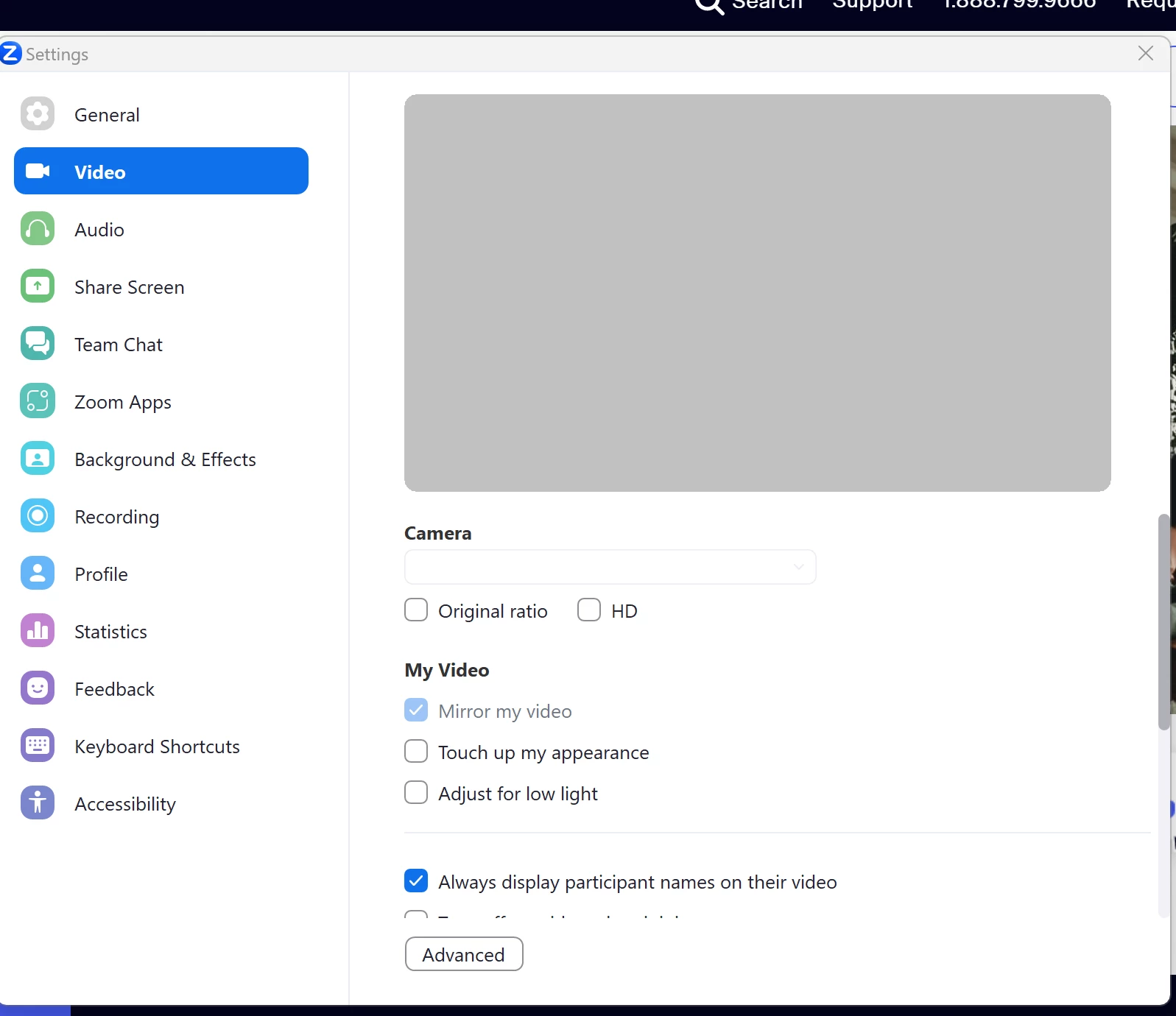
Zoom is unable to detect my camera. I have tried every recommendation that I can find on the internet. My desktop internal HP camera works fine with other applications. The problem is with Zoom. When I try to troubleshoot the problem on Zoom settings, under video, the option for camera (on the right) is blank. Why is it blank, and how can I get Zoom to recognize my computer's camera? Please see screenshot below.
    8 replies

    Newcomer
    April 6, 2023

    I'm new to asking for help from this community and haven't figured out how receive it.  I'm also have a situation with Zoom message stating No Camera Found!  I've tried the trouble shooting suggestions without success. Please advise next steps.

    Newcomer
    June 25, 2023

    Were you ever able to resolve this?  Randomly, I am experiencing the same thing.  Never had a camera issue, then it just stopped working.  Camera working with other apps, but not Zoom.  Cannot access the dropdown menu as you have displayed here.  Wondering if this could be the difference?  Thanks.

    Newcomer
    June 25, 2023

    Hi, I´m experiencinhg the same situation with my mac mini when I try to use Iphone as camera, other apps working


    tamallen1Author
    Newcomer
    June 26, 2023

    Hi. The problem is with Zoom, although they deny it. Their update in February was not compatible with my HP computer. I spent hours on the phone with HP, Microsoft, and Zoom. I finally got an email from someone in the Zoom community. I followed her directions and have no problems now. I hope this helps. This is what she wrote:


    Hello,

    Sorry for the delay.

    You can find the older installer directly on Zoom website (see bellow):


    Mac:

    https://zoom.us/client/5.12.9.13190/Zoom.pkg


    Windows 64-bit:

    https://cdn.zoom.us/prod/5.12.9.10650/ZoomInstaller.exe?archType=x64


    Windows 32-bit:

    https://cdn.zoom.us/prod/5.12.9.10650/ZoomInstaller.exe


    Uninstall your current version of Zoom


    Once installed, remember do not activate the automatic updates.


    Best regards,

    Newcomer
    November 6, 2023

    In case anyone stumbles upon this answer, this version no longer allows you to log in or join a meeting. Haven't found another solution yet.

    Newcomer
    February 15, 2024

    Hi. I had a Zoom meeting today. When I tried to join the meeting, I received a notification that I had to upgrade first. Since I had no other options, and it was time for the meeting to start, I hit the upgrade button. To my surprise, the camera is now working. If you haven't tried to upgrade yet, try it. It looks like Zoom may have finally figured it out.


    Thank you! This was really helpful and seems to have sorted the problem. Now if only Zoom could detect my microphone...

    CarlaA
    Community Manager
    Community Manager
    July 14, 2023

    Hi everyone!


    I apologize for any issues you're incurring when trying to connect your camera to Zoom. Before reverting to an older version of Zoom, please try the following troubleshooting steps outlined in this article: Zoom error message "Zoom is unable to detect a camera. Make sure your camera is powered on and connected to your computer."


    I hope this helps!

    Carla,
    Zoom Community Team

    tamallen1Author
    Newcomer
    July 15, 2023

    Carla, I don't think any of us would be here wasting our time if we hadn't tried everything that we have found on the internet, including your tips above. The only thing that has worked for me is switching to a previous version of Zoom. I think that's unacceptable, since I'm paying for a business account. However my business must continue to operate, so I do what I have to do. Zoom doesn't seem to be interested in solving this problem.

    Newcomer
    January 12, 2024

    I am not having the same problem. My external camera , nor my Mac camera shows up in the Video settings part of the Zoom. Of thousands of meetings I've had via zoom over the years, my cameras have always worked. I've tried sooooo many things to no avail. I am frustrated and have no idea what to do now. Help!!!

    Newcomer
    January 12, 2024

    correction:  I AM having the same problem


    Newcomer
    January 23, 2024

    Same problem, Zoom is trying to use an old USB camera that I have not connected to this computer in years. Why doesn't my laptop camera show up in the dropdown list? I have given permission in laptop settings although ZOOM doesn't show up in the list of apps.