

New Speaking language notification popup for better transcription-turn off? | Community
Skip to main content
Newcomer
April 24, 2024
Question

New Speaking language notification popup for better transcription-turn off?
  • April 24, 2024
  • 3 replies
  • 0 views

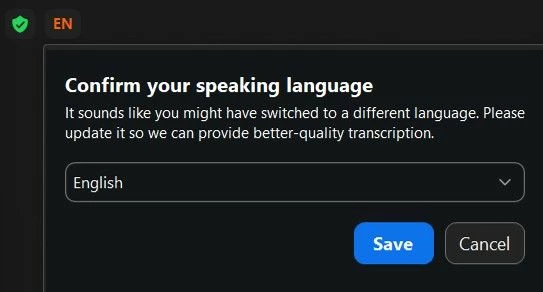
Since the last update (not sure when, likely in April?), some participants see a popup message on their Zoom in the top left corner during a live meeting that says "Confirm your speaking langauge" "It sounds like you migh have switched to a different langauge. Please update it so we can provide better-quality transcription".  (See attached).  Something seems to correctly be picking up when they switch from English to another language.  It does not seem to happen all the time, or to every person who speaks another language.


We are running a learning activity where transcription, recording, etc. is not permitted, and no one has any of this turned on. This message is causing concern to participants. Is there a setting or some other way to prevent this message from appearing?

3 replies

Newcomer
May 6, 2024

I've also seen this dialog appear. Does anyone have further insight?

YaBoiB
Community Champion | Employee
September 20, 2024

Hello @K_____H1 @pinacate , 

 I am looking into this. There is a setting on the Zoom Desktop Client in accessibility that says " show all captions", is that by chance enabled on your accounts? 

Also, what version of the Zoom Desktop client are you both running? 


Newcomer
December 3, 2024

Hi. This issue persists in all our accounts and computers. Zoom please offer a solution for this disturbing and distracting Popup. Please update us on tyrol-reception@ sivananda.net. Thank You very much

K_____H1Author
Newcomer
October 30, 2024

Hi Brandon, The "always show captions" setting is not enabled on my account in Settings.  I am running the latest version 6.2.6 (49050) .  I came back to this post because the same message popped up for me again yesterday in a regular meeting when I started speaking in French after speaking in English for a while.  Thanks for your help! I am hoping this can be resolved for our participants for the upcoming learning activity session in February, it was very concerning and distracting to our participants.

YaBoiB
Community Champion | Employee
October 31, 2024

Hello, 


 So, as you can see in this screenshot, I am an admin for our Main Zoom account, but I am a read-only admin, which means that I can see the settings but I cannot change them. I do not think that this is a bug but I could be wrong. If it turns out to be a bug, we will need a support ticket and a ticket up to engineering with some data.