

Mtg reminder popups for calendar/zoom delegates - how to turn off? | Community
Skip to main content
Newcomer
October 13, 2022
Solved

Mtg reminder popups for calendar/zoom delegates - how to turn off?

  • October 13, 2022
  • 3 replies
  • 0 views

My EA schedules meetings for me as a delegate inside Zoom and Outlook. Now she gets popup reminders of my meetings as well as her own meetings. Is there a way to stop reminders to delegates? She wants to get her own reminders, just not for every person she schedules things for. Thanks.

    Best answer by ZoomVA

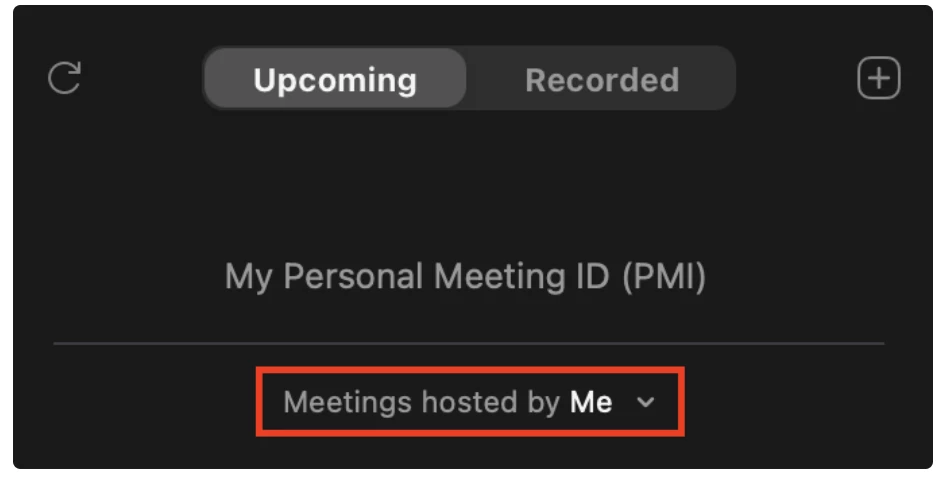
    Hi @arun_baheti and @tomsmith and welcome to the Zoom Community. To reduce the number of upcoming meeting reminder popup notifications being sent to folks with scheduling privileges, please ask them to open the Zoom Desktop Client and select Meetings > Click "Meetings hosted by" and select "Me"


    I hope this helps!

    3 replies

    Newcomer
    January 23, 2023

    Did you ever figure this out?  I have a user that is having the same issue.

    Newcomer
    January 23, 2023

    @tomsmith Nope, no answers from zoom or anyone else. It is a little frustrating for our EAs. I would think many others are in the same situation so surprised no answer yet

    ZoomVA
    Community Manager
    ZoomVAAnswer
    Community Manager
    January 23, 2023

    Hi @arun_baheti and @tomsmith and welcome to the Zoom Community. To reduce the number of upcoming meeting reminder popup notifications being sent to folks with scheduling privileges, please ask them to open the Zoom Desktop Client and select Meetings > Click "Meetings hosted by" and select "Me"


    I hope this helps!

    Newcomer
    January 26, 2023

    Looks like this worked -- simple too, I figured it had to be something simple. Thank you!