

How to quickly and easily organize gallery view layout? | Community
Skip to main content
Newcomer
June 11, 2025
Solved

How to quickly and easily organize gallery view layout?

  • June 11, 2025
  • 1 reply
  • 14 views

I often am in zoom meetings with 10-75 people.  When I am in the gallery view, I would like to easily and quickly organize the order of the video participants according to various options, such as:


1. Alphabetical organization by first name (A-Z)

2. Alphabetical organization by first name (Z-A)

3. As a sub-option, put all muted (either video OR audio) participants (in alphabetical order as requested in 1 or 2 above) either AFTER all the "regular" (audio and video on) participants OR put them in alphabetical order mixed in with the regular participants.


This new feature(s) would be very helpful to me and to many teachers who use zoom to lead group discussions!!
 

Best answer by Frank_TB

Hello,


The Zoom desktop meeting application already supports most of what you are asking for. 

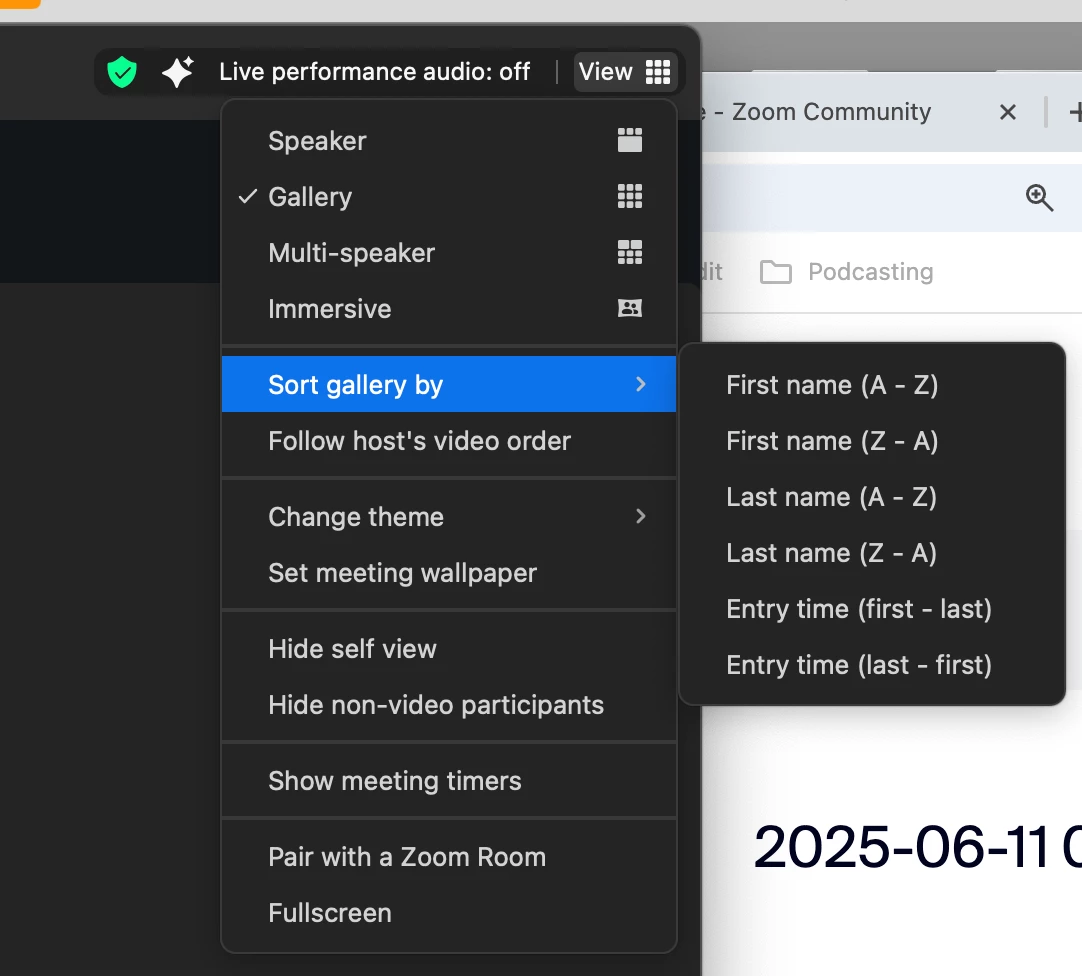
The Sort Gallery View option allows participants to sort their gallery view order during a meeting choosing from options including sorting by first name (ascending and descending), last name (ascending and descending), and meeting entry time (ascending and descending).


Note: Sorting gallery view order feature is only available with client version 5.14.0 or later.


It must be allowed at the account level by the owner or admin. It must also be allowed in your own account settings.


https://support.zoom.com/hc/en/article?id=zm_kb&sysparm_article=KB0058024 


Regards

If my reply helped, don't forget to click the accept as solution button!

1 reply

Frank_TBAnswer
Community Champion | Customer
June 11, 2025

Hello,


The Zoom desktop meeting application already supports most of what you are asking for. 

The Sort Gallery View option allows participants to sort their gallery view order during a meeting choosing from options including sorting by first name (ascending and descending), last name (ascending and descending), and meeting entry time (ascending and descending).


Note: Sorting gallery view order feature is only available with client version 5.14.0 or later.


It must be allowed at the account level by the owner or admin. It must also be allowed in your own account settings.


https://support.zoom.com/hc/en/article?id=zm_kb&sysparm_article=KB0058024 


Regards

If my reply helped, don't forget to click the accept as solution button!

Newcomer
June 11, 2025

I was pretty sure that Zoom already had this capability.  I just needed somebody to tell me where/how to find it!    As usual with Zoom, this option/feature is somewhat "hidden"  deep inside the overwhelming number of meeting options that allow you to customize your meatings.  Has Zoom become as unwieldly as WORD????