Enable Meeting Room | Community
Skip to main content
Newcomer
January 31, 2022
Solved

Enable Meeting Room

  • January 31, 2022
  • 3 replies
  • 5 views

In the web portal settings under security, I've enabled my waiting room. However, whenever I click "New Meeting", I still have to manually click on "Enable Meeting Room"  for it to work.  Any thoughts? 

    Best answer by Dan_ZoomSE

    @Alex_PFT @chawk1975 ,


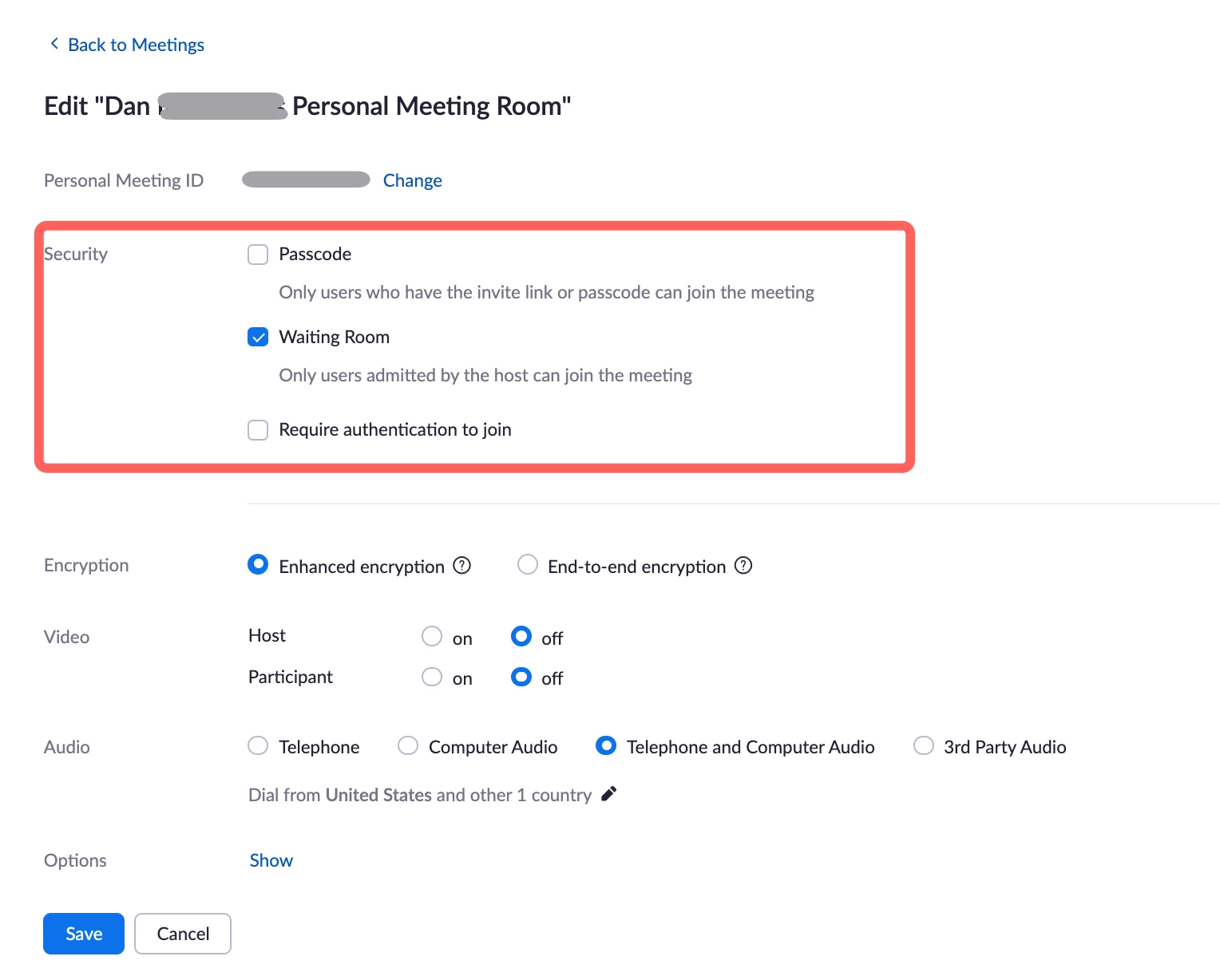
    @Alex_PFT makes a good point..  good catch..  if you are using your Personal Meeting ID (PMI) instead of a dynamically generated meeting ID, then the meeting settings for PMI are configured in a different location.


    In the portal go to Meetings on left navigation and then Personal Room across the top middle.  Here you can change settings specific to PMI meetings.


    If this has answered your question, please click the Accept as Solution button below so that others in the Community may benefit as well.

    Thanks!

    3 replies

    Dan_ZoomSE
    Employee
    Employee
    January 31, 2022

    Hello @chawk1975 


    After making changes in the web portal, if you are not seeing them take affect in your meeting client please dig out of the Zoom application and then sign back in.  Make sure you are using the same user account as the one you were signed into the portal with.


    If this has answered your question, please click the Accept as Solution button below so that others in the Community may benefit as well.

    Thanks!

    chawk1975Author
    Newcomer
    January 31, 2022

    Thanks so much for the quick reply. I've signed in and out - and I only have one account. 


    I've added a couple of screen shots so you can see the discrepancy between what's enabled on the web portal and the Zoom meeting app. 


    Thanks again!

    Alex_PFT
    Partner
    Partner
    January 31, 2022

    I'm guessing you are using your personal meeting ID. The waiting room won't be enable by default there. 

    The settings you are showing are for regular meetings.


    from the support page:

    Dan_ZoomSE
    Employee
    Employee
    January 31, 2022

    @Alex_PFT @chawk1975 ,


    @Alex_PFT makes a good point..  good catch..  if you are using your Personal Meeting ID (PMI) instead of a dynamically generated meeting ID, then the meeting settings for PMI are configured in a different location.


    In the portal go to Meetings on left navigation and then Personal Room across the top middle.  Here you can change settings specific to PMI meetings.


    If this has answered your question, please click the Accept as Solution button below so that others in the Community may benefit as well.

    Thanks!