email invitations | Community
Skip to main content
Newcomer
October 3, 2024
Solved

email invitations

  • October 3, 2024
  • 4 replies
  • 8 views

My scheduled zoom meetings are not being received by invited participants. When I type their email in, there is a red dot next to it?

Best answer by YaBoiB

Hello @rebekah29,

 Two options, 1. If you have personal contacts on the left side of your Zoom account, add those people into your personal contacts list and the system will recognize them once you start typing in their email address. 2. The second option (my favorite) is to integrate your calendar (google, outlook, apple) with your Zoom account by going to your profile tab > scroll down to others > log into your calendar option and your contacts from that calendar can be used through your calendaring service. For instance. I use google calendar. I can go into google calendar, create an event, choose the date and time and topic, etc. Then start inputting all of the contacts that I want to come to my meeting in the attendees field. Then, I can click "make it a Zoom meeting" and the system will pull from my Zoom account and input all of the meeting information (join link) into the location field of my calendar event. I know that it sounds complex, but it is all done using APIs on the backend (Zoom and Google servers). 
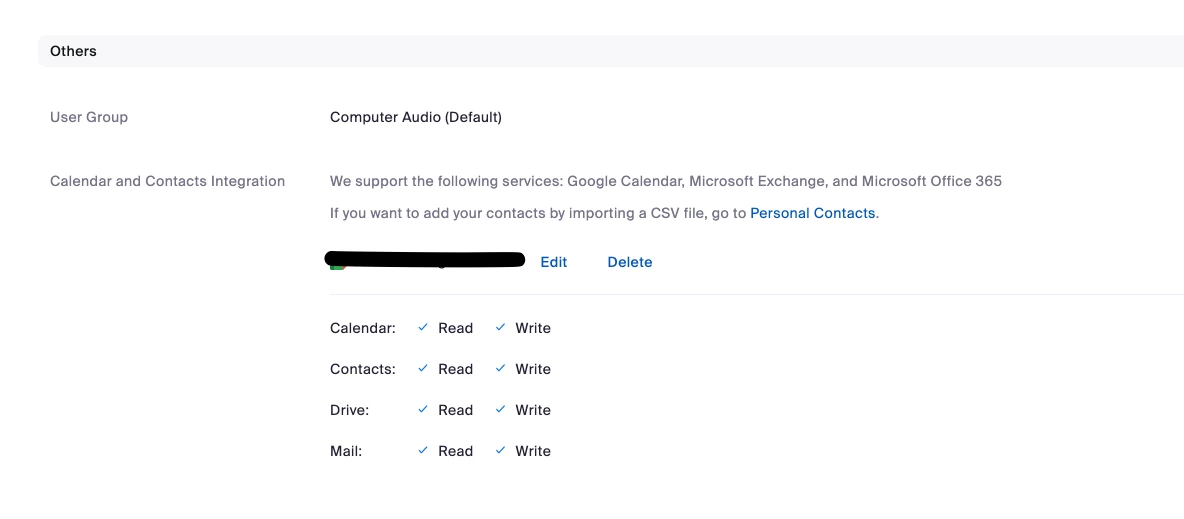
Here is what it looks like on your account. 

4 replies

YaBoiB
Community Champion | Employee
YaBoiBAnswer
Community Champion | Employee
October 3, 2024

Hello @rebekah29,

 Two options, 1. If you have personal contacts on the left side of your Zoom account, add those people into your personal contacts list and the system will recognize them once you start typing in their email address. 2. The second option (my favorite) is to integrate your calendar (google, outlook, apple) with your Zoom account by going to your profile tab > scroll down to others > log into your calendar option and your contacts from that calendar can be used through your calendaring service. For instance. I use google calendar. I can go into google calendar, create an event, choose the date and time and topic, etc. Then start inputting all of the contacts that I want to come to my meeting in the attendees field. Then, I can click "make it a Zoom meeting" and the system will pull from my Zoom account and input all of the meeting information (join link) into the location field of my calendar event. I know that it sounds complex, but it is all done using APIs on the backend (Zoom and Google servers). 

Here is what it looks like on your account. 

Newcomer
November 14, 2024

Hi, I have the same problem. I arrange a meeting on the zoom app. I enter the name as viewer, my own email as well. No-one gets any invite or email. Thanks for your help


MGSR
Community Manager
Community Manager
October 11, 2024

Hi @rebekah29!

Did you see the previous response from @YaBoiB?
If it has resolved your inquiry, please press Accept as Solution.

If you need further assistance, please let us know.

Have a great day!

Newcomer
March 12, 2025

I am having the same issue.  I do not see the options to "make it a zoom meeting" in my calendar.  I have tried to configurate the proper settings but I am not able to send invites to attendees

Newcomer
March 16, 2025

Adding attendees in Zoom does not trigger an invite by default. There are two solutions. You can copy the Zoom invite into a new calendar event and sent it that way. Or you can use a Zoom app, Salepager, that sends invites as you add attendees for your Zoom meetings. 

Newcomer
March 12, 2025

I am wasting a lot of time on this issue

MGSR
Community Manager
Community Manager
March 20, 2025

Hello @Cindee,

Welcome to the Zoom Community! We're glad to have you here.

I’m sorry to hear about the difficulty you’ve encountered. In order to assist you more effectively, could you please let me know which calendar you are using?

We'll look forward to your response.
