
Can't get rid of blue background | Community
Skip to main content
Newcomer
April 17, 2025
Solved

Can't get rid of blue background

  • April 17, 2025
  • 3 replies
  • 0 views

I have none checked for background and it's still blue. I've deleted the app from all of my devices and it is still showing up. 


Any help is appreciated 

Best answer by lancetlc

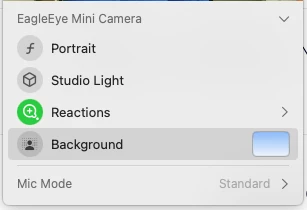
 I "think" that this might be your Facetime Camera mac background. Mac Sequoia has this new thing. It is really kind of cool where you can change the background of your camera. Can you check it and see if that is what is changing your background. It is a green icon at the top of your display, and when you click on it you will see what I see on the screenshot below. Let me know if this is the issue. 


3 replies

lancetlcAnswer
Employee
April 21, 2025

 I "think" that this might be your Facetime Camera mac background. Mac Sequoia has this new thing. It is really kind of cool where you can change the background of your camera. Can you check it and see if that is what is changing your background. It is a green icon at the top of your display, and when you click on it you will see what I see on the screenshot below. Let me know if this is the issue. 


Newcomer
July 31, 2025

Thank you SO much! This was making me crazy trying to figure it out! 

Newcomer
October 2, 2025

I had the same problem! The only thing I would add is the way you "remove the background" once you are in FaceTime Control at the top of your screen menu is to deselect it so it goes from green (on) to grey (off). Well done! 


Newcomer
December 24, 2025

have mac laptop keep getting blue background, click none, same background, how do i remove the background