Audio not sharing while sharing screen | Community
Skip to main content
Newcomer
August 30, 2024
Solved

Audio not sharing while sharing screen

  • August 30, 2024
  • 5 replies
  • 10 views

Attendees are not able to listen audio from media being played while screen sharing session.

Best answer by MGSR

Hello @Catfish1,

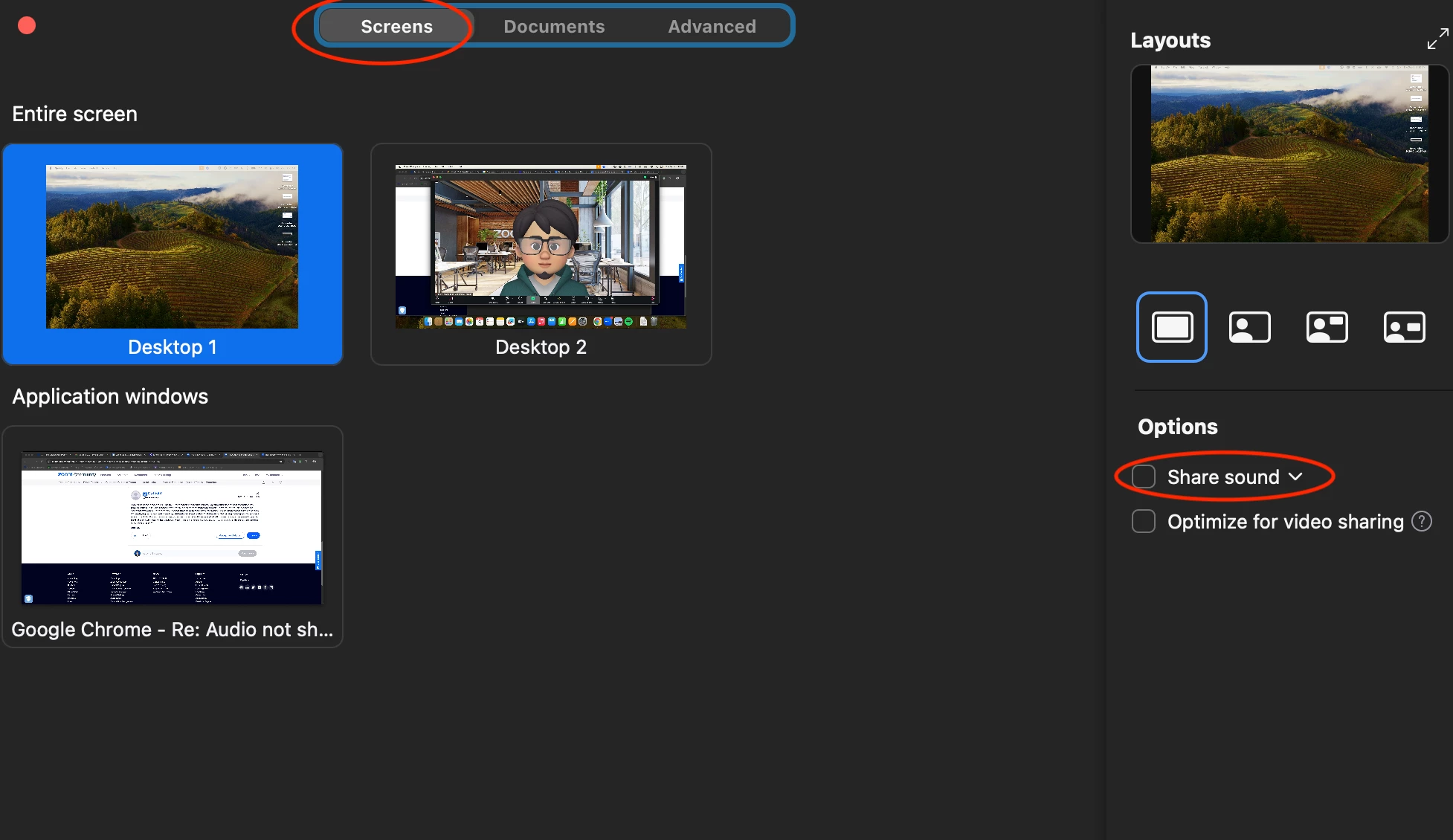
It seems that you are using the share your computer audio on the Advanced settings.

Kindly refer to the photo attached to this below on how to share your audio while screen sharing

Let me know if this solves your concern.


5 replies

MGSR
Community Manager
Community Manager
August 30, 2024

Welcome to the Zoom Community, @Hitesh_Kumar! We're glad to have you here.

On the share screen menu, there's a checkbox to share sound on the right side. Your attendees should hear the sound you are sharing if this is checked. 


Please let us know if you need further assistance.

Newcomer
August 31, 2024

I have the same problem as Hitesh_Kumar. When I share my screen, my students do not hear the music I'm playing. When I click on "Share Computer Audio," I cannot share my screen. I have taught music classes via Zoom for two years. Prior to today I did not have to activate Computer Audio; I could share song lyrics on screen while playing recorded music and my students received both simultaneously. Not having this capability hampers everything I do. My microphone is audible; my music should be as well - both come through the same It used to be that way - why was it changed? Can't my meetings be set up so that computer audio is always on, regardless of screen sharing?

MGSR
Community Manager
MGSRAnswer
Community Manager
September 2, 2024

Hello @Catfish1,

It seems that you are using the share your computer audio on the Advanced settings.

Kindly refer to the photo attached to this below on how to share your audio while screen sharing

Let me know if this solves your concern.


Newcomer
September 8, 2024

Thank you for the tip. It works, and I'm thrilled. However, dealing with audio throughout my class is still problematic. If I'm using my mic, my students hear no music. If I turn on "Original sound for musicians," enough background sound is audible that the music can be heard through my mic, but the quality is awful. For students to hear music the way I'm hearing it, I have to Share Computer Audio.


That sounds great, but if I want to talk about the music as we listen, I have to turn it way down. Not the worst thing, if I remember. Then if I want to share the lyrics, I have to turn off Share Computer Audio, which interrupts what they're hearing, open Share Screen, click on Share Sound, choose the image and click on Share. That takes 20 or 30 seconds which is essentially dead time for the students. Given what I'm teaching, I could easily need to do that 20 or 30 times a session, which adds up to a lot of dead air. 


Assuming there is no way around that, I have a suggestion. How about a software switcher which a user can program to execute a series of moves with one click?

Catfish1

Newcomer
September 8, 2024

My message to you disappeared off the screen, so I don't know if it was sent.  I'll try again.


Your tip works perfectly, so thank you. However, wrangling audio throughout my class is still a chore. When I'm speaking, students cannot hear music I play. If I turn on Original Sound for Musicians, my mic pics up the music, but the quality is unacceptable.  For them to hear what I'm hearing I have to access Share Computer Audio. If i then wish to share lyrics, I have to switch to screen share, which blocks the music, then click on Share Audio, Click on the image I want, hit Share, rewind my file, and hit play. That takes 20 seconds or so during which my students are staring into space. Given that I have to do that 20-30 times a class, my students sit through a lot of dead air.


I've also noticed that the volume levels differ from Share Computer Audio to Share Audio during a screen share, which means I'm constantly adjusting the balance between my mic and the music. It's the kind of busy work that pulls focus from the lesson. If I'm explaining something important as I execute these moves, I make mistakes. If I focus on the moves, I sometimes lose my thought.


I have a suggestion: Include a programmable software switch that users can set up to execute a sequence of moves with a single click.


Thanks for your time.

Catfish1

MGSR
Community Manager
Community Manager
September 10, 2024

Thank you for sharing this idea. At this time, all feature requests are managed within our https://zoom.us/feed submission form. We encourage you to submit this idea there, where the information will then be passed along to the relevant product team for review.

Have a great day!

MGSR
Community Manager
Community Manager
September 10, 2024

Hello @Hitesh_Kumar,

Did you see the previous responses?
If it has resolved your inquiry, please press Accept as Solution.

If you need further assistance, please let us know.

Have a great day!

Newcomer
September 12, 2024

I'm sorry, but I don't see "Accept as Solution." Where do I find that?

MGSR
Community Manager
Community Manager
September 19, 2024

I'm sorry for the confusion; it is only available to the original poster.

MGSR
Community Manager
Community Manager
September 19, 2024

Hi @Hitesh_Kumar!

Given the time elapsed since we last heard from you, I've taken the liberty of marking the provided answer as the solution.

If you need further assistance, please let us know.

Have a fantastic day!