

Zoom Calendar and Apple iCal Integration - Where? | Community
Skip to main content
Newcomer
February 11, 2025
Solved

Zoom Calendar and Apple iCal Integration - Where?

  • February 11, 2025
  • 16 replies
  • 6 views

Hi Zoom Support & Service,

I immediately need to integrate zoom scheduler (calendar, appointments, meetings, etc.) onto my Apple Calendar.
FYI - I do not use google, microsoft, or other products. Only with Apple!

Thank you for your prompt reply with tips how to work well with Apple Calendar!

Nice greetings,
JUE6
Best answer by LK_EXN

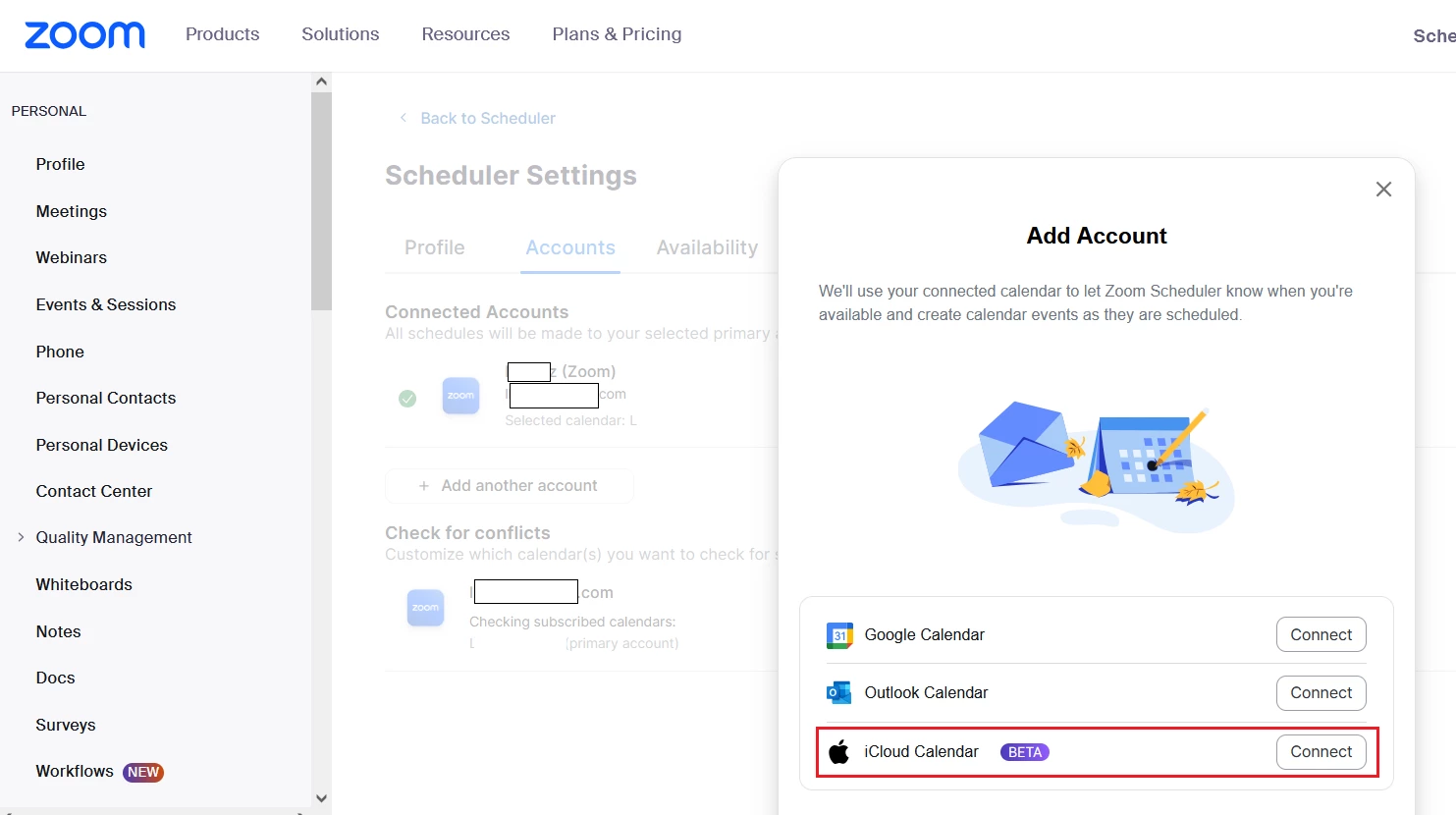
When you are in Scheduler tab, then in the bottom left corner you should find "Settings" option. After pressing that, Zoom should redirect you to Scheduler settings in a browser.
I've noticed, that if you go to "Accounts" tab there and press "+ Add another account", there is a iCloud Calendar available as a beta. Not sure if that will solve your Scheduler problem??


16 replies

Newcomer
February 28, 2025

I'd like to sync the zoom calendar with my ical calendar as well.  I noticed it only mentioned google and outlook - but i'm hoping those were just examples and not the only calendars we can sync to.

Newcomer
March 24, 2025

You could email yourself a calendar invite to your ical and add it that way. It's not as convenient as integrating directly but it's the next best workaround. Unfortunately Zoom does not integrate directly with ical. Alternatively there is a Zoom app, Salepager, that emails you an ics file each time you schedule a Zoom meeting and you can add it that way.

JUE6Author
Newcomer
March 24, 2025

That is no solution! I want to have "iCal" in the Zoom Scheduler, and not all other things like email or other apps. Zoom Scheduler can provide other calendars but iCal not. I don't accept this, period.

Newcomer
March 17, 2025

Is anyone from Zoom actually going to answer questions placed on the Community pages or is this a waste of time? There seems to be the same question going unanswered on a couple of posts. 


So, to be clear, with a new Mac, how can we integrate Zoom scheduled meetings with our Apple Calendars as the Zoom account holder? TIA. 

JUE6Author
Newcomer
March 17, 2025

Exactly! I am extremely disappointed with Zoom Service, which hasn't answered a single question here. I pay for the Zoom Business Pro and so zero service here.

iMac, Apple Calendar and Zoom = self-evident and highly busy everywhere and not even bothered by Zoom and solved the important problem! Very sad!!

Newcomer
March 19, 2025

You can click on the "Add to Calendar (ics)" link. Which will download an ICS file to your computer and then upload that in your Apple Calendar. Not elegant, but it works.

Newcomer
August 12, 2025

I don't have that option when scheduling a Zoom meeting.

JUE6Author
Newcomer
March 20, 2025

To plan a zoom meeting ok with uploading calendar to Apple calendar but for Zoom Scheduler unfortunately not possible.

LK_EXNAnswer
Community Champion | Partner
March 24, 2025

When you are in Scheduler tab, then in the bottom left corner you should find "Settings" option. After pressing that, Zoom should redirect you to Scheduler settings in a browser.
I've noticed, that if you go to "Accounts" tab there and press "+ Add another account", there is a iCloud Calendar available as a beta. Not sure if that will solve your Scheduler problem??


Community Champion | Partner
April 4, 2025

Zoom Scheduler is paid feature. 

I do not agree to pay for zoom account and then additionally to pay to use it effectively with my calendar. 


I guess I soon will use another video call app which is more friendly to users. 


I think that you are missing the point here. Original post owner was asking for Scheduler specifically.
Yes, it is a paid feature with certain plans (with others it is included).

But you get Zoom Mail and Calendar with even Zoom Pro plan. And it's not the same feature as Scheduler.
https://support.zoom.com/hc/en/article?id=zm_kb&sysparm_article=KB0058092 

SandeeRodriguez
Newcomer
Newcomer
May 29, 2025

You can't. I've been frustrated that it won't sync to my Apple calendar anymore and I missed a meeting this morning because of it so I looked into my settings and found Apple calendar isn't an option anymore. Zoom must have had issues with Apple and they just dropped Apple's calendar as a sync option. The only way to do it now is via Google calendar as an intermediary. 

Really annoying, Zoom! Please do whatever it takes to restore the sync to Apple calendar!

Newcomer
June 5, 2025

I am so pissed they just took this feature away. I was able to add my meetings to an external calendar until today and now the option is no longer. I serious hate tech bro jerks. Please share what other platforms you will be changing to because I'm interested. Disgusted with Zoom and they don't care about loyal customers anymore...I was with them when they first started but its time to screw over your base I guess

Newcomer
June 6, 2025

My Apple calendar integration took me months to get the system to work properly and all of a sudden with the latest update, I can't get my new meetings added to my calendar. As with others, I ONLY use my apple calendar. My frustrations with Zoom continue to increase as they seem to 100% focused on features that squeeze more money out of their user base versus creating features that work intuitively and seamlessly. There seems to be little care for the productivity impact and just shear frustration these issues create. Right now, I am pissed and wish there was a better option!!! 

MGSR
Community Manager
Community Manager
June 10, 2025

Hello Community,

Thank you for posting your feedback. We have shared this with the product team.

Newcomer
August 12, 2025

Seriously!! Too slow people. Any feedback? I'm looking for alternative platforms. 

Newcomer
June 18, 2025

where are the answers? I passed 10 hours trying to solved the problem. No more meeting Zoom on my calendar (Ical) since 3 weeks!!! 


Newcomer
June 19, 2025

The latest desktop update has solved this problem for me! It took two updates, feedback left on the app (per instructions from Support), and many back & forths, but for now, at least, I can add directly to iCal. Hopefully, the software team will stay more vigilant about releasing updates and checking on this. There are quite a few of us on Apple operating systems.

Newcomer
July 7, 2025

I've updated the app, signed in online, and it seems the only option to integrate Mac iCal is a PAID option? That is so wrong. I already pay for this service. You need to allow iCal syncing with Zoom for all of us that use our Mac to schedule our work and personal lives. Please add this back. I really don't understand why you took the option away. 

Newcomer
July 7, 2025

Mine resumed 2 updates ago (after a lot of feedback and back & forth with Support). I just tested on the desktop app on my Mac and it's still working. Have you scrolled down to the bottom of the scheduler and checked iCal? You may need to toggle off and on again. Also check your settings on your Mac. I have Zoom setup as a calendar on my Mac, with its own color, but when Zoom opens my iCal, it allows me to choose which calendar to use.

Newcomer
July 8, 2025

FGold, "Scheduler" is an additional paid feature above the standard Pro plan cost that I already pay for. It used to work and only stopped working in the past couple of weeks for me. I'll reach out to support to see if they can help fix it. Thanks