

Zoom Calendar and Apple iCal Integration - Where? | Community
Skip to main content
Newcomer
February 11, 2025
Solved

Zoom Calendar and Apple iCal Integration - Where?

  • February 11, 2025
  • 16 replies
  • 101 views

Hi Zoom Support & Service,

I immediately need to integrate zoom scheduler (calendar, appointments, meetings, etc.) onto my Apple Calendar.
FYI - I do not use google, microsoft, or other products. Only with Apple!

Thank you for your prompt reply with tips how to work well with Apple Calendar!

Nice greetings,
JUE6
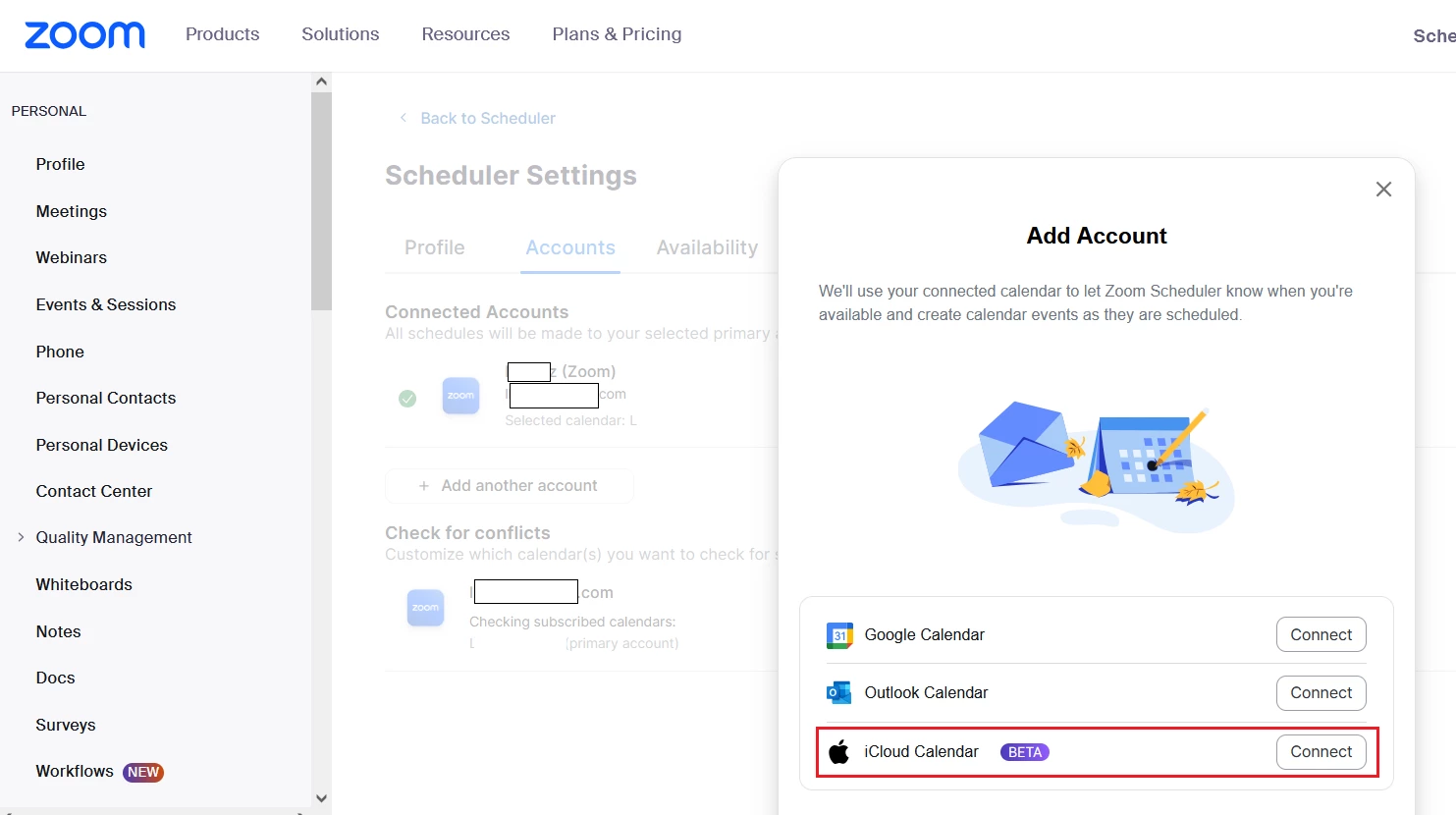
Best answer by LK_EXN

When you are in Scheduler tab, then in the bottom left corner you should find "Settings" option. After pressing that, Zoom should redirect you to Scheduler settings in a browser.
I've noticed, that if you go to "Accounts" tab there and press "+ Add another account", there is a iCloud Calendar available as a beta. Not sure if that will solve your Scheduler problem??


16 replies

Newcomer
July 8, 2025

May have found a solution:  seems in my account settings as the admin there are two new checkboxes to recognize (and use) Zoom calendar and Scheduler.  I unchecked and saved those (they were "on" but I never turned them on.  Went into my meeting invites and tried to save again, and it popped up on my Apple Calendar as always.  Not sure if it will last, but it's something.  I'd leave Zoom over this if it doesn't stay fixed...

Newcomer
July 9, 2025

TKap can you tell me where those setting are? Did you login via a browser, the desktop app, mobile app - and where did you find them. I've run through all of mine and I don't see anything like that. 

Newcomer
July 9, 2025

I opened my main zoom account in my Chrome browser and went down to the ADMIN settings.   This seems to be an admin-only setting as I didn't see it up in the personal settings.  Down in Admin, I opened Account Management and then Account Settings.  Across the top of that page I went to Mail and Calendar.  Under General, I unchecked the second box:  Allow users to choose Zoom as their email service provider, and I also turned off the option to use Zoom Scheduler.  I also turned off the Calendar and Contacts Integration under the Integrations heading just below. I don't use Google, Exchange or Office for my contacts or calendar -- just apple. Then I logged out of the desktop client and opened my zoom app on my Mac and everything worked as before.  I have no idea if these things I did actually fixed it, but it's working right now.  Good luck!

Newcomer
July 11, 2025

Brilliant TKAP. I followed these instructions and it seems to be working again. Thank you a million!!!!. 

I opened my main zoom account in my Chrome browser and went down to the ADMIN settings.   This seems to be an admin-only setting as I didn't see it up in the personal settings.  Down in Admin, I opened Account Management and then Account Settings.  Across the top of that page I went to Mail and Calendar.  Under General, I unchecked the second box:  Allow users to choose Zoom as their email service provider, and I also turned off the option to use Zoom Scheduler.  I also turned off the Calendar and Contacts Integration under the Integrations heading just below. I don't use Google, Exchange or Office for my contacts or calendar -- just apple. Then I logged out of the desktop client and opened my zoom app on my Mac and everything worked as before.  I have no idea if these things I did actually fixed it, but it's working right now.  Good luck!

Newcomer
July 11, 2025

I'm so glad it worked for you.  Before I was an n=1.  I hope the mods post this solution so others can get past this irritating glitch! 

MGSR
Community Manager
Community Manager
July 15, 2025

Hello Community Members,

We do apologize for the inconvenience and appreciate your patience.

While the “iCal” option is still visible in the Zoom macOS desktop app, we want to clarify that this feature has never been fully supported by Zoom. Although it may have worked for some users in the past, recent updates to Zoom and macOS have introduced inconsistencies with its functionality.

Because of this, our backend team is actively working on developing a fully supported integration to ensure a more reliable and seamless experience moving forward.

We’ll be sure to share more details as soon as we have updates available.

In the meantime, we recommend using one of our fully supported calendar integrations—Google Calendar, Office 365, or Exchange—for the most consistent performance.

Thanks again for your understanding and for choosing Zoom.

JUE6Author
Newcomer
July 17, 2025

Dear Zoom Team,


With all due respect, your explanation leaves us more confused and disappointed.


iCal was previously available and functioning, and now—suddenly—with the introduction of Zoom Scheduler, it’s no longer supported. This is a clear step backward in functionality, and unfortunately, we, the users, are the ones who have to "pay the price" for it. This is simply not acceptable.


We expect immediate action — not vague promises of improvements “at some point.” Many of us pay monthly for Zoom Pro and Scheduler services. In my case, I pay for both. That’s a significant amount of money, and yet Zoom cannot offer proper iCal support—despite the huge number of macOS users worldwide?

This is beyond frustrating and difficult to understand.


Once again: Please fix this issue as soon as possible and ensure Zoom Scheduler can integrate with iCal. Alternatively, provide a working solution for iCal immediately.

Thank you.

MGSR
Community Manager
Community Manager
September 9, 2025

Hello Community Members,

Kindly update your Zoom Workplace app to the latest version, and the iCal integration should work now.

Let us know if this helps or if you need further assistance.

Newcomer
September 9, 2025

Performed an update (Version 6.5.12 (63499)), but still only Google and M365, no iCal.

MGSR
Community Manager
Community Manager
September 9, 2025

Hello @prognis! On the home page of the Zoom Workplace app, click Schedule > More Options > Create in Calendar. Then, click the drop-down menu, where you should see an option for iCal.

Newcomer
September 10, 2025

"The integration is done through the Zoom web portal, not the desktop or mobile app. Log in to your Zoom account on the web, go to Settings > Calendar and Contacts, and you'll find the options to add iCal and other calendar services. Once connected, your Zoom meetings will automatically sync and show up in Apple iCal." 

Newcomer
September 11, 2025

I don't have Calendar & Contacts on my web portal - only Mail & Calendar.

When I look at the "add calendar" feature - it still only shows me the 3 options and no iCal.

I did the app refresh to the latest version and it is integrating for today. Long may it last 🤞