

Testing Registration / Ticketing in Zoom Events? | Community
Skip to main content
Newcomer
August 11, 2023
Solved

Testing Registration / Ticketing in Zoom Events?

  • August 11, 2023
  • 3 replies
  • 1 view

Hi - I am seeking 🤔 🤔 best practices for testing our registration/ticketing before launching to the public.  If anyone has a way to do this with your internal teams I would so appreciate the guidance (also note to @608130  - please make a best practice for testing in your support hub? ) 


Also - I thought there was now a way to have attendees register without having to login to their zoom accounts first?  As far as I can tell I have checked all the boxes  - please advise as I am still getting sent to sign in when I am attempting to test with my testing email (not my ZE email)
Best answer by Ohkawa

Hi, @janelstewart_75 

I cannot advise you on the first half of your question because I do not understand your question, but I will reply on how I can help you on the second half of your question.


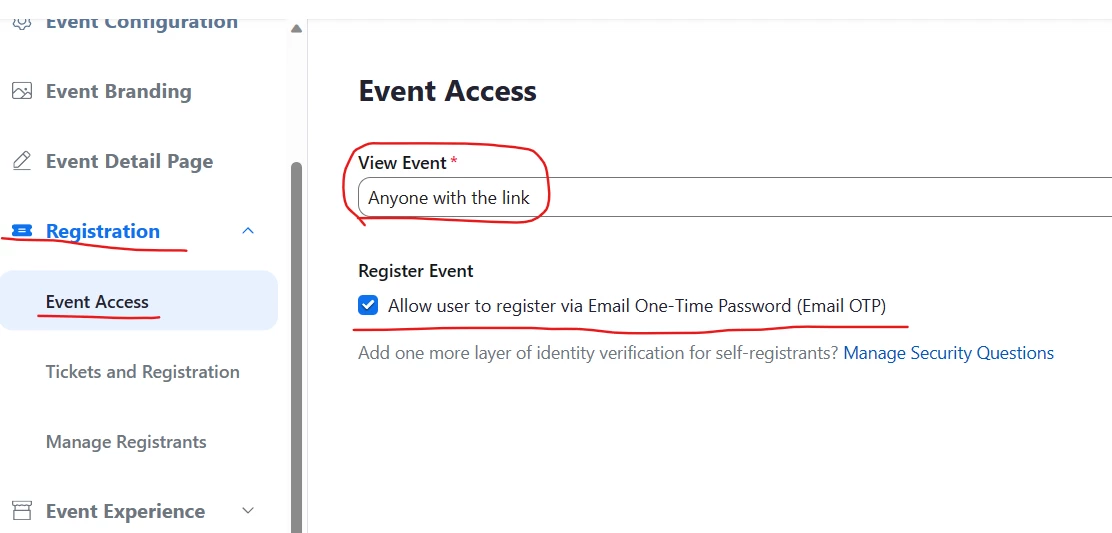
Registration>Event Access menu

View Event=Anyone withi the link

Register Event = chek "Allow user to register via Email Pne-Time Password(Email OTP)

Understanding the new event creation experience – Zoom Support


Please mark this post Accepted if it helped you !

3 replies

Ohkawa
Community Champion | Customer
OhkawaAnswer
Community Champion | Customer
August 13, 2023

Hi, @janelstewart_75 

I cannot advise you on the first half of your question because I do not understand your question, but I will reply on how I can help you on the second half of your question.


Registration>Event Access menu

View Event=Anyone withi the link

Register Event = chek "Allow user to register via Email Pne-Time Password(Email OTP)

Understanding the new event creation experience – Zoom Support


Please mark this post Accepted if it helped you !

Ray_Harwood
Community Super Champion | Customer
August 13, 2023

Hi, @janelstewart_75.


Are you creating your own registration: ticketing system?  If so, this is a question more appropriate for the Developers Forum at https://developers.zoom.us/


If you are just talking about testing Zoom Events registration, please provide details of your Zoom Event “Event Access” page:


Newcomer
August 13, 2023

Thank you!  Yes,  we are using ZE registration.   I figured out the issue I was having when I was trying to test.  I needed to create a private ticket with the email addresses that were going to test and NONE of those emails can be a part of your ZE account.  Busting out the ol 🤣@hotmail, @aol , etc.

Newcomer
August 13, 2023
  • The