
From Manual Chaos to Automated Certificates: How One Training Director Found Relief
The Challenge: Managing a Hundred Participants, One Certificate at a Time
I met with Sean, a Training Director, for an account review. Like many training coordinators, his days were filled with a familiar frustration: managing numerous training sessions single-handedly while drowning in administrative tasks.
Picture this: After hosting a training session with numerous participants, they would manually review attendance records, cross-reference completion requirements, create individual certificates, and send them out one by one. For someone managing multiple training sessions each week, this process consumed hours that could have been spent on what truly mattered, which is improving training quality and working on other training sessions.
"I have to manually share links with each person individually," Sean explained during our call. With paid instructors delivering specialized content and participants expecting professional certificates upon completion, the manual tracking and certificate distribution process had become unsustainable.
The Solution: Zoom's New Certification Feature
What if certificates could award themselves? That's exactly what Zoom Webinars Plus and Zoom Events now offer with their new Certification feature.
This game-changing capability allows event hosts to automatically award certificates to attendees who meet predefined criteria during live events. No more manual tracking, no more late-night certificate creation sessions, and no more worried emails from participants asking, "Where's my certificate?"
How It Works
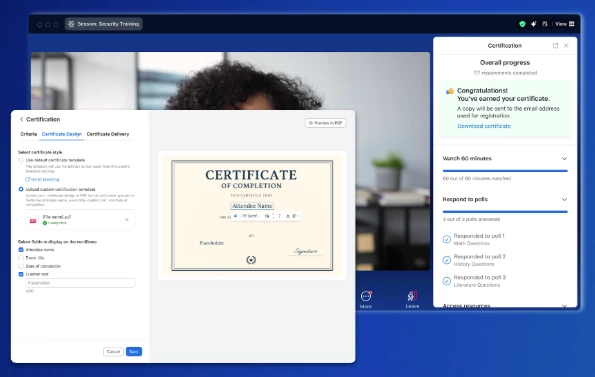
The Certification feature streamlines the entire process:
- Set Your Criteria: Define what constitutes completion, such as attendance duration, poll participation, or other engagement metrics
- Customize Your Certificates: Design professional certificates with your organization's branding, including logos, colors, and custom text
- Automatic Distribution: Once attendees meet your criteria, certificates are automatically generated and delivered
- Built-in Tracking: Monitor who has earned certificates and access detailed completion reports
Key Features and Benefits
For Training Coordinators
- Time Savings: Eliminate hours of manual certificate creation and distribution
- Accuracy: Reduce human error in tracking attendance and completion
- Scalability: Handle 10 or 1,000 participants with the same ease
- Professional Branding: Maintain consistent, professional certificate design across all events
For Participants
- Instant Gratification: Receive certificates immediately upon meeting requirements
- Easy Access: Download certificates directly from their Zoom account
- Verification: Certificates include unique identifiers for authenticity
- Professional Recognition: High-quality, branded certificates they're proud to share
For Organizations
- Compliance Made Easy: Automatically track and document training completion for regulatory requirements
- Enhanced Credibility: Professional certificate management elevates your training program's reputation
- Data-Driven Insights: Access comprehensive reports on completion rates and engagement
- Cost Efficiency: Reduce administrative overhead and reallocate resources to program improvement
Real-World Impact
For organizations like Sean's, this feature transforms training management. Instead of spending hours after each session managing certificates, training directors can focus on curriculum development, instructor support, and participant engagement.
The automation also improves the participant experience. Attendees no longer need to wait days for their certificates or send follow-up emails. The moment they complete the requirements, their certificate is ready. This may be a small detail, but it significantly enhances satisfaction and professionalism.
Getting Started
The Certification feature is available for Zoom Webinars Plus and Zoom Events users. Setting it up is straightforward, and Zoom has created a helpful 2-minute video walkthrough to get you started: Watch the Certification Feature Tutorial
For detailed setup instructions and best practices, check out the complete support article: Using Certification for Zoom Webinars Plus and Events
The Bottom Line
In today's fast-paced training environment, automation isn't a luxury, but a necessity. The Certification feature represents Zoom's commitment to solving real pain points for training professionals like Sean, who are doing critical work with limited resources.
By automating certificate management, training coordinators can reclaim their time, reduce stress, and deliver a more professional experience to their participants. It's not just about saving time; it's about elevating the entire training experience from start to finish.
Ready to transform your training management? Explore how Zoom's Certification feature can streamline your workflow and enhance your participants' experience. Your future self (and your participants) will thank you.