Newbie Question about Meeting Registration | Community
Skip to main content
Newcomer
March 15, 2024
Solved

Newbie Question about Meeting Registration

  • March 15, 2024
  • 1 reply
  • 5 views

Apologies if this has been asked a lot - I didn't know what to search for. 


Our Licences are:  Zoom One Business and Zoom Events. 


We're trying to get started on Zoom Webinars and want users to register but don't want them to have to enter One Time Passwords (OTP). 


Recently I attended a Webinar that looked like what we wanted. The people who arranged it sent an invite message to me. I forwarded it to some of my colleagues. We all registered. When the meeting started it said "If you are the meeting host, sign in to start the meeting XXX XXXX XXXX" and "I'm not the meeting host: Join Meeting as an Attendee".  

When I signed in, it asked for a code that was already on the invite. I suspect that everyone might have gotten the same code (not sure?). 


It was a normal event - where I was just a listener and the other organization had three speakers. 


Can someone please tell me which license they were probably using (I'm guessing Zoom Events?) and can you please point me in the direction of the Registration options.  We've been looking at Registration options and have been told by Zoom that it's not possible but clearly it is... so I think we're using the wrong words to ask for what we need. 


Thanks. 

Best answer by ArvinG

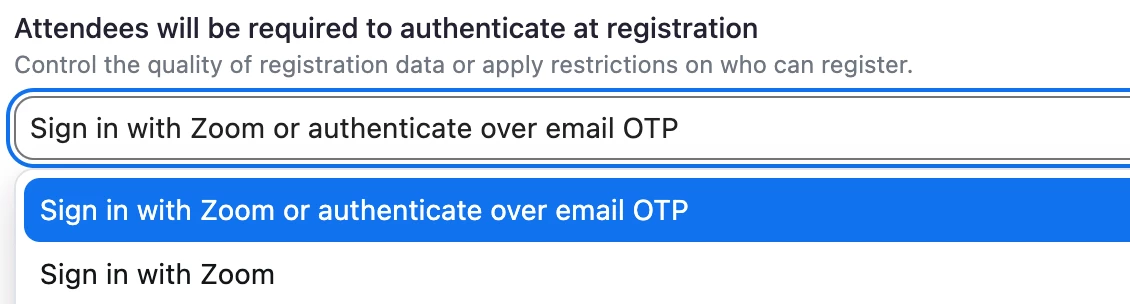
Hey there! You will find this in the  "Event Access" section. From here, you will find a couple of registration options that looks like this:


If you don't want your attendees to be using email OTP as an authentication method then you can just pick "Sign in w/ Zoom" from the drop down. 


From experience, I would recommend that you give your attendees some flexibility here and just select "Sign in w/ Zoom or authenticate over email OTP" because not all attendees may have an existing Zoom Account.


I hope this helps. Thanks!

1 reply

ArvinG
Employee
ArvinGAnswer
Employee
March 27, 2024

Hey there! You will find this in the  "Event Access" section. From here, you will find a couple of registration options that looks like this:


If you don't want your attendees to be using email OTP as an authentication method then you can just pick "Sign in w/ Zoom" from the drop down. 


From experience, I would recommend that you give your attendees some flexibility here and just select "Sign in w/ Zoom or authenticate over email OTP" because not all attendees may have an existing Zoom Account.


I hope this helps. Thanks!