


Brand Vetting & Partial Upgrade: What Zoom Customers Need to Know
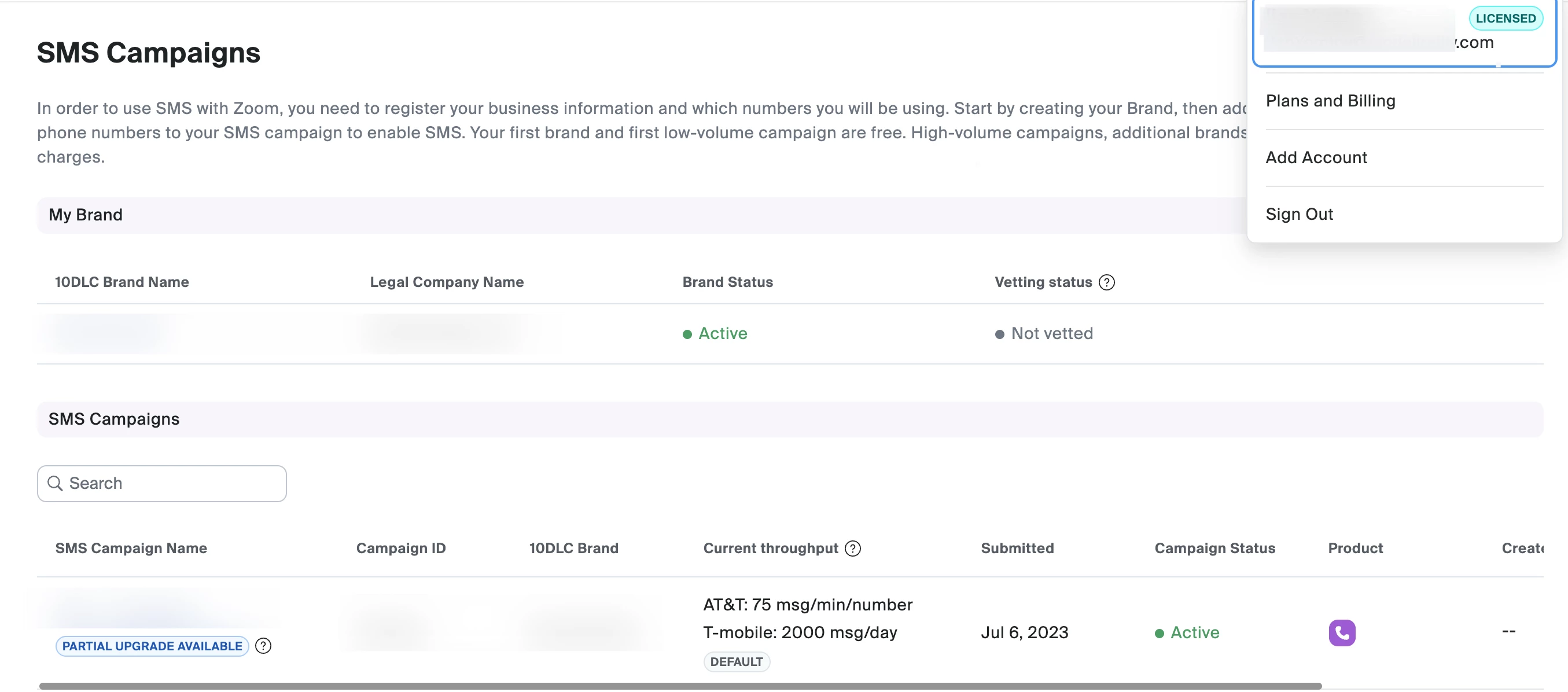
We’ve been getting a lot of questions lately around Brand Vetting and the “Partial Upgrade Available” label in Zoom SMS Campaigns — so we wanted to take a moment to clearly explain what these mean, why they matter, and how they affect your ability to use Zoom SMS.
If you’ve seen a “Not vetted” status or a Partial Upgrade Available tag and wondered what’s next, this post is for you.
What is Brand Vetting in Zoom?
Brand Vetting is a required verification process for Zoom customers who want to use SMS (10DLC) for business messaging.
It’s part of carrier compliance requirements and helps ensure that:
- Your business is legitimate
- You are authorized to represent the brand name you registered
- SMS traffic sent through Zoom is trusted by mobile carriers
This process is especially important for A2P (Application-to-Person) messaging, which includes customer notifications, alerts, reminders, and support messages.
What is the Vetting Status for?
The Vetting Status (for example, Not vetted or Vetted) tells you whether your registered brand has completed carrier verification.
- Not vetted
Your brand is registered and active in Zoom, but it has not yet completed carrier vetting. Messaging may be limited in throughput or subject to stricter filtering. - Vetted
Your brand has been reviewed and approved by carriers. This typically allows for higher message throughput, improved deliverability, and eligibility for advanced campaign options.
In short:
Brand vetting directly impacts how reliably and at what scale you can send SMS messages.
What Does “Partial Upgrade Available” Mean?
When you see Partial Upgrade Available on an SMS campaign, it means that:
- Your campaign is currently active under default or lower-throughput settings
- You may be eligible to upgrade certain campaign features without changing your entire Zoom account or plan
A partial upgrade can allow:
- Higher messaging throughput
- Expanded carrier support
- Enhanced campaign capabilities
However, it’s important to note:
A partial upgrade does not bypass brand vetting requirements.
Carrier-regulated features still require an approved brand.
Note: This option is designed to support phased adoption, allowing customers to scale SMS usage as their needs grow.
How Brand Vetting and Partial Upgrades Work Together
Here’s the key takeaway many customers miss:
- You can have an active SMS campaign while still not vetted
- You may see Partial Upgrade Available, but upgrades may be limited until vetting is complete
- Completing brand vetting helps unlock better performance, higher limits, and long-term scalability
Resources:
- https://support.zoom.com/hc/en/article?id=zm_kb&sysparm_article=KB0082051
- https://support.zoom.com/hc/en/article?id=zm_kb&sysparm_article=KB0081387
- https://support.zoom.com/hc/en/article?id=zm_kb&sysparm_article=KB0081388
- https://support.zoom.com/hc/en/article?id=zm_kb&sysparm_article=KB0059336#h_01FYVVR3XCVF37DM94AZ4PGZAK