

How to disable login verification code | Community
Skip to main content
Newcomer
January 27, 2022
Solved

How to disable login verification code

  • January 27, 2022
  • 49 replies
  • 139 views

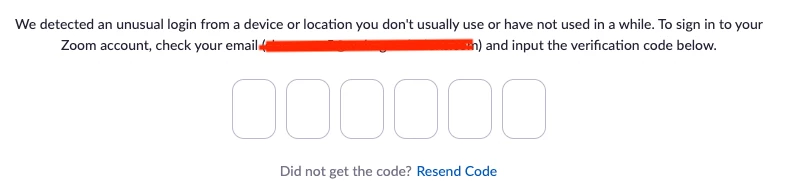
We have a Zoom account that is shared by several people to host meetings. When logging into Zoom it often thinks that there is an unusual login and the hosts are asked to enter a verification code (please see screenshot below). The verification code is sent to the account email that these hosts have no access to. This is causing a lot of frustration and delays. Is there any way we can disable this logion verification? Thank you.


    This topic has been closed for replies.
    Best answer by JPWW

    Our admin set up a separate email to serve as the login for one of our organization’s licenses.  It’s not the main organization email and used only for Zoom.  The people who use Zoom in our organization have access to this email account and can pick up any OTP request.  Works so far. 

    49 replies

    Newcomer
    August 30, 2022

    There is another workaround for the OTP "security" feature. I have tried several times to get Zoom support to disable the OTP as suggested below as the solution. Here is one that works, if you make sure to do all the steps (including "Allow participants to enter at any time)


    • In setting up the meeting, do not use a waiting room.
    • In setting up the meeting, enable participants to join at any time (if this is not enabled, Zoom imposes a waiting room whether or not you have enabled this feature until a host signs in, with the OTP)
    • Make sure the "recognized" host is NOT in the meeting; if an official host is present, there is no option to claim host.
    • Ahead of time, provide a meeting participant with the specific "Host Key" found in the account profile.
    • Once the person who will host the Zoom meeting is in the meeting, they can click on "Claim Host" at the bottom of the participant list, enter the Host Key, and have full host privileges. I tested this option with one of my volunteers and it works. At this point, they may also enable the waiting room, for example, when the teaching team is conferring before a class begins.
    Newcomer
    September 6, 2022

    Hi Tara. Does Zoom then recognise the new Host when they sign in again later? 

    Newcomer
    September 8, 2022

    This was not successful for us at all, as I have posted previously.  My suspicion is they only grant this exception to those with a large number of licenses as they don’t want to lose that much business.

    Newcomer
    September 8, 2022

    We got an exception (after about a month) - we only have 7 licenses. Seems random


    Newcomer
    September 8, 2022

    Perhaps, it just depends on which individual at Zoom you happen to get and some are more amenable to granting the exception than others.

    Newcomer
    September 20, 2022

    We are not receiving the verification code, and one of the users cannot get in. We are a remote org and share this account. Can someone assist us, please

    Newcomer
    November 30, 2022

    Just happened to me again today for a code to be sent to my email address.

    I am okay with the code being sent out but how can I change it to be sent to my iPhone?


    Bort
    Employee
    Employee
    November 30, 2022

    The code can only be sent to the email address associated with your Zoom login. If you want to receive that email on your phone, you need to have access to that email account on your phone. 

    Newcomer
    February 16, 2023

    What a waste of people's time and effort. I cannot imagine how come after a year of constant users' feedback, there was nothing at all done to solve this problem.

    We have been using zoom for meetings and classes since before Covid, and we are seriously considering moving to Teams or Google, even though we like them slightly less.


    It should be 1) optional feature, 2) disabled by default, as for most of non-secret-corporate users the inconvenience highly outweigh any potential benefit...


    Edit: Just so you know, I created an account just to express how frustrating this thing is

    Newcomer
    February 21, 2023


    @leopoldj wrote:

    We have a Zoom site account that is shared by several people to host meetings. When logging into Zoom it often thinks that there is an unusual login and the hosts are asked to enter a verification code (please see screenshot below). The verification code is sent to the account email that these hosts have no access to. This is causing a lot of frustration and delays. Is there any way we can disable this logion verification? Thank you.


    I'm late to this party but just started having the same issue. Small nonprofit, multiple accounts but multiple users per account. Did anyone ever find a satisfactory solution? The verification codes aren't even coming through when I can access the related email. Incredibly frustrating!

    Newcomer
    March 25, 2023

    It is important to have Two-Factor Authentication Login just to make sure it cannot be duplicated so there is nothing you can do about it.

    Newcomer
    May 12, 2023

    I was having 2FA issues on my desktop version of zoom but was able to login on my iphone.  Can't change account settings on phone, so i was in a catch 22.  Was FINALLY able to "use Apple" to login to desktop and that bypassed 2FA for me.  Then I was able to turn off 2FA on desktop.  Was also able to view "Recovery codes" in case I got caught in the 2FA loop again.  After turning off 2FA, I tried logging in again to test it.   It still makes me be logged in on my iPhone app, when logging in on desktop, I get a notification on the iPhone app and have to "allow" the login by my desktop.  This may not help those of you sharing a login with multiple users, but it will help those of you on this thread that just have issues getting around 2FA that somehow got put on their account.  I don't find where to turn off needing to "Allow" by my iPhone app.  If i figure that out, i'll try to find this thread again and update.

    Newcomer
    July 27, 2023

    How do you contact support. I have the cheapest paid version and they dont allow support calls and I cannot find any way to contact them. I never get the verification emails, even though my email is set up to get them. I am the only user and I cannot use it because of this verification.