

How to disable login verification code | Community
Skip to main content
Newcomer
January 27, 2022
Solved

How to disable login verification code

  • January 27, 2022
  • 49 replies
  • 139 views

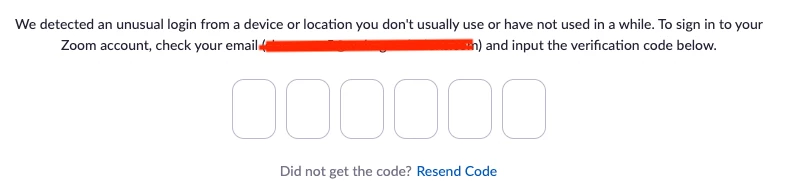
We have a Zoom account that is shared by several people to host meetings. When logging into Zoom it often thinks that there is an unusual login and the hosts are asked to enter a verification code (please see screenshot below). The verification code is sent to the account email that these hosts have no access to. This is causing a lot of frustration and delays. Is there any way we can disable this logion verification? Thank you.


    This topic has been closed for replies.
    Best answer by JPWW

    Our admin set up a separate email to serve as the login for one of our organization’s licenses.  It’s not the main organization email and used only for Zoom.  The people who use Zoom in our organization have access to this email account and can pick up any OTP request.  Works so far. 

    49 replies

    Newcomer
    June 9, 2022

    A suggestion: write to your preferred national newspaper - the Tech editors should have a field day with this issue.

     
    Newcomer
    June 9, 2022

    Has anyone had any success on getting Zoom Support to disable the feature? Any idea how long this takes? I've reached out and not a peep. 

    Newcomer
    June 9, 2022

    Im in the middle of negotiating.. begging, for them to opt us out of the OTP.  Its via their support system and its a week so far of several emails back and forth and everyone ends with, this isn't a guarantee we will/can remove OTP our teams are looking into it. 

    Newcomer
    June 10, 2022

    Same issue for our small non-profit offering free support services to cancer patients. We pay for 10 accounts. Has anyone had any success using the support ticket request? If so, suggested template for request?


    Newcomer
    June 13, 2022

    After a week or bit more and a few back and forth with support we did get an exemption. They required a signoff on the fact that it will your security profile will be less by opting out and a explanation of why it wouldn't work for our situation.  They did state in their few standard replies that sharing accounts is against usage, i didn't try to argue that just how we use it, how we have been using it for years, and how 2fa and SSO wouldn't work. So a support ticket seems the way to go until they get enough of them they change it for everyone. 

    Newcomer
    July 13, 2022

    IT Support here, this is good to know I'll feed this back to our customer .. cheers for that. 🙂

    Newcomer
    July 13, 2022

    A super easy solution (wish we'd always used this) that keeps the accounts more secure it to use Zoom's "claim host" feature. Hosts then do not need to log into the organization's Zoom accounts at all. They use the participants' link, and you give them the permanent code to "claim host".

    Newcomer
    June 13, 2022

    Same for us. We got an exemption today June 13rd, after filing a support ticket June 1st,  sending a statement that we know what we are doing, and writing to our commercial Zoom rep to try to move the issue.  It took  several exchanges with different levels in the support team. 


    As we do not know if the exemption will be permanent,  we are going to (1) work towards establishing SSO as fast as we can, and (2) plan for an alternative provider.


    Keep piling those support tickets. 

    Newcomer
    June 14, 2022

    We have the same issue. when trying to sign in  with different devices from different locations. We get the verification code runaround. Its not possible or practical to have someone babysit the email account for the code.

    Just need them to have a simple on of off button with a disclaimer that we agree to not using it. Real simple.  More tickets I guess or leave for something else! Money talks!


    Newcomer
    June 21, 2022

    Hi everyone,


    I have exactly the same problem. We have a small language school and have quite a few accounts with zoom, with a couple being shared as they are not used at the same time. All was fine until May when all accounts suddenly needed a one time verification code. This caused all the codes to come to the business email and I had the send them to the teachers. The it went away and now it is back, unpredictable. Sometimes it's ok, sometime it asks for a code.  The teachers need to contact me, I can't give everyone access to the business email. Also the other option, facebook, google SSO won't work as there are lots of teachers. 


    I have ask support to disable OTP for 2 of the accounts but I'm not sure it will happen. It is really creating uncertainty amongst teachers and students about whether they will be able to teach their class, which obviously isn't great. Not to mention the students!!! 


    This is so unhelpful - I hope this can be resolved or I will need to also drop Zoom completely.


    Please sort this out Zoom,

    Karen

    Newcomer
    June 21, 2022

    We are in the same boat. When this started, our first strategy was to set our zoom email account to auto-forward to 2 of us (we're all volunteers). When  teachers (also all volunteers) got the OTC request, they needed to text one of us to get the code. 


    Now we're having the email address for each of our zoom accounts auto-forward to all of the teachers using that account. So if a teacher gets the OTC request, they can find the code in their own email. But of course if there are 10 teachers using one account, they are all getting the OTC every time any of them needs it. We tell them just to ignore the OTC emails if it wasn't them trying to log in. Despite my best efforts at clear communication, I got emails from several teachers about "suspicious" emails from Zoom. Ironic. Zoom really needs to fix this! We have 100 volunteers trained to teach on Zoom, many of them retired and not tech savvy. It would be difficult for us to change platforms.

    Newcomer
    July 15, 2022

    Try the "claim host" feature instead. No one needs to log into the Zoom accounts. Hosts use the "participant" link, then click "participants" and, at the bottom, "claim host" - you will just need to give everyone the claim host key, which is easy to set up. It's easy for our teachers (totally not tech savvy) and keeps our Zoom accounts more secure. Meetings just need to be set up with "enter before host allowed" and no waiting room.  https://support.zoom.us/hc/en-us/articles/205172555-Using-your-host-key

    Newcomer
    July 21, 2022

    Hi.  We have a Zoom account that folks use within our association but it is connected to our email account.  If I set up a "claim host key", I won't have the watch our email account whenever folks try to access the Zoom account?  We are looking for a solution as we can't give them access to the email account.  Thanks.

    Newcomer
    June 28, 2022

    Two things:

    1. After lots of back and forth, Zoom support did disable the OTC for our accounts!

    2. Before they did that, we started talking about using "claim host" to get around the OTC issue. So teachers join the meeting using the participant link, and we give them the account "claim host" key so they can become host. It seems quite simple actually, and keeps the accounts more secure - no one needs the account password or the OTC. Still testing this, but seems like it should work.


    Newcomer
    July 13, 2022

     was trying to think through the claim host option. Who starts the meeting? for us its the Pro account that creates it they already have access. Or is it that you are in a waiting room and then you can claim host? 

    Employee
    July 13, 2022

    You won't be able to use a waiting list with this feature, claim host can only be utilized once the meeting has started.  Waiting room and join before host are incompatible with each other, and join before host must be enabled.  Once a user has 'claimed' host privilege, they can turn on the waiting room.  https://support.zoom.us/hc/en-us/articles/205172555-Using-your-host-key

    PK76_2
    Employee
    Employee
    August 17, 2022

    Hi all, here's a support article that discusses this feature: https://support.zoom.us/hc/en-us/articles/6188435206157#h_01GAPGKNJB9EYZZ2WB41T6SFED