

How to disable login verification code | Community
Skip to main content
Newcomer
January 27, 2022
Solved

How to disable login verification code

  • January 27, 2022
  • 49 replies
  • 137 views

We have a Zoom account that is shared by several people to host meetings. When logging into Zoom it often thinks that there is an unusual login and the hosts are asked to enter a verification code (please see screenshot below). The verification code is sent to the account email that these hosts have no access to. This is causing a lot of frustration and delays. Is there any way we can disable this logion verification? Thank you.
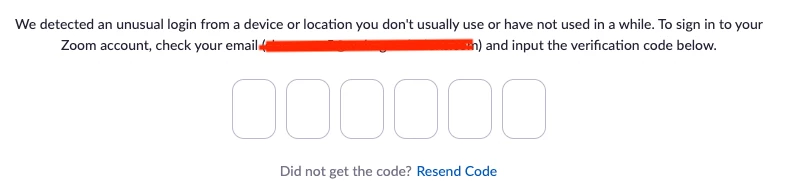


    This topic has been closed for replies.
    Best answer by JPWW

    Our admin set up a separate email to serve as the login for one of our organization’s licenses.  It’s not the main organization email and used only for Zoom.  The people who use Zoom in our organization have access to this email account and can pick up any OTP request.  Works so far. 

    49 replies

    Newcomer
    June 3, 2022

    Just filed a ticket requesting a bypass of the OTP until they have a fix. we'll see. Its amazing all the people here, I don't know if it will make a difference but maybe everyone should enter a support ticket too... they don't seem to care bout us posting here.

    Newcomer
    June 3, 2022

    I filed a ticket via the Support portal requesting OTP be disabled for our company.  Zoom Support sent me an email asking for details as to why we cannot just use 2FA or SOS.  I have sent the reasons why these options won't work for us.


    Meanwhile, I am using a temporary workaround until OTP is eliminated. 


    I have activated 2FA for all of our accounts, however, I have not set up the actual 2FA app information on the Zoom accounts.  So, when our trainers login they will get a message that the administrator has set up 2FA and request that they set up the 2FA.  There is a option on the page: Not ready to set up two-factor authentication? Skip.".  They can just click on "Skip" and go right into the account and no OTP is activated.


    Hopefully, Zoom will soon get the message from all of our comments here and Support tickets that OTP should be optional at the discretion of the account holder and not just globally implemented.  If not, as others have mentioned, then Teams is a good alternative.

    Newcomer
    June 4, 2022

    Thanks CARM i will try that also. I just received the answer to the support ticket and it seems they are sticking to their guns, the answer was boiler plate about how to use OTP and their other security features not even recognizing my question or the problem. So they've transitioned to  just another cooperation. This model just wont work for us. Maybe we go to 40 minute programs and they get no money. Will start looking at alternatives. 

    Employee
    June 6, 2022

    You can reply back and tell them it doesn't work for your use case to move your request forward

    Newcomer
    June 5, 2022

    So many of us seriously affected by this and not a peep. We're a nonprofit sharing four pro accounts for different hosts to run vital  support groups. 

    I've opened a support ticket. In the meanwhile, if hosts use their personal email to log in and then use Zoom account Hostkey to claim meeting host, would that be ok workaround until it's fixed, or we leave?


    Newcomer
    June 6, 2022

    Since they ignore us here mabye we goto twitter or other social media @51 there is  a new president maybe we can persuade him. 

    Newcomer
    June 6, 2022

    We purchased 12 extra license seats from Zoom, specifically for using with different trainers across the country. These accounts often are used by one person on one day, and someone totally different on another day and in another location in the country.

    These users sign in with a trainer+1 trainer+2 etc. username/password combo that are tied to our trainer@....  Gmail address and these trainers do NOT have access to the email inbox for this address.

    This is the place that these 'codes' are sent to..  This means we have to babysit this email address and have someone internal to the company send out each individual code to each of these different remote trainers, each of whom are in different time zones, etc.

    This isn't security, or you would just allow this to be a toggle setting in the Advanced tab in Zoom settings. This is Zoom being heavy-handed in the way that they enforce the terms in which you use their service.

    You gave no notice when you turned it on the first time which pretty much enraged everyone, then turned it off re-evaluate.

    I guess you are done re-evaluating, because you turn it back on AGAIN with NO notice, causing panicked scrambling as we have training in place tomorrow. We give you a lot of $$$ and this is serious cause for us to do some re-evaluation on our own as to the service we pay for.


    Newcomer
    June 7, 2022

    the other solution is to use Host Key, instead of sharing your account to others. Using Host Key so you can easily gave the host to others without sharing your premium account, ergo, no verification code (OTP).

    Newcomer
    June 7, 2022

    I don't see how this would work.  One needs to be able to sign in to the account to obtain the host key.  Those of us trying to legitimately sign in to begin legitimate meetings can't even get to the account profile to see the Host Key, much less use it.  We first encounter the OTP verification demand, and that's as far as we can go, if we don't have access to the email where the verification code is sent.

    Newcomer
    June 7, 2022

    One needs to sign in with the zoom premium account, create the scheduled zoom links, and obtained the hostkey to be given to the other one whom login with another zoom basic account, whom using the hostkey to claim the host role.

    Just make sure of one thing, don't enable the waiting room and set the login time to 'anytime' while creating the scheduled zoom links.

    Enjoy! 😃

    Newcomer
    June 7, 2022

    We're using an automated service (Apiant) to interface with our scheduling software (Mind Body) to create classes  / meetings typically 48 hours before the start time. It's all automated and has (to date) worked very well with minimal administration.

    Just a lot of overhead to to have obtain the host key and send to instructors, who are not typically power users.

    Newcomer
    June 7, 2022

    Yoga Studio here - same issue. Our instructors are unable to log in reliably due to OTP. So far I end up providing the


    We partner with Apiant to link up Zoom and Mind Body which forces us into setting up discrete zoom accounts (to make things work, automating meeting/class set up, registering students, etc.)  so having a separate account for each instructor is cost-prohibitive (most teach 1x per week) - we do have 3 paid accounts, we'd need to increase that to 10 or 12 to cover all the instructors teaching remotely. 

    If this continue we will need to migrate off zoom and onto the Mind Body branded platform. Not happy about that.  

    Newcomer
    June 8, 2022

    Maybe to ease things down, the ZOOM people should made all registered BASIC zoom accounts can be added to the users management list and CAN be made as an alternative hosts which will be used for hosting the scheduled meeting.


    After all, we all try to build a community here..  please ease of a thing or two.

    Newcomer
    June 8, 2022

    Joining the chat to confirm that we have encountered this issue for the first time this week and from two computers regularly used by our teachers.  This is making the use of the room impossible if the office manager is out of the office and we can't access her email account.  What do we need to do to set the email account for this to a common mailbox so it is available when we sign in? 

    Newcomer
    June 8, 2022

    This is SUCH a problem!! Zoom needs to address this.