

How to disable login verification code | Community
Skip to main content
Newcomer
January 27, 2022
Solved

How to disable login verification code

  • January 27, 2022
  • 49 replies
  • 136 views

We have a Zoom account that is shared by several people to host meetings. When logging into Zoom it often thinks that there is an unusual login and the hosts are asked to enter a verification code (please see screenshot below). The verification code is sent to the account email that these hosts have no access to. This is causing a lot of frustration and delays. Is there any way we can disable this logion verification? Thank you.
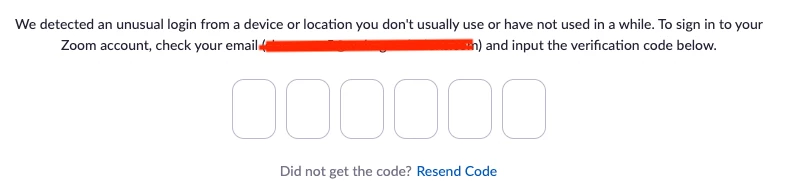


    This topic has been closed for replies.
    Best answer by JPWW

    Our admin set up a separate email to serve as the login for one of our organization’s licenses.  It’s not the main organization email and used only for Zoom.  The people who use Zoom in our organization have access to this email account and can pick up any OTP request.  Works so far. 

    49 replies

    Newcomer
    June 2, 2022

    We're having issues across several accounts now, too.  Multiple people globally are responsible for maintaining a paid Zoom Webinar at various times during the day, and they can no longer log into maintain the session.

    Employee
    June 2, 2022

    Hello,


    With Client Release 5.9.0, Zoom added an additional security feature to protect the accounts of our customers. This feature is designed to avoid fraud and abuse. When attempting to log in from a different device/ location, Zoom will send a One Time Password (OTP) to the user's email.

    If for any reason, you are having issues logging in because of the feature above, please contact support so they can investigate and provide solutions as necessary.
    Support can enable their 2FA in order to bypass the security feature mentioned above so that users can temporarily log in to their account.


    Thanks,

    Allan

    leopoldjAuthor
    Newcomer
    June 2, 2022

    Support can enable their 2FA in order to bypass the security feature mentioned above so that users can temporarily log in to their account.

    This is confusing. What does it mean by enable 2FA? 2FA and OTP are totally different issues. We want to disable OTP. How does enabling 2FA achieve that? Can you please explain this better? Thanks.

    Employee
    June 2, 2022

    OTP and 2FA are both used to verify that the person logging into the account is the person who owns that account.  Both are measures to prevent account hijacking.  OTP will not trigger if:

    • 2FA is enabled on the account
    • The user uses SSO
    • When logging in using Google, Facebook, or Apple ID

    2FA can utilize either mobile authentication app and requires additional setup.

    OTP is sent via email, and requires no additional setup.

    Newcomer
    June 2, 2022

    To reiterate some comments, we need the OTP disabled, we can't use the 2fa or the SSO in the manner this product was rolled out and we have used for 2 + years now.  You will need to affect a change whether that's disable the OTP, allow us to choose to enable or disable, something else. We can't afford to provide everyone a pro account so they can manage their own OTP, but then they probably wouldn't need it, so it does seem this is punitive wrapped in a 'security' blanket.  The product has been great and we do notice all the work zoom does but this does really seem like a deal breaker our users can't use it in this way. Thanks for all the good times. 

    Newcomer
    June 2, 2022

    We completely concur with above. Users for 3+ years in the education sector. Have 10 accounts for each of our permanaet staff but one account for one group of classes which we use temporary staff changing weekly. The OTP has ruined things for us without any warning. Zoom knew this  from comments above, disabled it then re-enabled it without warning. Goes to show how much they care about education business. We will be looking for other alternatives.  

    Newcomer
    June 2, 2022

    I am a volunteer part of an organization - a church - that also has a paid Zoom account. I have been successfully logging in remotely on the same computer to host weekly meetings since March 2020.   And I experienced the OTP this morning as I tried to begin a prayer meeting at 7 am, way before anyone in the church office would be available to access the official log in email.  This of course was annoying as well as distressing. 


    As others have stated, more than one person and certainly more than office staff, use the PAID Zoom account to facilitate meetings for prayer, study, church business, planning, etc.  We obviously don't do this all at the same time.  When he checked into this after I alerted him to the issue, our office administrator was told today that we have to have a separate license for every person who uses the church's Zoom account. WHAT?  This doesn't seem like 'security' to me; it seems like a deliberate attempt on the part of Zoom to get more money!  Surely not everyone in an organization using Zoom has access to the account email, and surely not everyone using Zoom is working in an office where they would have access to it.  What part of REMOTE working does Zoom not understand? Ironic!

    Newcomer
    June 3, 2022

    Exactly.  The famous "security" excuse.

    Newcomer
    June 3, 2022

    Hello


    We were having the same issue with one account and multiple different users having to log in to host meetings. 

    The way "around" it is to turn on 2FA. 


    Hear me out...


    Setup Google authenticator on a device but instead of using the qr code that zoom shows, choose to use the alphanumeric code instead. Make a note of this code. 

    Then anyone that needs to use the account just needs to setup Google authenticator on their phone/tablet using the same alphanumeric code. 

    This works well for us, hopefully useful for others.


    Rich

    Newcomer
    March 11, 2023

    It seems from your description it is a little technical and we should rehearse and get this setup prior to the meeting to confirm everyone understands what to do.  

    Newcomer
    June 3, 2022

    Here we go again,


    We have 100+ licences and considering ordering more, but this OTP will definetly make us review our choices and go on TEAMS.

    Zoom starting to be untrustfull. They are on the path of their decline...

    Newcomer
    June 3, 2022

    Same thing here, we are planning to unsubscribe our zoom account and start to use the other tools.

    Newcomer
    June 3, 2022

    We have the same issue. Please just disable the annoying OTP. 🙎

    Newcomer
    June 3, 2022

    Dear ZOOM,   


    You are shooting yourself on the foot. I hope you understand that.


    Thanks

    Newcomer
    June 3, 2022

    I don't think so at this point. if they drop the hammer and say we aren't using it in agreement with the terms, I leave and use another product.. if it continues to not work for us... i leave and use another product. This list of about a hundred people having the same problem is how you get things done. 

    Newcomer
    June 3, 2022

    I have the same problem. Please I need support because I have a lot of employees that are using this account.

    Regards,


    Aura