

Turn off status message banner | Community
Skip to main content
Newcomer
September 1, 2023
Question

Turn off status message banner

  • September 1, 2023
  • 2 replies
  • 1 view

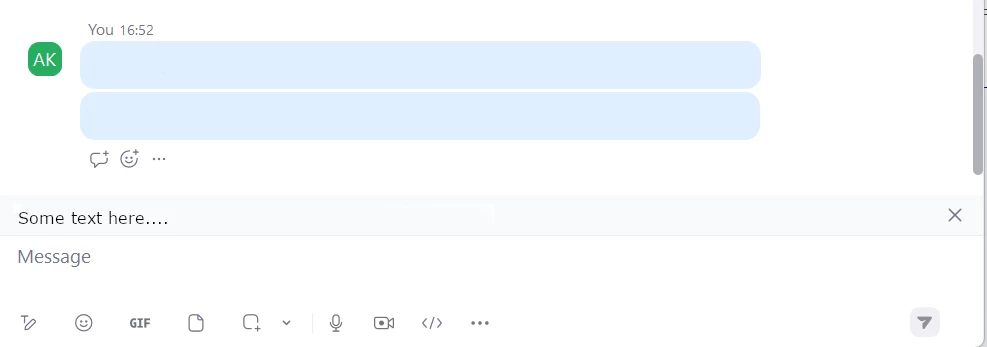
Is it possible to permanently turn off someone else's status message? This never used to be there, is this part of an update? I keep clicking the X to the right but the Status message keeps coming back. I don't want to see the status message as it is irrelevant as some people do not use it as status message. I have removed the status message in the screenshot below but it pops up in a grey banner at the bottom of the screen where the text I have put "some text here...." 
2 replies

newl
Education Ambassador
September 2, 2023

Hello @adamfs ,


I have noticed this "feature" for sometime now, not sure when it was implemented.


I can concur with your experience, if you click the "X" on the right-hand side of the chat window to remove the status message, click into another chat window and then move into the previous chat again, the message is back!


I have gone through the Zoom client settings on Mac and Windows as well as the Account Settings, there does not appear to be a way to permanently remove the message.


I can see how it may seem annoying, but I can also understand that some may consider it helpful to "remind" users of an individual's status, so I don't think it is a bug.


If I find a way to permanently remove it, I will report back.


Hope this helps!


@newl 

Newcomer
January 21, 2025

I'm surprised that more people have not liked or commented on this. It's a marketing message, and it's annoying. Some of us are paying for this service, and the message is trying to get more money out of us. If I need an audience of 500, I will upgrade. Zoom, please give us the option to remove these marketing messages!