

Chat sound notification | Community
Skip to main content
Newcomer
January 6, 2022
Question

Chat sound notification

  • January 6, 2022
  • 20 replies
  • 50 views

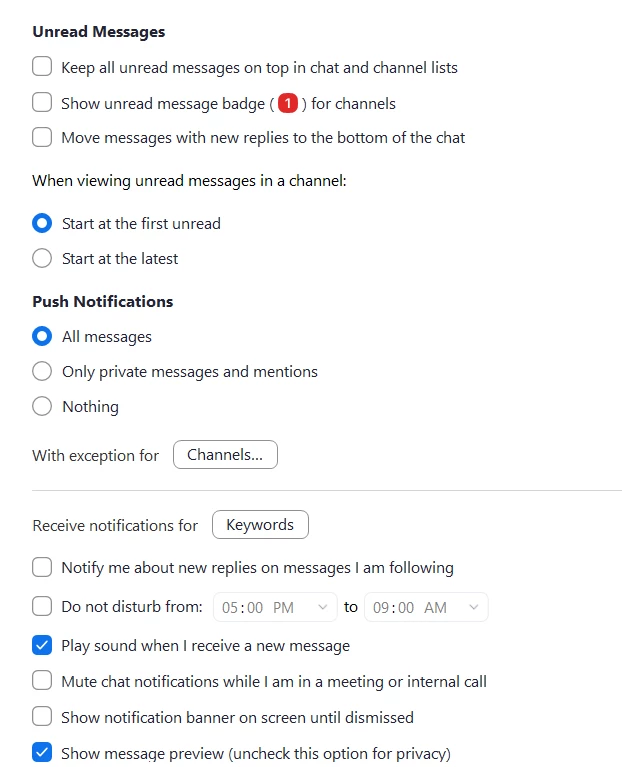
I have my chat sound notification box enabled but still do not hear any sounds when someone chats in zoom.  Here is a screenshot of my settings.  All other chimes and notifications are working - like when someone enters or leaves a meeting. 


    20 replies

    Newcomer
    January 26, 2023

    Zoom does not appear in the list "Get notifications from this senders" within the "Notifications & actions" setting. It definitely should be listed there. This is on a Windows 10 Pro.

    Newcomer
    February 3, 2023

    I have a MacBook Pro, using macOS Ventura - I tried updating the settings in 'notifications & focus' as suggested by other Mac users, but I am still experiencing no ding, and managing a large team this is something I NEED - at least while I am available, and not in DND. I have no problem getting Slack notifications, but my organization uses Zoom. 

    Newcomer
    November 21, 2023

    Have you solved it?
    You have to turn sound on for Zoom in "Notifications" in your Mac system settings.
    Mac system settings > search 'notifications' > click Zoom > turn sounds on

    Newcomer
    March 30, 2023

    +1 for Windows

    Newcomer
    April 12, 2023

    I'm not sure this is the entire solution as I was looking at many different settings trying to solve the same issue, but my notifications pop-ups and sounds magically started appearing again when new messages came in.  Try clearing your "Zoom Apps Local App Data & Cookies".


    Newcomer
    August 24, 2023

    Just check your systems settings. Had this problem on my Mac, turned out zoom notifications were disabled by default in the system. Now they're working

    Newcomer
    September 19, 2023

    Reviving this thread and the consequent request. This feature is a must which is absolutely needed by practically all professors and lecturers at the University here (just to make an example), and generally to everyone who is giving a speech/presentation and cannot instead stay focused on the presence or absence or a small dot somewhere.... Really, this is a trivial feature to implement and yet useful and mandatory for seminars, it makes no sense in 2023 not to have this implemented.

    Do we need to have a petition (zillions of users need it, plain obvious use case...) or can someone from Zoom QA/QC just chime in and escalate? Thanks on behalf of all those giving seminars and lessons around the world...

    Newcomer
    November 21, 2023

    Hi! I was having this problem and finally found the solution
    Go to the MAC SETTINGS to 'Notifications' and turn Zoom sound on there. That'll get your sound playing, hopefully. It worked for me.
    I hope this helps.

    Newcomer
    October 11, 2023

    There seems to be an overwhelming majority that would like this feature. It all gets hidden behind other open programs and we never know when someone is messaging or reaching out. No sound! 

    Newcomer
    November 21, 2023

    Go to the MAC SETTINGS to 'Notifications' and turn Zoom sound on there. Boom, solved. 
    I hope this helps, I was super frustrated and happy to find the solution.

    Newcomer
    October 11, 2023

    Can we remove the "Solved" tag from this post? Saying that this is not a feature today doesn't mean this issue is solved.

    Newcomer
    November 21, 2023

    I was having this issue and just solved it.
    YOU HAVE TO GO to the MAC SETTINGS to 'Notifications' and turn Zoom sound on there. Boom, solved. 
    I hope this helps, I was super frustrated and happy to find the solution.

    (I put some caps because I'm hoping it will catch other peoples attention that need help.). 😄

    Newcomer
    March 19, 2024

    WINDOWS USERS STILL HAVE NO RESOLUTION ON THIS.


    It appears that Macs may have found a work-around, but us Windows 10/11 users stillhave no sound notifications for chat which is VERY frustrating because people are sending chat messages and wondering why others aren't responding.

    Newcomer
    October 12, 2023

    Score a big one for WebEx, if you're not going to fix that Zoom.

    Newcomer
    March 26, 2024

    i need help to get in the meeting with my friends