

Chat Encryption: Messages fail to decrypt randomly | Community
Skip to main content
StefanScherbik
Community Champion | Customer
September 2, 2021
Question

Chat Encryption: Messages fail to decrypt randomly

  • September 2, 2021
  • 15 replies
  • 38 views

Has anyone had issues in which chats will just randomly refuse to decrypt for certain users?  Most frequently it happens when someone views/sends a chat on one device and then attempts to view/send it on another device (eg the chat is opened on one's work laptop and that works, but then the user views it on their personal laptop and they can't view the chat).
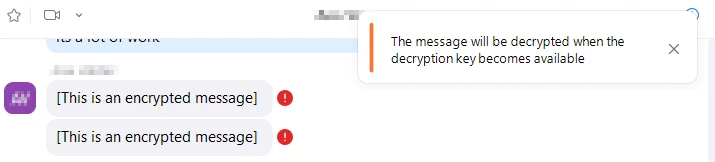


But sometimes, it happens even when both users involved assure me they're only using one device.  And it seems to strike users at random.  Sometimes chats will fail to decrypt for one person and at no point does the "decryption key become available" no matter what they do--the chats simply fail to display for one person.  It even happens in group chats or channels where one person's messages will not decrypt for everyone else, yet everyone else's messages do.  And sometimes someone will tell me that nobody can view any of their messages, but then I send them a test message and they respond and we can both view each other's messages.  Yet the messages don't display for everyone else they chat with.  So it's a totally random yet persistent occurrence and I have as yet not managed to find a cause.


The way I used to fix this was to delete and re-create the affected user's account.  Which works like a charm, but this means they lose all their chats so many people aren't too happy with that solution.  Zoom Support once provided me with a cleaner.exe file which I can run on someone's computer and then re-install the latest version of Zoom.  This works for the most part, but sometimes we do this on someone's computer, and then a week later, the same encryption issue starts happening again.


So has anyone found a permanent solution for this issue?  And does anyone know the cause?  I wish Zoom would add some kind of functionality to get the encryption working more reliably because it does seem to get stuck for people frequently.

    15 replies

    Newcomer
    September 27, 2021

    Same issue. 

    Newcomer
    December 14, 2021

    Same issue. Would love for Zoom to offer an explanation.

    Newcomer
    January 28, 2022

    I'm a Zoom admin at the University of Rochester Medical Center, and this issue crops up with our users occasionally. I've never found a reliable solution, and I'd love to hear about one.

    Newcomer
    February 1, 2022

    I'm having the same issue right now trying to chat with a colleague.

    Newcomer
    February 1, 2022

    We just figured out that the problem was her VPN. When she turned it off all of the chat messages showed correctly.

    StefanScherbik
    Community Champion | Customer
    Community Champion | Customer
    February 2, 2022

    Hmm, on our end, the issue seems to affect users whether or not they're connected to our VPN.

    Newcomer
    November 9, 2022

    This has happened to us many times over the last 3 years. The fix has usually been getting ALL of the involved parties online at the SAME time on ALL of their devices. Obviously you cant be signed in on 2 different computers, but you can be on one and on your smartphone. After a while keys sync up... minutes.. hours... Also try 'Sign me out of all devices', exit and restart Zoom, sign out sign in, etc.. Sometimes you have to completely remove all traces of Zoom from the users profile and the computer and reinstall.

    We've tried to get Zoom tech support to help several times over the last few years. They won't respond to this issue. We gave up. 😕😕

    BrandonS
    Community Champion | Partner
    Community Champion | Partner
    November 10, 2022

    I have noticed this problem for the first time recently myself.  I have been told that there is a hot fix for it in release 5.12.7. 5.12.8 is the latest version now.  If you are up to date, can you confirm or deny you have seen the issue since updating?

    StefanScherbik
    Community Champion | Customer
    Community Champion | Customer
    November 10, 2022

    Hello Brandon--funny you should mention this.  I just had this issue pop up for the first time in a long time, but this time it happened to one of our very few Mac users.  I can confirm that this user is on v. 5.12.8.


    Normally, when this happens to a Windows user, we have a Zoom cleaner.exe file which we can run on their device, then completely uninstall/reinstall Zoom to fix.  That almost always fixes the issue.  But I don't have a package to run this cleaner on a Mac.  I don't suppose you have a Mac Zoom Cleaner tool I could use?

    Newcomer
    November 10, 2022

    5.12.7 has been working ok, after some initial decryption errors. Some of my users needed uninstall / reinstall. Try the steps I listed above.

    Newcomer
    November 14, 2022

    It seem somehow zoom is not updating correctly. The only way i was able to fix was to go to uninstall. Wait a few seconds. Then hit cancel. Zoom will restart and the user will need to login. Only way i found to fix mac users.

    Newcomer
    November 11, 2022

    Our account has 38k users. just now there are some tickets popping up regarding chat encryption problems - before it was quiet for a long time. The solutions that are discussed here are a bit vague, has anyone a better explenation for the problem or is also experiencing more problems since the last couple of days? 

    Newcomer
    November 15, 2022

    For all that run into the same problem:


    This the official support reply - Deinstalling of the client did work on my own apple laptop (which was on the latest version already. hot fix not sooo hot)

    I understand that you're having an issue with your Zoom app encryption. Upon checking, this issue is already raised to our engineering team, and a hot fix was released on 11/10. Can you please kindly try to install the version 5.12.8 (12565)? 
     
    You can also refer to this article:
    https://support.zoom.us/hc/en-us/articles/201361963
     
    If the issue still persists, I suggest uninstalling/reinstalling the Zoom app. This will help clear any backlogs. 
     
    You can follow the steps here:

    Uninstall Zoom version 4.4.53932.0709 and higher

    1. Open the Zoom desktop application.
    2. Select zoom.us at the top of your screen and select Uninstall Zoom.
    3. Select OK to confirm uninstalling the Zoom desktop application and all of its components.
       
    4. Once completed, reinstall Zoom on our download center.

    Uninstall Zoom version 4.4.53909.0617 and below

    1. Open Finder.
    2. Select Go at the top of your screen.
    3. Select Go to Folder...
    4. Once opened, input ~/.zoomus/
    5. Move ZoomOpener to your trash.
    6. Once completed, repeat steps 3 through 5 for the following folders and files:
      • Folder: /Applications/ Move to Trash: zoom.us.app
      • Folder: ~/Applications/ Move to Trash: zoom.us.app
      • Folder: /System/Library/Extensions/ Move to Trash: ZoomAudioDevice.kext
      • Folder: ~/Library/Application\ Support/ Move to Trash: zoom.us
        Note: Zoom may not be installed in both the /Applications and ~/Applications folders.
    7. Once completed, download Zoom from our download center and reinstall

     
    You can also refer to this article: 
    https://support.zoom.us/hc/en-us/articles/201362983-Uninstalling-and-reinstalling-the-Zoom-application
     
    Additional troubleshooting notes;
     
    When using advanced chat encryption, there may be situations where a sent message cannot be decrypted and viewed. This is often due to both users not being connected at the same time and thus unable to share the key that is used to decrypt the message. As soon as both users are online, the key will be automatically shared between them and the message decrypted.
     
    If a message is sent and the user clears their chat messages or uninstalls the Zoom client before the message is decrypted and viewed, then the key that was used to encrypt the message(s) is lost and cannot be recovered. This means that the sent message cannot be decrypted, as the key to do so no longer exists on either device. 
     
    You can also check out this article: 
    https://support.zoom.us/hc/en-us/articles/207599823-Setting-up-advanced-chat-encryption


    Cheers, Till


    BrandonS
    Community Champion | Partner
    Community Champion | Partner
    November 16, 2022

    Thanks for sharing that.  I uninstalled again from inside Zoom this time and reinstalled and unfortunately the same messages are encrypted as viewed from both MacOS and iPhone apps, both on the latest versions.