Workspace Reservation for Specific People | Community
Skip to main content
Newcomer
August 25, 2022
Solved

Workspace Reservation for Specific People

  • August 25, 2022
  • 4 replies
  • 1 view

Hi,


We're just about to launch Workspaces in our environment and I was wondering how you can specify who can reserve a specific hot desk? An executive in our company wants his office to be a hot desk, but only reservable by himself and another colleague (possibly one more person in the future). Is this possible?


Any answers are greatly appreciated.

    Best answer by YaBoiB

    Hello @Bryan_Rosado


     Actually, I was talking to a member of our Workspace Management team and she explained that for your use case you can use the following support article with these some further instruction to make this work for you Executive. 


    https://support.zoom.us/hc/en-us/articles/4906676947213-Designating-users-that-can-reserve-workspaces


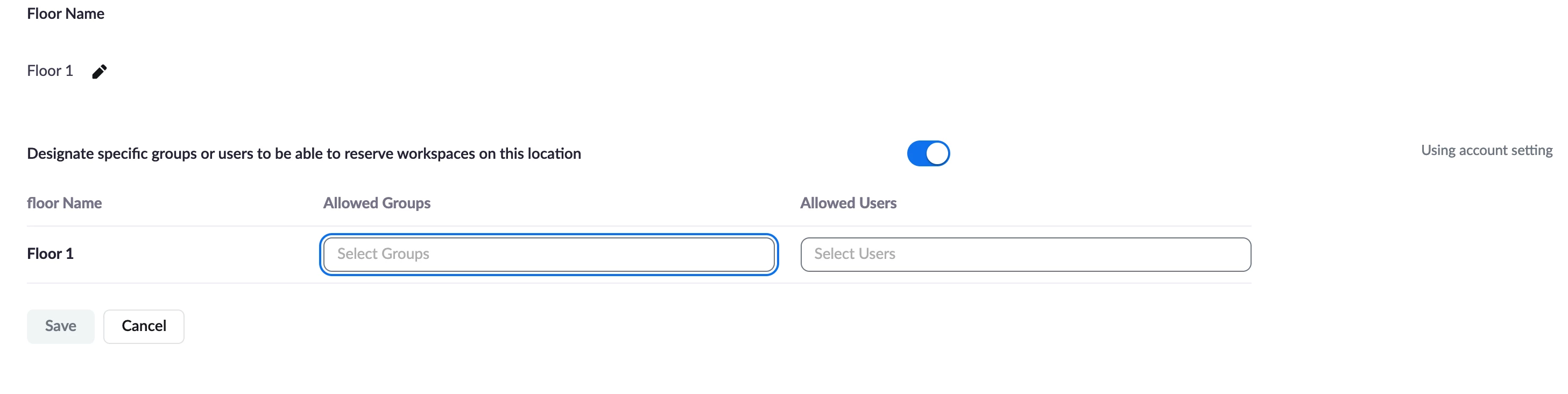
    On the floor level, toggle on - "Designate specific groups or users to be able to reserve specific workspaces" > type the workspace name, > type the individuals allowed to reserve that space > click save. 


    Toggle on in floor settings

     

    Choose workspace and choose user. Click save. 


    Would you please let me know that this worked for you?


    The feature that we have coming in a future release is going to be called "permanent desks" so that will help with your use case as well I would imagine. 


    Thanks, 

    Brandon

    4 replies

    YaBoiB
    Community Champion | Employee
    Community Champion | Employee
    August 25, 2022

    Hello @Bryan_Rosado

     This is not quite configurable to the extent that you are asking at this time, but I have confirmed that it is on the RoadMap for a future release. Looking towards the end of 2022 right now. Please continue to follow the release notes for this product and we will make you aware of when and what version this will be released on. 


    Kind Regards,

    Brandon 

    Newcomer
    August 25, 2022

    Thank you so much, Brandon. I'll be on the lookout for when this becomes enabled in the future.


    YaBoiB
    Community Champion | Employee
    YaBoiBAnswer
    Community Champion | Employee
    August 25, 2022

    Hello @Bryan_Rosado


     Actually, I was talking to a member of our Workspace Management team and she explained that for your use case you can use the following support article with these some further instruction to make this work for you Executive. 


    https://support.zoom.us/hc/en-us/articles/4906676947213-Designating-users-that-can-reserve-workspaces


    On the floor level, toggle on - "Designate specific groups or users to be able to reserve specific workspaces" > type the workspace name, > type the individuals allowed to reserve that space > click save. 


    Toggle on in floor settings


    Choose workspace and choose user. Click save. 


    Would you please let me know that this worked for you?


    The feature that we have coming in a future release is going to be called "permanent desks" so that will help with your use case as well I would imagine. 


    Thanks, 

    Brandon

    YaBoiB
    Community Champion | Employee
    Community Champion | Employee
    August 25, 2022

    @Bryan_Rosado


     Also, please let me know if those screenshots are not big enough to see well. I can make them bigger. I just realized that they are very small. 


    Thanks, 

    Brandon

    Newcomer
    August 25, 2022

    Hi Brandon,


    Funny enough, the executive I mentioned in my original post asked if there was a work around for this. I started poking around and did exactly as you mentioned above.


    Thank you for replying again. I appreciate the follow up.

    YaBoiB
    Community Champion | Employee
    Community Champion | Employee
    August 26, 2022

    Hello @Bryan_Rosado


     I think the "permanent desking" function (when added) is going to be perfect for your use case. 


    Glad to see that this is working for your executive. We use this here at Zoom and it is great for our employees. 


    Kind Regards,

    Brandon 

    Newcomer
    November 6, 2024

    Hello Team, hope everything is well

    What is the max number of users that can be added to the "Designate specific groups or users to be able to reserve workspaces on this location" under Allowed users? thank you

    YaBoiB
    Community Champion | Employee
    Community Champion | Employee
    November 8, 2024

    Hello @Juan_Grijalva


     I do not know the answer off the top of my head, so I am working on finding the answer to this question for you. 

    Newcomer
    November 8, 2024

    Is <= 500 😁