
EMOJIS ARE NOT WORKING IN CHAT SECTION | Community
Skip to main content
Newcomer
March 1, 2022
Question

EMOJIS ARE NOT WORKING IN CHAT SECTION
  • March 1, 2022
  • 7 replies
  • 0 views

Hi everyone, 

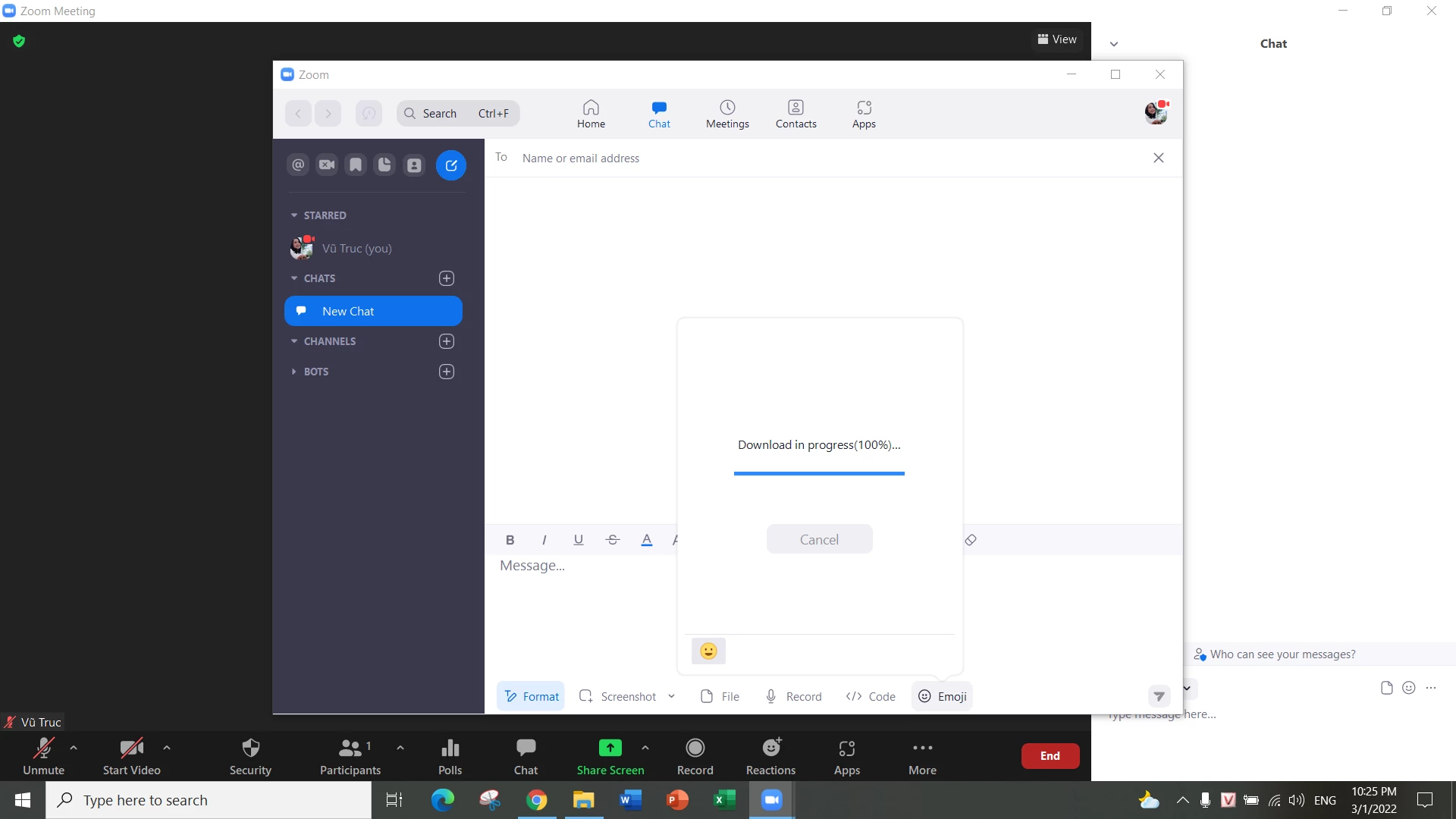
the chat section on my zoom can not work, it aways shows that it's downloading in 100%. But I can not open it. Please help me solve this problem.  Thanks in advance 

    7 replies

    Community Manager
    March 1, 2022

    Hey @Trucvu with a new client Zoom client release out 5.9.3, suggest Upgrading Zoom to the latest version or uninstalling/reinstalling Zoom to see if that resolves your issue. 

    TrucvuAuthor
    Newcomer
    March 1, 2022

    I've just updated to the lastest version but it's still that problem. I can not open it 


    Community Manager
    March 1, 2022

    Hey @Trucvu thank you for updating Zoom. Hmm, could you try to uninstall and reinstall Zoom instead to see if that resolves your issue? 

    Newcomer
    July 28, 2024

    Same issue for me... I am upgraded to the latest version.

    Reinstalling doesn't help neither.

    Any suggestions? 

    MGSR
    Community Manager
    Community Manager
    July 29, 2024

    Hello there! 

    Welcome to the Zoom Community, and thank you for your contributions!

    First, kindly check if it is currently disabled on your account or check with the admin/account owner to see if it has been disabled.

    You can check out this article on how to enable it. 

    Let me know if you need further assistance.

    Newcomer
    July 30, 2024
    Hi, thank you for your answer.
    I've checked and can confirm it is not disabled. 
    Thanks, Neta
    MGSR
    Community Manager
    Community Manager
    August 1, 2024

    Thank you for the response. Kindly check if you are using the 6.1.16 Zoom version. If you have this version and the emojis are still missing, please respond with the specifications of the device you are using. 

    Newcomer
    August 2, 2024

    Version 6.1.1 Zoom Workplace

    Emoji's are not working in the desktop chat (reactions as well)

    they come up as a triangle with an ! 

    Uninstalled zoom 3 times (did a zoom clean in between) 

    the first time emojis worked for a week - the second time a time and the third time an hour


    My account is not disabled 


    any suggestions?! please help

    MGSR
    Community Manager
    Community Manager
    August 2, 2024

    Hello @ClarissaB,

    Welcome to the Zoom Community! We're glad to have you here.

    First, I would advise updating you Zoom client to the latest version which is 6.1.16.

    Let me know if that helps.

    Newcomer
    August 27, 2024

    Hello! I found this thread today because a user of mine was experiencing the same issue as reported by the original poster. Her Zoom Workplace Desktop Application was version 6.1.10, so I uninstalled and downloaded 6.1.16 and installed that on her system.


    Now she has NO emoji button in her chat window during a meeting.


    I installed the same version on my system and I also have NO emoji button in my chat window during a meeting.


    What is the solution here? Is there a larger problem?


    Thank you very much,

    X.


    Issuing a correction follow-up: Zoom needed a few minutes but then the emojis did appear where they should be.


    Zoom Workplace version 6.1.16 is working with emojis.


    Thank you

    Newcomer
    August 15, 2024

    Hello @Mark 

    Zoom has been updated to the lasted and still no emojis - user has the option to use emojis but they do not appear when selected 


    Clarissa

    Newcomer
    September 20, 2024

    Hi Truc !

    I got the same issue and got resolved. This root cause is because the folder name of User folder ( C:\Users)  is using NOT ENGLISH character. In your case, I believe your folder name useing Vietnamese name. You may try to change that folder name to English name ( it  may affect others installed app) OR you can create new user account. 

    Hope it will help

    Newcomer
    December 26, 2024

    I have the same problem.

    I had downloaded the last version just a couple of months ago.

    I've downloaded the last version today which I believe being 6.3.1 but the issue is still occurring.

    Thank you for advising.

    Bri
    Community Manager
    Community Manager
    January 6, 2025

    Hi, can you download 6.3.5 and let us know if the issue still occurs? 

    Newcomer
    January 6, 2025

    Hi Bri,

    Thank you for your message and advice.

    I've just downloaded the last version and I can see they are working fine now.

    Thank you.