

cancel
Showing results for 
Search instead for 
Did you mean: 
The Zoom Community will be placed in read-only mode January 9th, 2026 through January 22nd, 2026 to deliver you a new and improved community experience!

The community will still be accessible, however, the creation of any new discussions or replies will be temporarily unavailable. We appreciate your patience during this time.

Branded Text Link

MC15
Newcomer
Newcomer

I recently switched from Calendly to Zoom Scheduler.  I really LOVE how on Calendly I can include my Company logo.  I can't seem to find how to included my logo so when the customer receives the text they see our LOGO on the text instead of the very LOOOOONGGGGG URL. 


I am a small business - by the way - and branding goes a very long way with our prospects and customers.  I switched because I wanted to streamline all the Apps I'm using for the business.  It just makes sense.
1 ACCEPTED SOLUTION

ThatMatMik
Zoom Employee
Zoom Employee

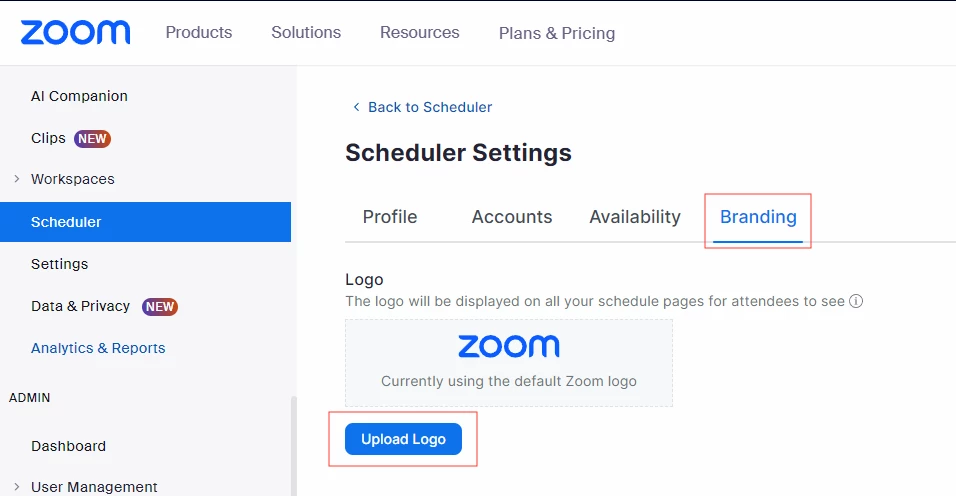
Zoom Scheduler should now have a "branding" tab which will allow you to upload a company logo.  As for the image instead of the URL, can you provide a little more background here?  I'm not sure i'm following you.


ThatMatMik_0-1708651672855.png


View solution in original post

2 REPLIES 2

ThatMatMik
Zoom Employee
Zoom Employee

Zoom Scheduler should now have a "branding" tab which will allow you to upload a company logo.  As for the image instead of the URL, can you provide a little more background here?  I'm not sure i'm following you.


ThatMatMik_0-1708651672855.png


RN
Community Moderator | Employee

Hi @MC15 hoping this reply was helpful from our fellow Zoomie @ThatMatMik, I have gone ahead and marked their reply as the solution as scheduler should have branding capabilities now! Here is more info on setting at the Account Level for Customizing a user's logo

⎯⎯⎯⎯⎯⎯⎯⎯⎯⎯⎯⎯⎯⎯⎯⎯⎯⎯⎯⎯⎯⎯⎯⎯⎯⎯⎯⎯
Zoom Community Moderator
he/him/his

Have you heard about Zoom AI Companion? ➡️ Check it out!