
Solved
Meeting identication
How can I identify who participate in the meeting after the meeting finished if I didn´t record it?

How can I identify who participate in the meeting after the meeting finished if I didn´t record it?
Hello @Luciane1 ,
I hope you had an awesome weekend!
Regardless of the Zoom Meeting subscription you have and even if you did not record the meeting, you can still pull the participants who attended your meeting.
You must have owner/ admin access to the Zoom Account, then go to the:
Admin Section >> Reports >> select Active Host
You can customize the date range (Maximum report duration [date range] equal or less than 1 Month and
Reports will show information for meetings that ended at least 15 minutes ago), then hit search.
By clicking this link, it will take you to the report you're looking for: https://zoom.us/account/report/user
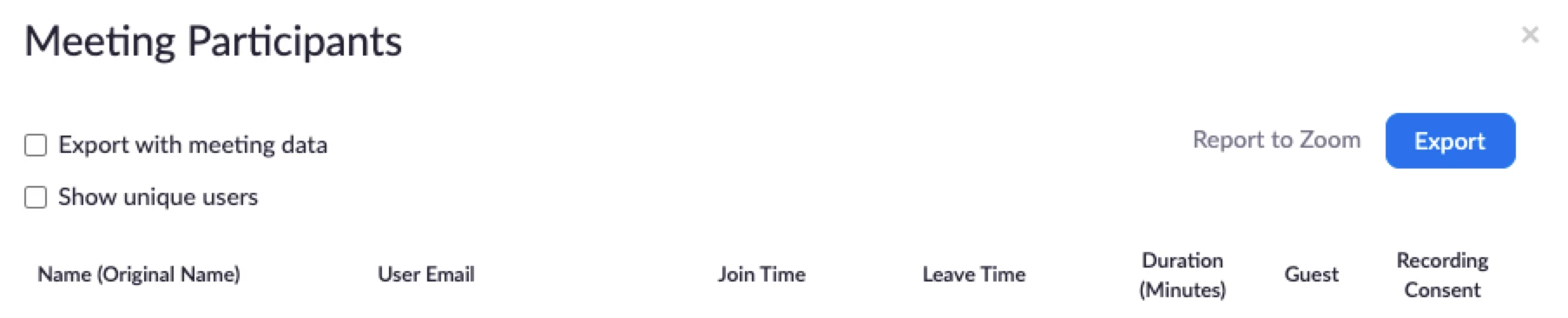
It will list all the meetings you had in the past within the selected date range, locate the meeting you are looking for and click on the hyperlink (the one that shows the count of participants in that meeting), there will be a popup that will display all the names and other information (as shown on the image below) plus you can also export them as a .csv file.
Please don't forget to hit like and accept the solution/ response provided if this answers/ resolves your question.
Thank you and stay safe!
No account yet? Create an account
Enter your E-mail address. We'll send you an e-mail with instructions to reset your password.